I have a Roland Fantom 08 which has a sequencer but it’s not a patch on my keystep pro which has four independent sequencers. But my Fantom has a much better keyboard than the KSP. Would it be possible to use the midihub to send to send four midi tracks from the Fantom to the keystep pro and somehow return the midi to the Fantom to use it as a sound module? If this is impossible then I can stop racking my brains about it.
If its possible any advice about how to go about it would be much appreciated.
hey @JimF, this looks like a matter of investigating the capabilites of the Fantom and the KSP first, maybe setting up some simple routing in Midihub to help you do it.
So questions like
-
what channel(s) does playing the Fantom keyboard send out on?
-
how do you set up KsPro to record these notes?
(I recall Pro, unlike KS37, can record unquantised. Look into whether it will record only onto the ‘active’ channel, etc)
Now, I’m not sure whether you intend to play Fantom (no sound - keys only out) → MH → KSP record → MH → Fantom (notes played as sound module) all in go…
…or whether you just want separate record/playback phases.
How much is possible depends on the Fantom. A deep-dive of the Roland manual calls! 
When you’ve got an idea of what possible on the two ends of the hardware, report back if you need help with the Midihub routing side
Thanks @resonotter - v useful reply. I agree I probably need a deep dive into the manuals. But from the points you raise I have some of the answers.
- the fantom can TX and RX on 16 midi channels
- you are correct the KSP can record unquantised but only on the active track
- the ‘problem’ I have is the mini keys on the KSP so I wanted to use the much better keybed on the Fantom. So I was hoping to use it as you suggest "Fantom (no sound - keys only out) → MH → KSP record → MH → Fantom (notes played as sound module)”
- and I would playback 4 independent channels (and output into Tascam Model 12 digital mixer/recorder)
-Does any of this prompt a potential answer at this stage?
Thanks again for your response
JimF
PS - preparing for deep dive…
To use the same device which is producing MIDI data as a sound generator, one has to turn off the “Local Control” setting - it should be mentioned somewhere in the manual. When the Local Control is off, using its keyboard or sequencers should not produce any audio, it should produce audio only using the incoming MIDI events.
A lot of devices do have this configurable setting, but some don’t. Usually it is controlled through some settings menu or a special key combination like Shift + some particular keyboard note key (like on devices with no display).
Fantom Side
Thanks @Giedrius, I was trying to think of the setting name!
@JimF you will find this in the Fantom Reference Manual on p169 called “Local Switch”
Try testing it with just Midihub:
- Connect Fantom MIDI-Out to MH MIDI A-IN
- Connect MH MIDI A-Out to Fantom MIDI-IN
- then try this preset for a bit of testing fun
JimF_FANTOM_Local_Sw_test.mhp

When Local Switch is OFF and you hit a key you should hear:
- nothing for about a second
- then a five-note arpeggio playing for about 3 seconds.
As I don’t know what channel plays what sound on your Fantom, I’ve put a Ch.Remap in the pipeline for you to adjust which channel is sent back to the sound generator.
Playing around with this should solve the Fantom side of the equation…
Keystep Pro Side
Good news on this front, @JimF:
I just did a little test on my KS Pro and it looks promising.
Here’s what I did:
I set my KSP up like this in the (Arturia) MIDI Control Center:
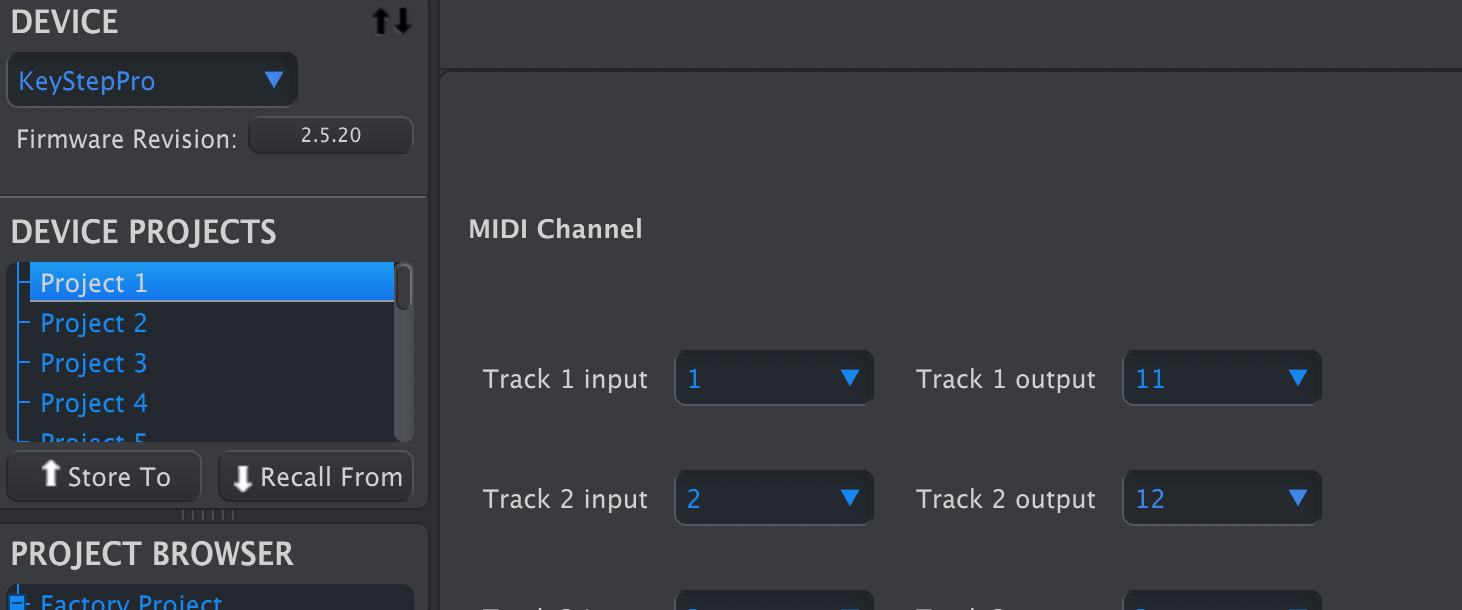
here the input & output channels differ – I wanted to make sure I could distinguish between notes played out from KSP and those passing straight thru
Then, whilst playing a pre-existing sequence on track 1:
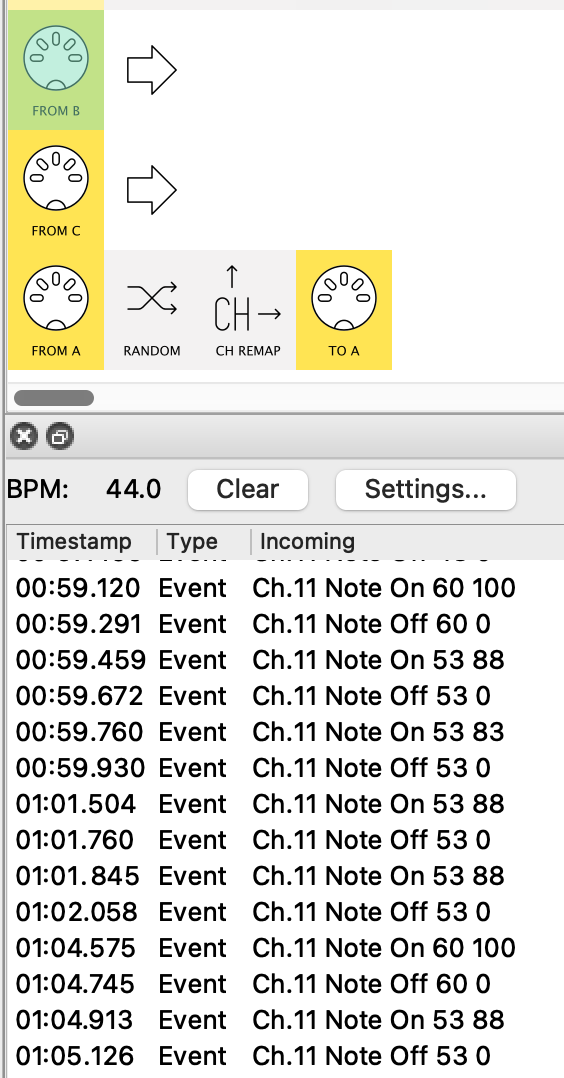
see all the notes are on Track 1’s Ch.11
I selected track 2 and recorded some notes from a device (my phantom Fantom if you will)
through MH (that’s the MIDI A → MIDI A pipeline in the pic) into KSP:
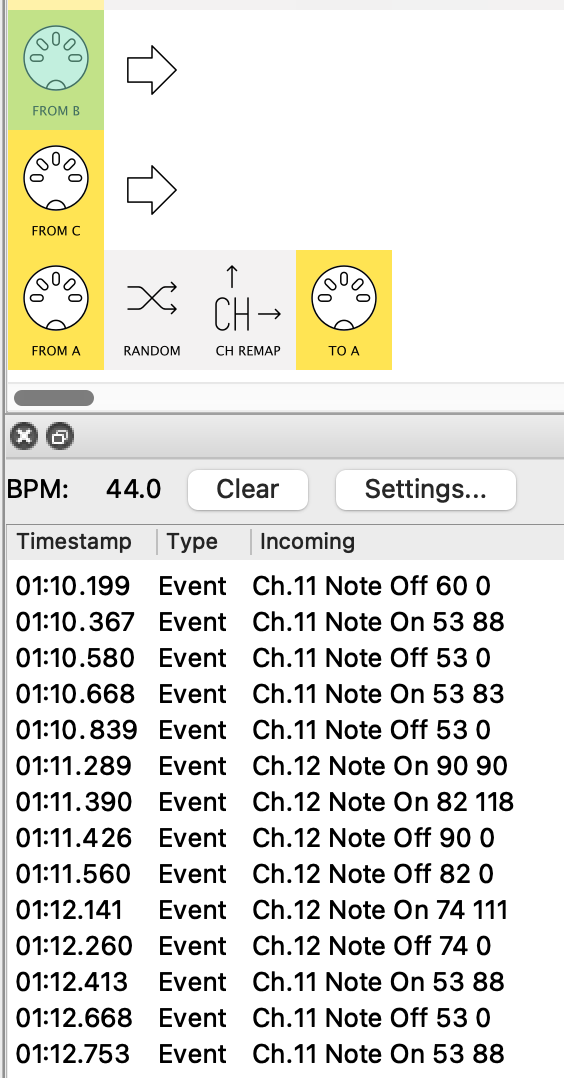
See how we know have Track 2’s Ch.12 notes in the mix
Still a number of questions to be answered, but it does look possible.
Thanks. I had local off when doing the testing but encountered some glitches which meant I have to keep power cycling the KSP. You will see that @resonotter has also replied and I plan to set aside some time tonight to test these solutions.
I’m grateful for your response.
JimF
Hi @resonotter - v grateful for your detailed responses. As I said to @Giedrius I have been encountering some glitches which are not MH related. It is very exasperating when you get something working and it then stops for no apparent reason!
I never thought of using midi control centre - your proposals look very promising so I will set aside some time later to test all this out.
Thanks again
JimF
Actually, KSP can be equally configured via that tiny display.
I used MCC primarily so I could show you the methodology.
In practice, you might do all your re-channeling in Midihub.
I had local off when doing the testing but encountered some glitches which meant I have to keep power cycling the KSP.
If you have MH as go-between, keep an eye on the MIDI-monitor at inputs as you want to check for feedback loops…
Yeah, I think the most likely reason for devices misbehaving is some accidental MIDI feedback loop.
Hi @resonotter (also @Giedrius) - this is a quick reply as there is more to be done.
The short answer is that it worked - and then it didn’t!
Testing the MH direct back into the Fantom I could hear a delayed note so I connected the MH A output into the KSP and from there to the Fantom in. The fantom transits and receives 16 midi channels on 16 different tracks. I could control the KSP tracks 1-4 (which match the Fantom 1-4) from the Fantom keyboard. The arpeggiators worked and I could input sequences from the fantom. It was all go! Then two of the tracks dropped out and couldn’t be controlled from the Fantom. And a little later the other two dropped out. Since then I haven’t managed to get anything to work. The Fantom local SW is off. All the cables are fine. The connection (in/out) have been checked multiple times. And I have reset the MH a couple of times and reloaded the patch. No joy
I am leaving it for another crack tomorrow. I need to start again and do everything systematically.
Thanks again both of you for your help.
Hi @Giedrius (also @resonotter) - this is a quick reply as there is more to be done.
The short answer is that it worked - and then it didn’t!
Testing the MH direct back into the Fantom I could hear a delayed note so I connected the MH A output into the KSP and from there to the Fantom in. The fantom transits and receives 16 midi channels on 16 different tracks. I could control the KSP tracks 1-4 (which match the Fantom 1-4) from the Fantom keyboard. The arpeggiators worked and I could input sequences from the fantom. It was all go! Then two of the tracks dropped out and couldn’t be controlled from the Fantom. And a little later the other two dropped out. Since then I haven’t managed to get anything to work. The Fantom local SW is off. All the cables are fine. The connection (in/out) have been checked multiple times. And I have reset the MH a couple of times and reloaded the patch. No joy
I am leaving it for another crack tomorrow. I need to start again and do everything systematically.
Thanks again both of you for your help.
@JimF, the delay-test was just intended for Fantom → MH → Fantom testing.
For the full F(keys) → M → K → M → F(sound), I would start from scratch and build it up slowly putting in Filters and Ch.Filters.
It might be a good idea to run a K(seq) → M → F message flow…
…then MIDI Monitor a Fantom-IN → {nowhere} pipeline..
…to see whether messages are coming out of Fantom.
You want to prevent this, for there MIDI feedback lurks!
PS. See p167 of the ref manual about USB-MIDI Thru = OFF, ON
Check it is set to OFF
Hi @resonotter - thanks again. This is not the problem, I’m reasonably familiar with the fantom controls so the issue lies elsewhere. I think I need to go back over some oft he MH tutorials before I have another crack.
@resonotter @Giedrius - UPDATE - SUCCESS
The Fantom-MH-KSP-Fantom is working. I get exactly as @resonotter describes. But I need to spend some time understanding this patch before moving on. I don’t get the filtering - it doesn’t seem to do what i expect it to do (my problem). And the signal always seems to come back into the fantom on Ch1 despite my attempts to change this.
Feel free to ask any questions and share screenshots  The MIDI Monitor should help a lot to work it out.
My initial Fantom ↔ MH test preset had a Ch Remap in it but I thought you’d moved on from that
Fantom-MH-KSP-Fantom is working
This looks like you’re not using Midihub between KSP → Fantom
A starting point like this…
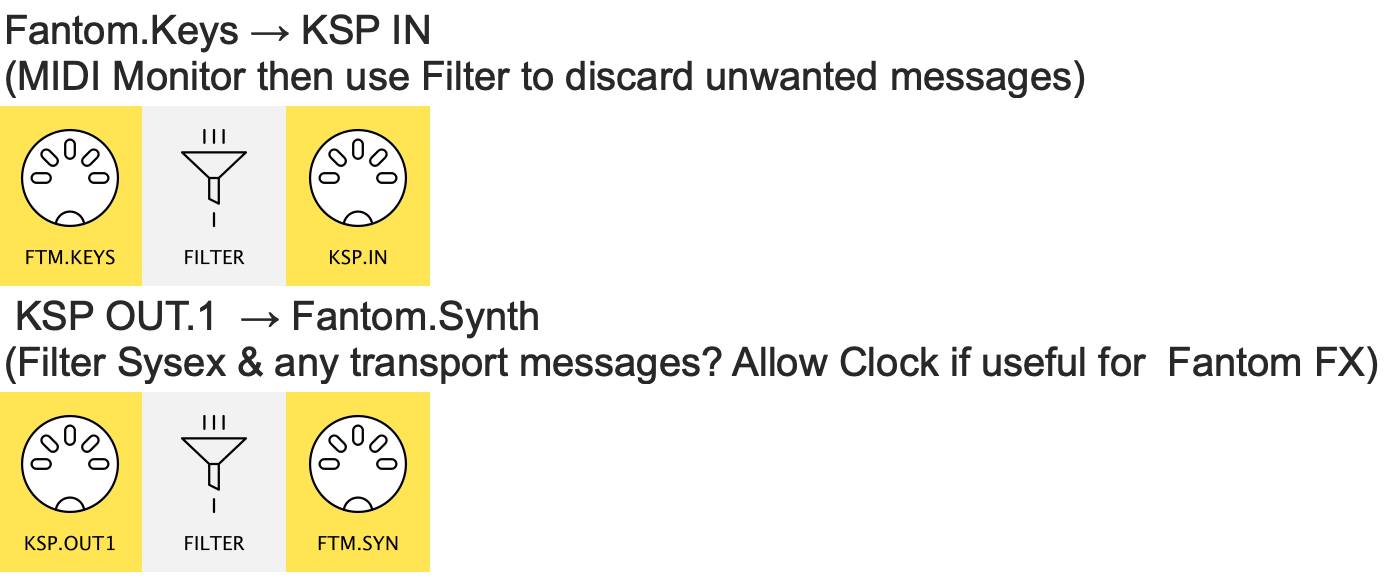
…will enable you to MIDI Monitor traffic both ways.
As @Giedrius hints, using MIDI Monitor is the key to tracking (and reporting) puzzling outcomes.
If you’ve not used it much before, the tutorial might be useful.
Noted thanks @resonotter -thanks for the patch - but you’re right - next step is to go back to the tutorials.