I have watched as many tutorials as possible but something as basic as this is still escaping me. I want to reroute channel 2 to channel 6 and filter out channel 2 so I only get the signal on six. I have tried many different ways to do this that gets a signal to channel 6 but I can’t find a way to filter out 2. What am I missing?
On a completely separate topic, why do the midi channel settings seem to have minds of their own. Often when I go back to check channels after setting out pipes the channels have changed and I need to reset them. What is going on here?
All advice is gratefully received thanks.
Jim
Hello, you may have mapped some of the parameters to external controls unintentionally, this would explain them changing. Also, make sure you store the preset in device’s memory after making changes, as every time you switch back to it or power on the device again, it uses the version that was stored in its memory.
To remap Ch. 2 to Ch. 6, use Channel Remap, set In Low and In High to 2, Out Low and Out High to 6.
One thing to watch out for - if you have multiple pipelines that process the same data from the same input port, Ch. 2 messages might have an alternative routes which you don’t want - in that case, place filters where necessary, use Virtual pipelines to save on pipes by reusing common paths.
You may upload your current preset here so we can provide accurate insights.
Many thanks. I am doing pretty much as you describe but with multiple channels. I will try a single channel and see how that works. Thanks for the tip about external mapping - I will explore this. It was very confusing!
Thanks again for the advice. I have now got part of the way towards my goal which is to have 4 sequencer channels that can be mapped to 4 additional channels to give a total of eight individuals channels or combinations of each pair. I have succeeded in getting four individual channels (1-4) and 3 pairs of channels 2/6, 3/7, 4/8 (channels 1/5 are provided by the key step pro). But I still have not managed to isolates the secondary channels (6,7,8) and play them separately. Logically (I think) this could be done with the channel filter but I can’t get it to work. I have uploaded my preset below.
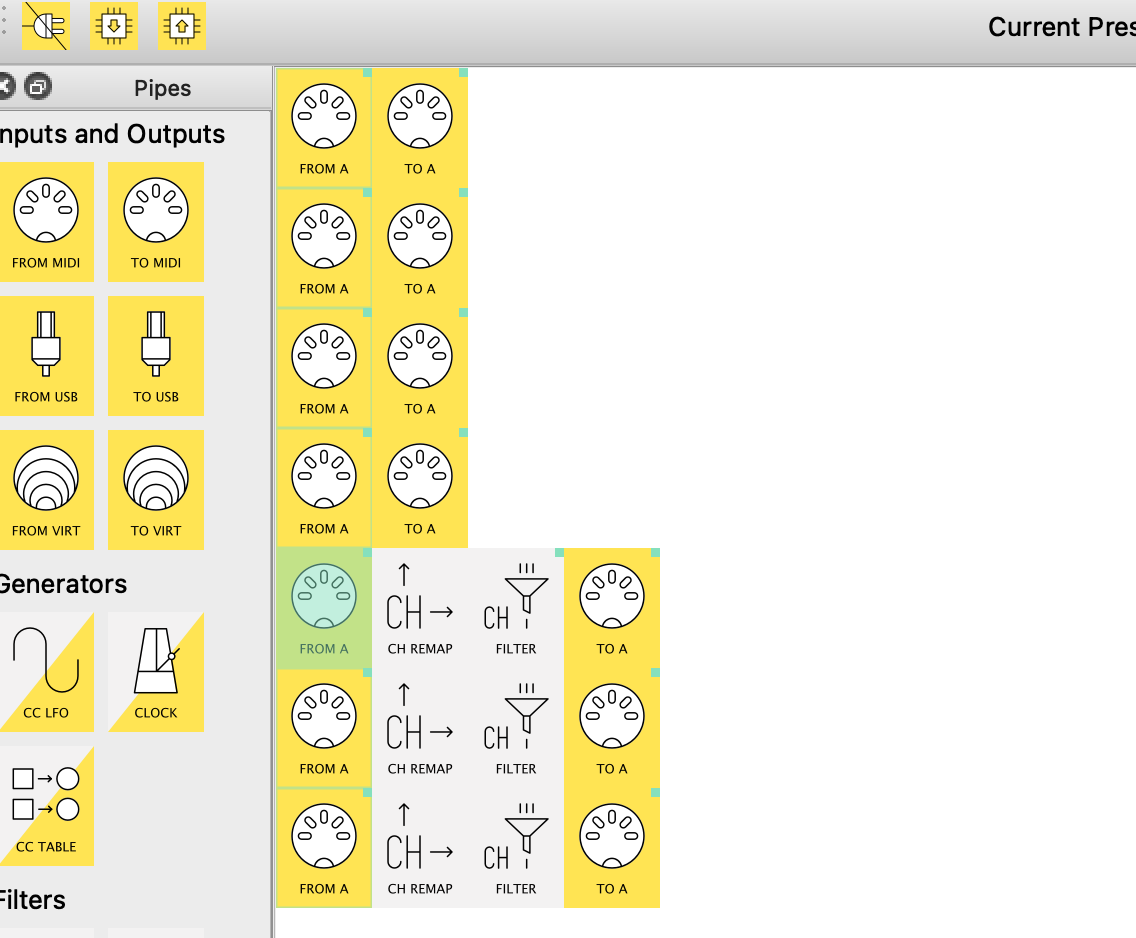
You should remove the first 4 pipelines - each of them makes a copy of the MIDI events without any processing or filtering, as you would get multiple copies of the original data as well as another channel remapped copy, according to your last 3 lines.
Channel Remap pipe automatically filters out events which have channel number not within In Low and In High (inclusive) range, so Channel Filters are probably not strictly needed in that position, after Channel Remap has already discarded unrelated channel events.
Please upload your preset as a .mhp file so we can see the properties too.
Thanks again. I will have another go and incorporate your advice.
Hey, @JimF, comparing your spec with your screenshot, your preset shouldn’t need any mappings❖
All the pipes with little green squares in the top-left corner of their icon have got mappings.
These should be removed, I think
in more detail
here I have one mapped pipe:
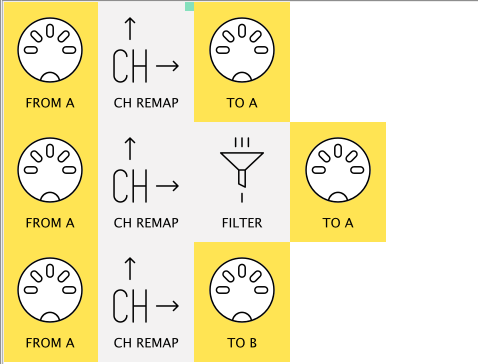
here are the mappings:
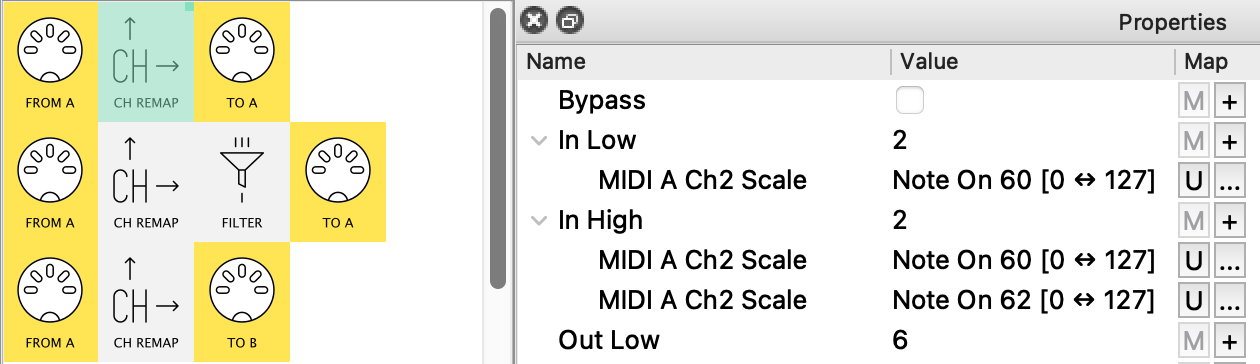
I made them by clicking the little M button (when Midihub was hooked up) then hitting middle C and D (note 60 & 62)
Now, the In channels will change according to how hard I hit those keys…
…which I don’t want!
So I need to get rid of each of them by clicking the little U button (Undo).
Then my pipe will stay the same during play.
❖ Mappings and Remaps in Mdihub are completely different ideas.
While you might not need mappings right now, they could become useful – particularly using KS Pro’s encoders in Control Mode…
Filter pipe
Depending on what your MIDI A OUT connects to,
this also might be useful:
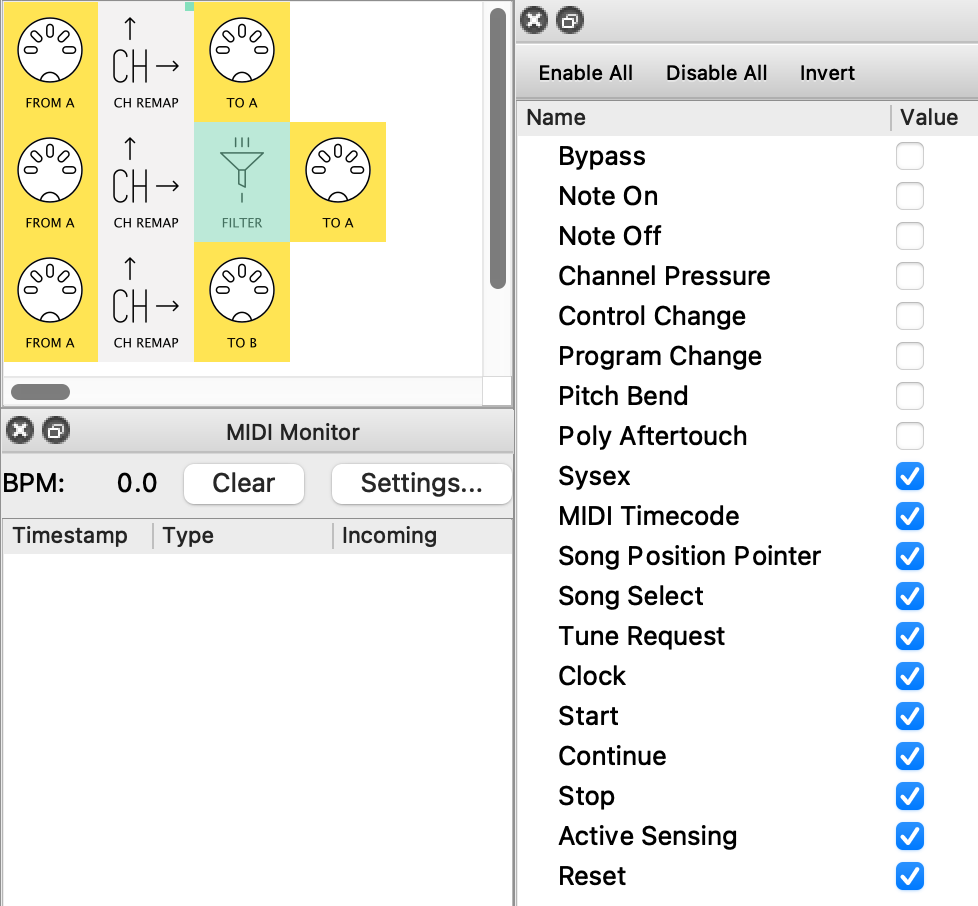
(Only channel-specific messages are allowed through)
It stops duplicate Clock etc getting sent out – at present you’re sending 72 Clock messages every 1/4 note
PS. to upload a preset .mhp file do
- File → Save on your PC/Mac
- drag the saved file into the editing window when you next reply