I want one synth which is on MIDI channel 1 to be able to drive another synth which is on MIDI channel 2
Physical
Synth1 MIDI Out → MidiHub MIDI In B
MidiHub MIDI Out B → Synth2 MIDI In
Preset
From B → Channel Filter → Channel Remap → To B
The Channel Filter is filtering every channel except Channel 1 (the channel Synth1 is set to internally)
Channel Remap
In Low 1
In High 1
Out Low 2
Out High 2
The first few notes I play on Synth1 get played on Synth2. Then it stops and notes I play seem to be changing the start of the MidiHub pipeline. It jumps from various inputs every time I press E5.
If I play an E5 the source changes.
If I play a different note, the In Low/In High values for midi change.
I have to choose the beginning of the pipeline and change the source port back to MIDI B.
What am I missing? This is really confusing.
Hi @David_Kurtz
It sounds like you have inadvertently mapped the Source property of the Input pipe.
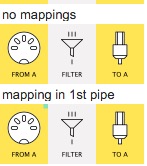
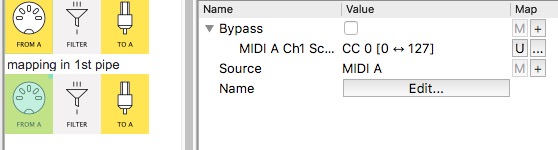
If you have any pipes with a little green square (in top right corner of pipe icon), that shows a mapping:
From your description your preset, your preset shouldn’t need any mappings.
Investigate and click the little U button next to the mapping
(not the same as yours–just a quick example!)
You can post a screenshot and the preset itself here if you’re still having problems 
PS
From B → Channel Filter → Channel Remap → To B
Your In Low|High = 1, Out Low|High 2 settings mean Channel Remap is doing the job of Channel Filter, so Channel Filter can be removed.
( test this: Bypass the Channel Filter then Monitor the Channel Remap with other channel notes to confirm – all notes on Ch2-16 will get discarded)
Yes the green dot was there on every step of the pipeline. I couldnt figure out how to get rid of it, so I deleted the entire pipeline and recreated it. Thanks for the tip on not needing the channel filter for the remap.
Two ways:
- find the mappings and for each, click the
U (Unmap) button for each
- alt-drag the pipeline. This will create a copy but without the mappings. So useful if you want to get rid of all the mappings
Is this still a request, btw?
I am still trying to figure out how to do this yes. Part of it is that sometimes I want to layer completely, other times I want one specific split, and other times I don’t want Synth1 controlling Synth2 at all. And I want to be able to switch between the multiple modes with the MC6
OK, that sounds like it might involve using MC-6 to switch routing within a preset rather than necessarily switching presets themselves.
This would involve deliberate use of mappings using some message coming from MC-6.
When you’ve got time to spec it out clearly, start a new Topic.