After using it as a general patchbay to route the whole midi-stream around, i wanted to go deeper but my experience here it’s unfortunately a bit mixed.
I just want to use my JL Cooper CS-32 as controller for my MachineDrum and since the CS-32 comes with fixed CCs, i created finally a somehow working patch with filter, CH remap and CC remap.
My problem: Every time i switch to another component in my patch and come back later, the CH and CC values are messed up. A channel 1 is then a channel 11 or a CC 8 is a CC 80? At first i thought it was my lack of focus but it happens all the time. Even pressing enter or saving the patch constantly does not help?
I can’t believe this is a bug and i’m the first to discover  What is happening here? It’s quite impossible to work that way …
Hey, @stoltenberg, might be you’ve got something mapped which shouldn’t be:
Save your preset to File then upload it here
(click here… …in the reply menubar or just drag the file into your reply)
does this refer to something in Midihub or somewhere else?
Hej and thank you! Yes, i refer to the Midihub Editor. (Editor and firmware are up to date.)
Midihub 2025.12.29 18.29.51.mhp (1.6 KB)
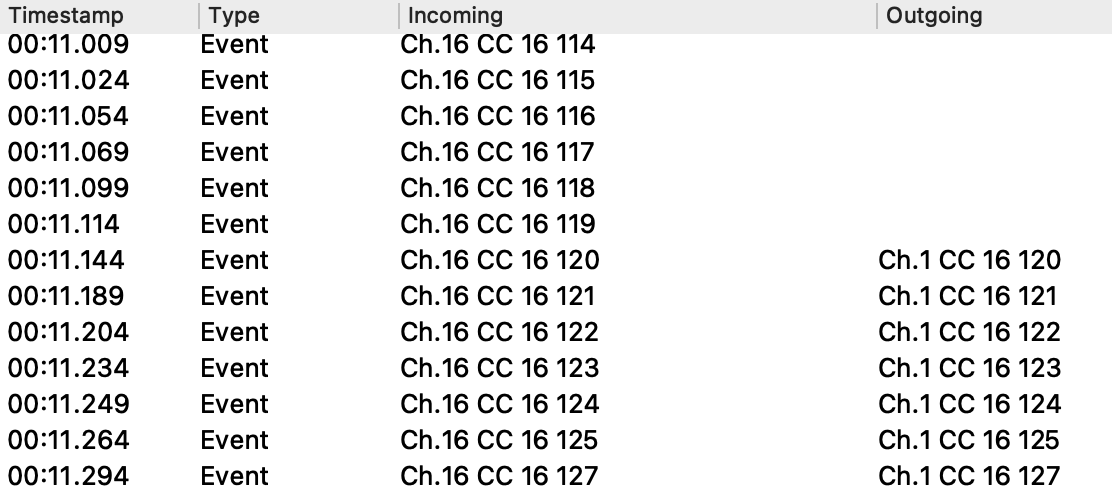
… and a bit more weirdness: Sometimes there is a missing spot while moving a fader. The CC comes in smoothly and there is no intentional filtering in the flow?
Hej back and thx for the preset.
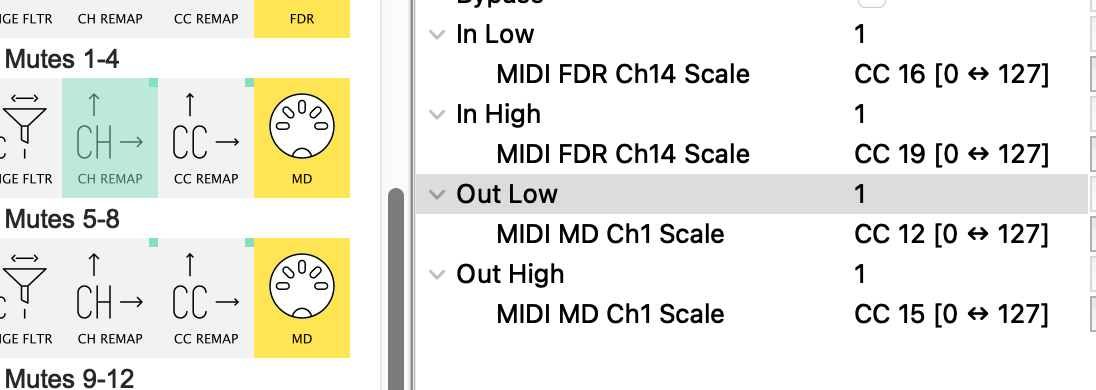
Looking at your 8 CC Remap/Rechannel lines I notice that 7 of them have most properties of the CH Remap & CC Remap mapped❖ rather than fixed values.
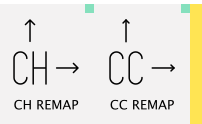
❖ (You can spot this by the little green square in the corner of the icon)
This may be intended, but it leaves, say, this pipe completely variable:
depending on what values FDR Ch14 CC16&19 and MD Ch1 CC12&15 take…
…your Ch Remap could be sending Channels {9;2} → {4;11} or any other combination!
If you want each line to be a fixed re-map, get rid of the mappings (or better still, just replace the mapped pipes with new ones) and enter the values you want by clicking and typing in the property fields.
Mappings and Remaps are separate concepts in Midihub
btw, looking at your MD > FDR Tracks 1-4 vice versa pipeline, there’s a couple of things that should help:
-
the CC Range Filter only lets CC16-19 into the pipelinne from MD…
…but the CC Remap is set to only deal with CC8-11; everything else will be discarded.
-
If you want, say CC[8;11] → CC[16;19] (ie. CC8 → CC16, CC9 → CC17, etc), the you can lose the CC Range Filter because your CC Remap will do the filtering for you.
-
Lastly, if you’ve only got CC’s FDR → MD and vice versa (ie. No Notes, Clock, PC, etc, etc) then fine. Otherwise, you’ll want a plain Filter to stop duplicate messages being sent.
I’m aware I’ve given you a bit to work through.
Hopefully it’ll all make sense! 
Found one interesting hint: Fader 4 (CH16, CC19) movements are changing the “In High” value in the CH remap pipe – live and without any midi learn involved
This breaks the functionality of the pipe.
Which pipeline, @stoltenberg?
OK, got it
Now whatever value CC19 is sending in 0:127 is scaled to 126:127
this means the In high will always be Ch 16.
Thanks a lot again! This clarified already some details. I searched for the little green dot in the documentation but without luck  The MachineDrum isn’t the easiest partner here since the CCs are distributed over four different channels. Indeed there is only dumb CC needed between the two.
I’ll take a deep breath and follow your kind instructions.
Sorry, its the CH remap pipe under “FDR > MD Tracks 1-4”.
in the screenshot I posted, there are 4!
see what I mean?
here are two:
Thanks a lot, @resonotter ! You saved me. Initially i’ve filled all the fields and clicked all the elements and it was just too much Great help!
Hej @stoltenberg Good, glad it seems to be sorted.
Why not post up your amended preset so future readers can learn from it?
Happy New Year, if that’s your thing!