Annoying Ghost notes?

Hi guys!

Quick description of my setup, to put into context:

Octatrack Midi Out → Midihub IN A
Faderfox Ec4 Midi Out → Midihub IN B


Midihub Out A → Roland Tr6s Midi In
Midihub Out B → Virus Snow Midi In
Midihub Out C → Roland Mc101 Midi In
Midihub Out A → Faderfox Ec4 Midi In

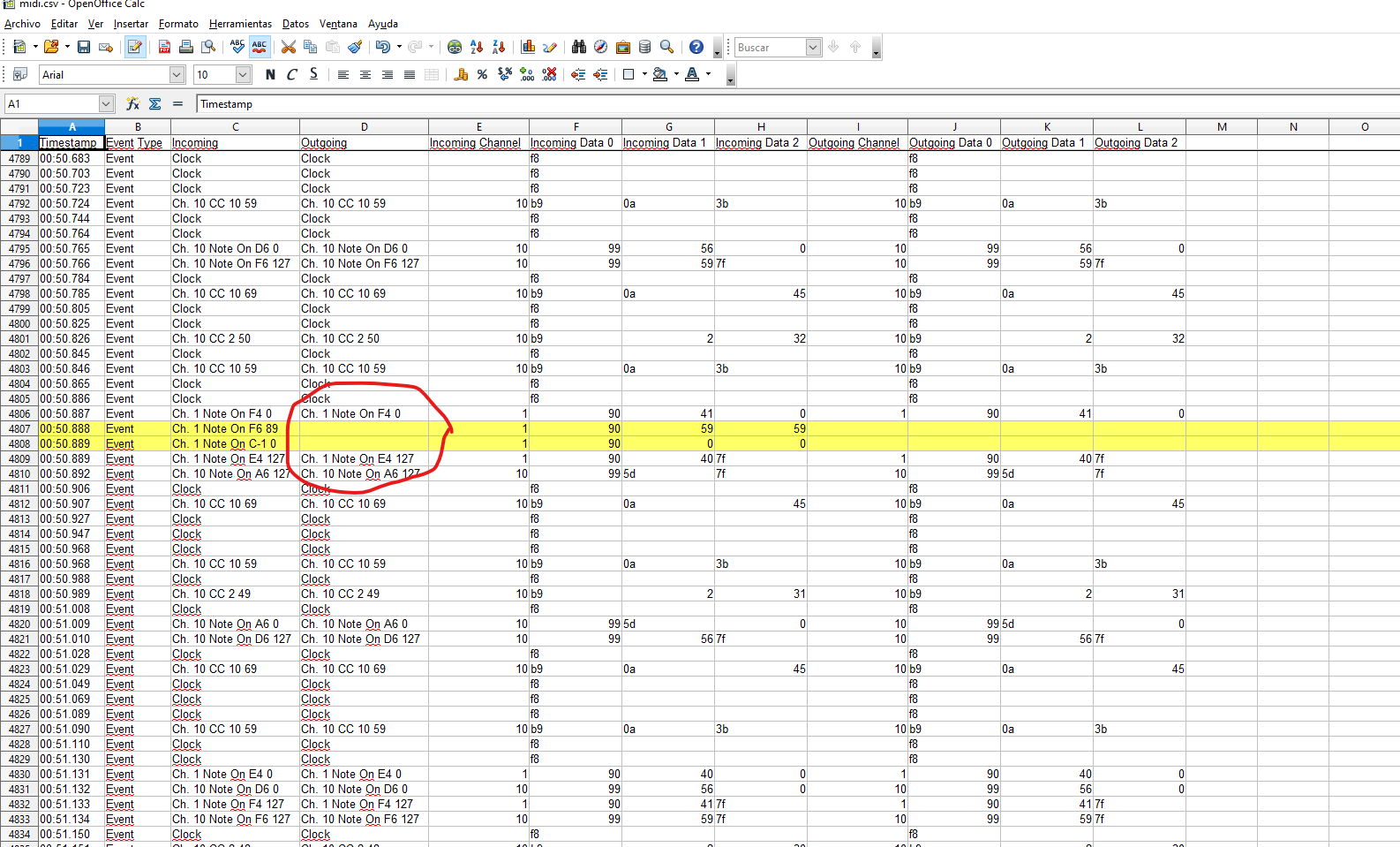
So, every now and then, I get ghost sustained notes, that only stop when I send a note off command (double stop in the Octatrack). I have detected it happening in both Virus and Mc101 (Out ports B and C). It’s really random, I double checked it’s not coming from the Octatrack sequencer. And it was difficult to detect, because it’s not very common, but I managed to grab it in the monitor. In this case the log comes from the “To C” of second pipe in the preset (which I attach, together with the CSV). I don’t use any USB pipe, btw.

As you can see in the screenshot, suddenly out of nowhere a F6 note and C-1 note are triggered (apparently coming from the Octatrack), but the weird stuff is that they are not producing any output (but they are actually sending the sustained infinite note). There’s no other row in the log with the empty outgoing cell.

I’m using firmware 1.16.0 (not the last one) and last editor. I could update, but wanted to check here first.

Any help? I’m not sure the issue comes from the Midihub, but it’s pretty annoying! thanks!

Midihub 2025.11.12 11.34.29.mhp (3.1 KB)

midi.csv (441.4 KB)
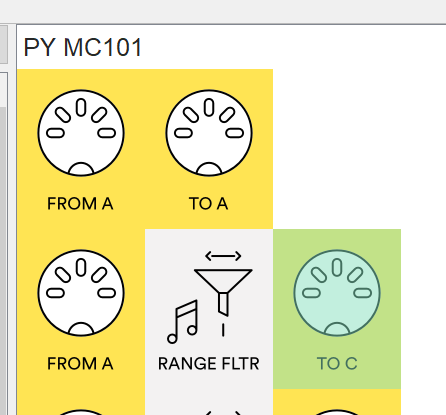
Do you mean the monitored log is from this position in the preset?

Please update the Midihub and the Editor to the latest version, and see if you can reproduce the issue. Try also to find a minimal preset required to reproduce the issue - like remove the pipelines for devices that never participate in this, etc…

Thanks @Giedrius ! I have updated the firmware and it happened once. However after rebooting the Octatrack it hasn’t happened again… let’s see.

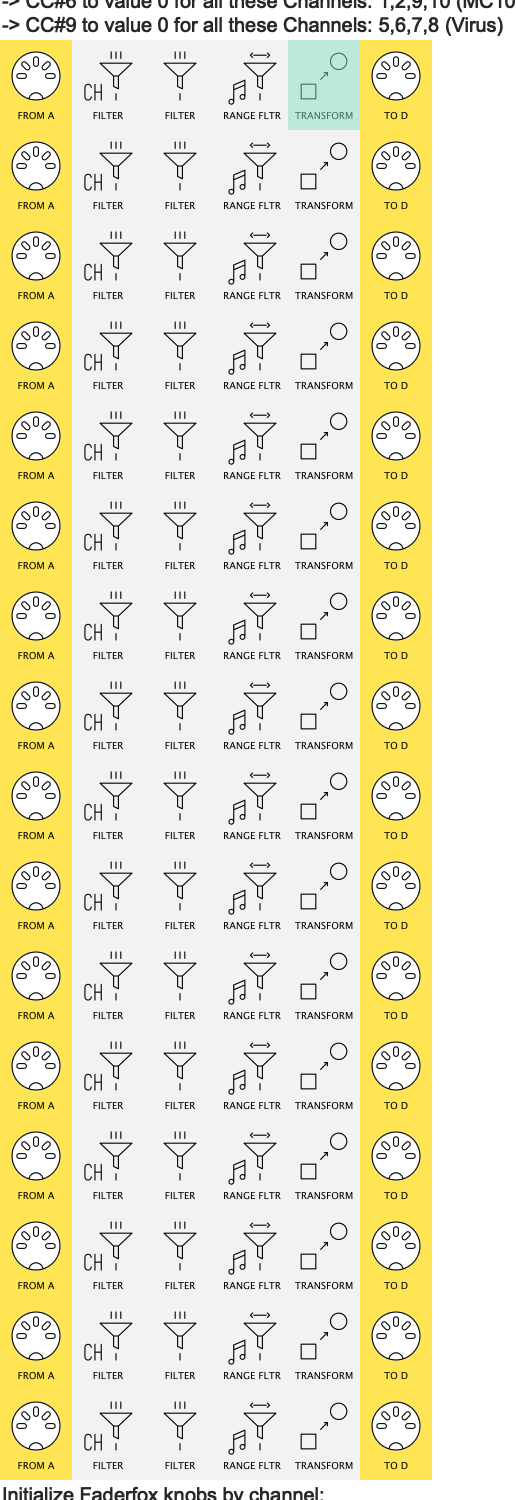
I also wanted to ask, could you help making my preset simpler? I have two big blocks that I’m pretty sure can be done in one or two pipelines. I have organised the preset to attach it here, the main blocks I’m talking about are these two:

Initialize Faderfox all knobs to 0 with one note:
When Note G9 is played in Channel 9, set:
→ CC#3 to value 0 for all these Channels: 1,2,5,6,7,8,9, 10 (Virus and MC101)
→ CC#6 to value 0 for all these Channels: 1,2,9,10 (MC101)
→ CC#9 to value 0 for all these Channels: 5,6,7,8 (Virus)

Initialize Faderfox knobs by channel:
When note F#9 is played in:
→ Channels 1,2,9,10 → Set CC#3 and CC#6 to value 0 for corresponding Channel (MC101)
→ Channels 5,6,7,8 → Set CC#3 and CC#9 to value 0 for corresponding Channel (Virus)

I have set one pipeline for every condition explained above, but I’m sure it’s much simpler. As I said, I’m attaching the preset here

simplificar.mhp (3.6 KB)

Thanks!

that’s something @resonotter proposed here, but I’m not sure how to tackle it: Monitor all ports? - #2 by resonotter

On this point @DiegoC, yes you can make this much simpler by making use of Transform’s Ranges

This block…


…for example, can be replaced by one line.

I’ll upload an example of the first few lines, then answer the other question about monitoring all lines when I’ve taken a closer look at your pipelines


OK, this is not the most compact way :one: to go, but it might be the easiest to adapt from your current preset:
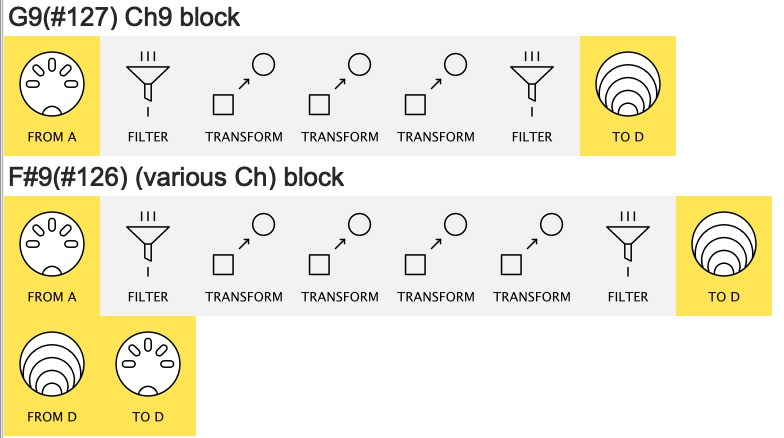
here we have the (unfinished )replacements for your two Initialize blocks


(3 Transforms from G9 block, 4 from F#9 block)

DiegoC_simplificar_ejemplo.mhp

changes to make

in each Transform, I’ve made use of Transform’s Ranges to make sure a given Transform only acts on the Channel & Note you want.

This means that, instead of being Replaced, as the note goes along the pipeline it creates the required CCs. (the final filter discards the Note)

So as you drag :two: the old pipes acoss to the new line this is what you change:

  1. ReplaceInsert Before (or Insert After – it doesn’t matter)

  2. Work with Any Channel is unchecked and Work with Channel is set to the required incoming channel

  3. Work with Note Number in Range ... values to set required note


:two: it might be best to:

  • do File → Append From File… to place my pipelines in your preset
  • drag the lines to the matching block
  • copy (alt-drag) the old Transforms across one by one and modify
  • delete the old line

or start from scratch!


monitoring in one place

Obviously, this is made easier already with just two lines…

…but notice my example uses Virtual D as the Output
..then has a Virtual D → MIDI D pipeline

This gives us the option of

  1. Monitoring each “Init Line” by itself and
  2. Monitoring the output of both together

:one: using CC Table instead

The simplifications above reduce approx 180 pipes to about 40 using Transform improvements made about 3 years ago

This year’s Editor version gives us CC Table which is designed just for jobs like yours.
Using CC Table would bring the pipe-count down to about 10 – one CC Table for each channel + outputs

I didn’t wanna hit you with this straightaway as you might prefer adapting what you know rather than learning a brand new approach.

Let us know if to want to try CC Table (it’s a bit neat :smiley: )

1 Like

Thanks a lot @resonotter ! Really appreciate your time here- I’m not sure how I would do it with a CC table (not sure what triggers those CC values), so I’m sticking to the Transform method.

One question: I assume that “Work with channel” and “Work with note” filters out in the same way as if I put a Channel Filter and Range Filter in the beggining of the pipeline (so I don’t need to put those anymore?)

image

Thanks!

Sort of:

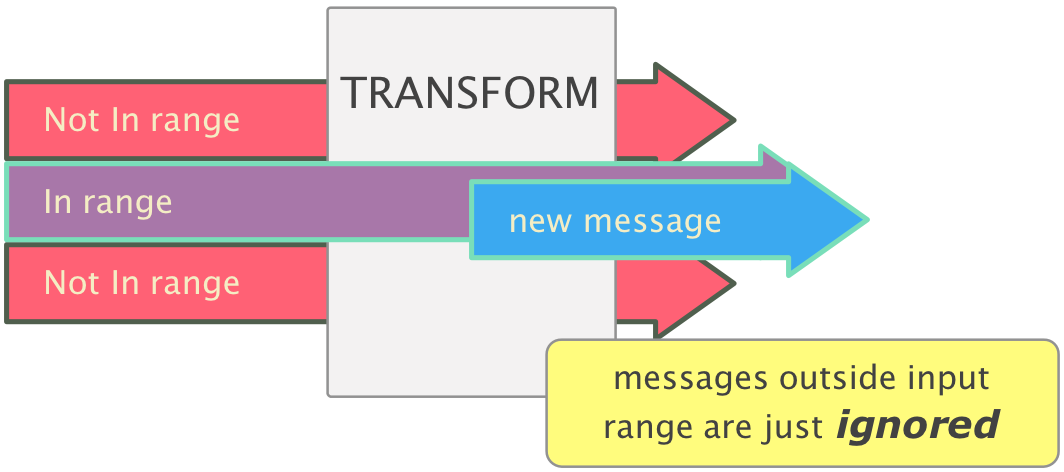
instead of filtering out those unwanted notes/channels, Work with Channel and Work with Note in Range just tell which notes/channels to work with…

…so instead of being blocked, those that don’t fit just get ignored:


(try Monitoring the final filter while sending in an unwanted note..)

This is the beauty of Transform: a single pipeline can be used for multiple messages and a single message can trigger a number of Transforms, if it matches their ranges.


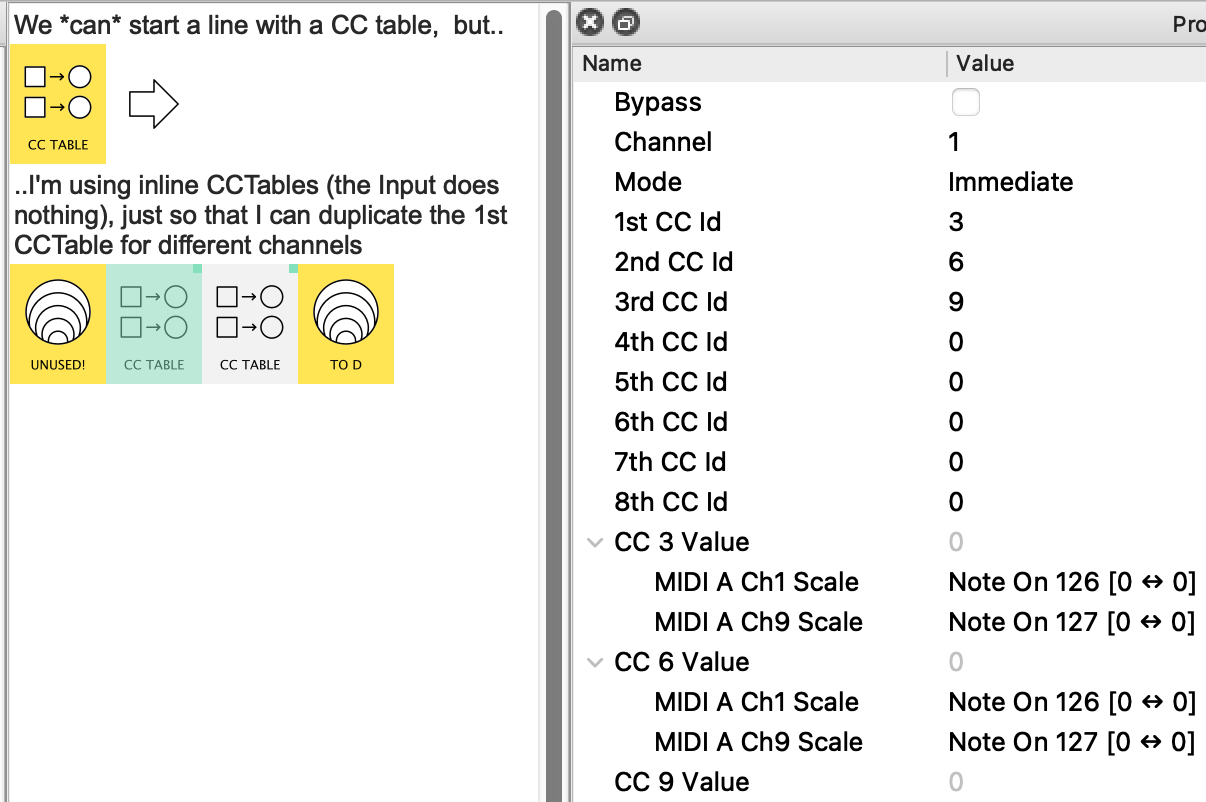
Here is the seed of a CC Table preset just so you can see:


DiegoC_CCTable_ejemplo.mhp

Here's how it works:

Instead of your F#9, G9 being used as messages, in CC Table they are used as mappings
(F#9 = Note126, G9 = Note127).
In detail:

  • the 1st CC Table is Ch.1

  • the CC3 value is set by MIDI A Ch9 Note 127 (=G9)†
    and by MIDI A Ch9 Note 126 (=F#9)

  • See that every mapping has the Range [0 ↔ 0].
    This means that, no matter what the incoming velocity is, the mapping will output 0 as required

  • Once I have set up on CCTable, I can shift-alt-drag it to make a copy for the next channel (complete with mappings)…
    …and then edit those maps which need correcting

† I don’t use Note Names with mappings because there is a currently glitch in the way they display.

Decide which approach works best for you.


Oh, btw, which Faderfox are you sending Init CCs to? I’ve not tried that.

Hey @resonotter thanks for your detailed help once again (sorry for the late reply!)

I tried the “Transform pile” option and it works great, I didn’t even get any ghost notes apparently, so I guess a cleaner preset works better :slight_smile:

I use a Faderfox EC4, which works great, but the problem is that when changing presets, they don’t initialize, so if the same CC is set in different presets, they will carry the current value… but I’m using this solution since some years ago and it works flawlessly, on my Octatrack I just set a trig with F#9 (initializes CC to 0 for that channel) or G9 in channel 9 (initializes all).

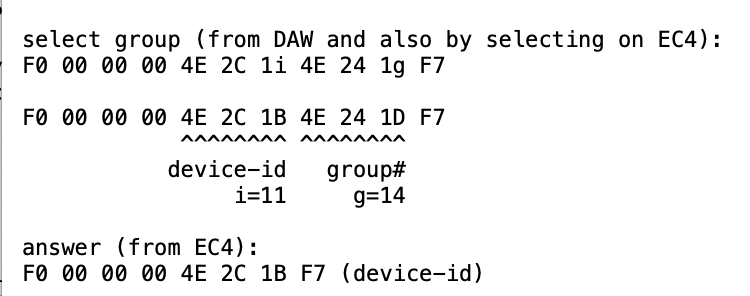
Another question! :smiley: With the last upgrade, Faderfox enabled the option to select group (i.e- preset) sending a Sysex command (there’s no other option, only manually so far). AFAIK the Midihub cannot handle Sysex commands, right? is there any workaround? this is the sysex documentation:
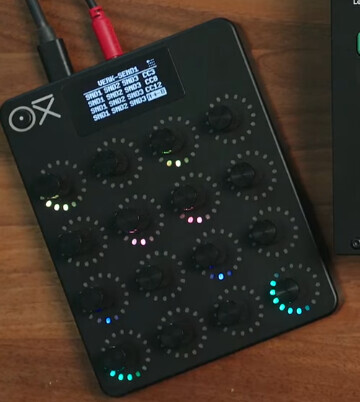
Also I’m really looking forward to the new Oxi E16, which would be a cool update!

Thanks!

Aah, I was wondering about the original query you were discussing with @Giedrius.
Do you want to tick that as solved?

(I think I may move all the posts from #3 to a new thread so it has it’s own title, if that’s OK with you)


I tried the “Transform pile” option and it works great

Excellent. Why not upload your preset for future readers to compare with your original?


I use a Faderfox EC4

OK, great , I’ll try that.
I rather like the same CC → all instances thing; I have an EaganMatrix device & they warn you heavily about turning down the volume whenever you edit the matrix (scary stuff) so having a button which resets the vol control to low removes a lot of anxiety!

And No, MH only filters Sysex at present.


don’t tempt me with the OXI! - I’d promised myself to not buy any more controllers for a year (then I saw the Melbourne haptic thing!)

btw, you know you can get Midihub to do CC morphing? :smiley: