My Roland TB-303 replica “Din Sync RE-303” w/Sonic Potions firmware v0.95 has an unfixed bug where it’s MIDI OUT Note Off is always CH 1, regardless of the set TX channel. This in itself is a simple fix with a Transform, but I also want to transpose all midi out notes (including the fixed Note Off CH’s) 1 to 4 octaves down without using any mappings or program change to select different presets.
I was thinking to create several identical pipelines with different TO MIDI’s and physically plug the MIDI cable in output A to D if I wanted to transpose -1 to 4 octaves, but I actually prefer changing the TX channel of the device itself (i.e. CH16 = transpose 0, TX CH 1 = transpose -1 octave, TX CH2 = transpose -2 octaves etc. etc). Problem is the “always Note Off CH1 bug” also need to match the new TX channel.
Is this possible or do I need to just switch my cable between outputs A to D? Thanks in advance!
Hey, @hotswank, maybe I’m misunderstanding✻ the issue here but..
…can’t you just create Note Off messages for every channel used ❖
then have a parallel series of pipelines like
Virtual V → Ch Filter → Transpose → MIDI M ?
❖Many (most?) synths just ignore unexpected Note Off messages.
✻ (I definitely don’t get the “cable in output A to D” bit!)
Thanks for the reply! The Re-303 bug sends midi notes as note On + vel XX CH X followed by an note Off vel O CH1. Synths maybe ignore occasional note offs but these note offs are not occasional but permanent and my drumcomputer certainly does not like CH10 on’s and CH1 off’s. To explain the cable bit: I duplicated the pipes with the note off set to a fixed channel and added a transpose pipeline -1, -2, -3 and -4 octaves with their own output A-D. By switching the midi cable into output A~D, the notes are transposed -1~-4 octaves.
Not sure if you understand the problem though. Basically I want “If input CH = 2, transpose -2 octaves and set all CH1 note off’s to CH2 as well”. If CH=3, transpose -3 octaves and change note off CH1 into CH3.
Sorry what I mean is if a synth gets say Ch7 Note On #66 and Ch7 Note Off #66 and Ch7 Note Off #23 it won’t throw a hissy on the extra Note Off.
I’m suggesting this:
PS. depending on how many channels you need, there is a more compact way
btw. If extra Note Off messages on a given channel turns out to be an issue there is a workaround for that too
Thank you so much resonotter for the suggestions and time! Much appreciated.
So you are saying sending a Note On followed by 2 note off with 2 different channels is okay, as long one note off has the same channel as the note on and the other note off will be ignored anyway. Got it.
Have a nice evening.
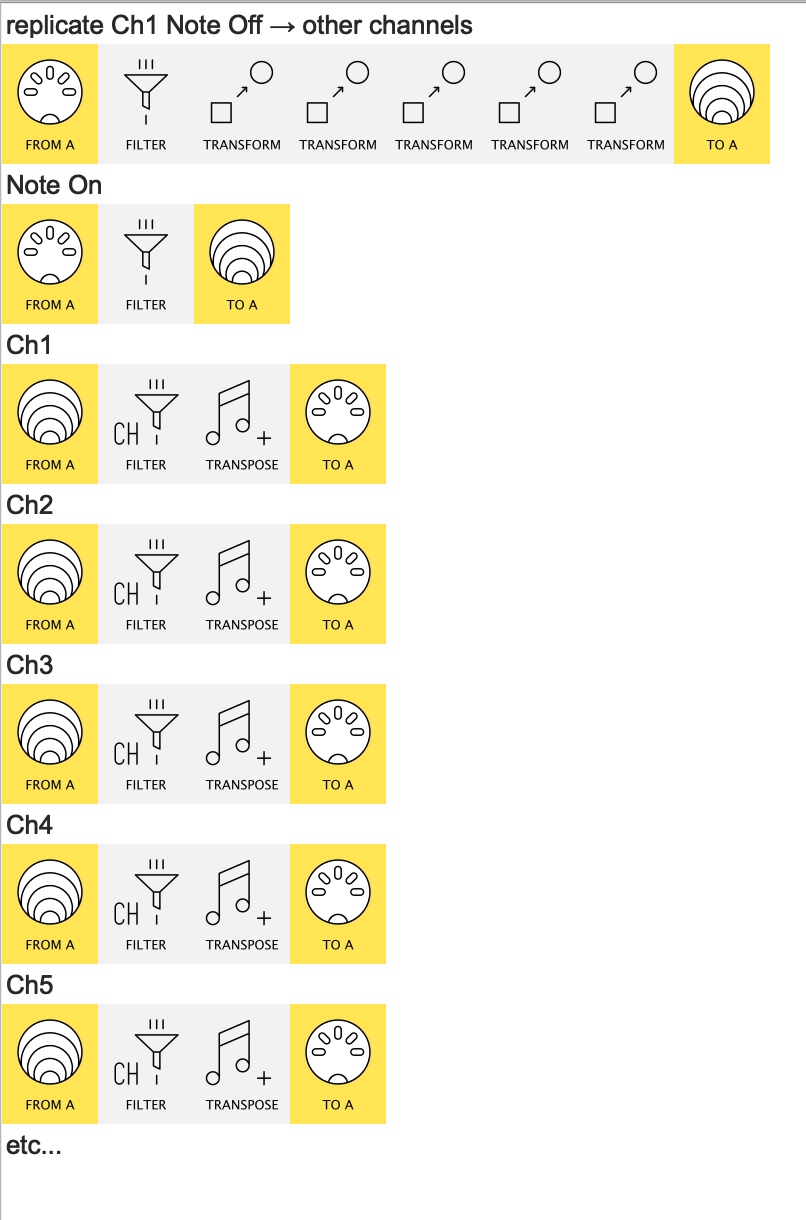
Yeah, I’d say do a setup like the screenshot shown,
then, if it turns out to be an issue, you can adapt the strategy here to only allow a Note Off through when it’s preceded by a Note On on that channel.
But I think that’ll turn out to be unnecessary!
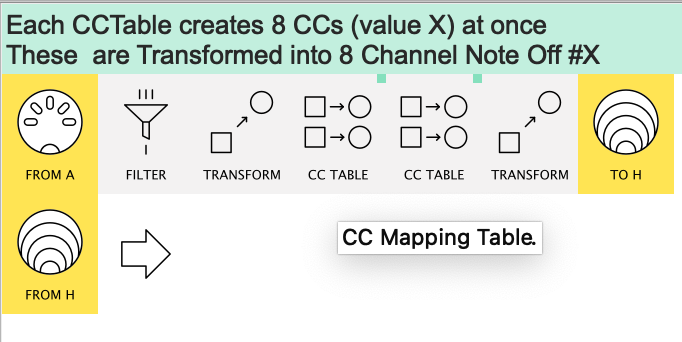
PS. If you’ve got lots of channels to replicate for, the wonders of CCTable now give us this:
Lemme know if you need this
Hi resonotter, I really appreciate your help but your solutions are way too complicated for what it is. I used to build very, very complex sysex editors in MaxMSP and also many server mods for the OG Call of Duty PC game with many “if-then-else” statements, but I don’t understand the logic and terminology used in midihub. The screenshots do help but without knowing the actual settings of each pipeline it’s hard to comprehend. The Context Help menu does help but again I still do not always understand what it actually says and what it means. May I ask in what language midihub is written?
Anyway, I decided to use midi mappings with a bluetooth CME WIDI Master and iPad with “MIDI Macros” app for fixing the note off channel and optional transpose because it’s only a very simple problem and could be easily fixed with one transform / transpose pipeline (and some mappings).
BTW I was pulling my hair out figuring out the CC# values for Ch1 - Ch16. Turns out Ch1 = 1, Ch8 = 56 and Ch16 = 127. Transpose -12 semitones = 52, -24 semitones = 40, -36 semitones = 28 and -48 semitones = 16 !!! It took me many tries to figure it out and this is NOT explained anywhere. All I found was info about 0-63 and 64-127 for check boxes (disable pipelines).
Love midihub but programming it, is not for the faint hearted LOL.
PS If you pick a CC for midi mapping it does say the CC# but also the Low and High value as if they are notes i.e. [C-1 < > G9] and not [0 < > 127]. I found that a bit confusing.
RE-303 Note Off CH3.mhp (426 Bytes)
I don’t know cos I’m just another user like you!

The solution I hinted at fitted with your initial brief (“without using any mappings”) and made no assumptions which I wasn’t given.
Your mapped preset will work fine with monophonic input but I didn’t make that assumption with what I suggested with my sketch. Sorry, should’ve asked!
Mine is more complex cos it’s designed to handle overlapping polyphonic notes. Glad your use-case is simpler.
'not for the faint hearted'
I think we see MH in quite different ways; it’s always struck me as rather neatly logically coherent:
so to use your two examples:
-
when I saw first Transform Channel by mapping wasn’t just 0-15 or 1-16, it made better sense that {0-15 / 1-16} would be spread over 128 values cos then Ch ↔ Value is made as simple as poss. Then a quick calculation suggests it’s gonna go up in 8’s ❖
(Only after did I notice “As the range of channel numbers in MIDI is 1 - 16, but data values have a range of 0 - 127, it is necessary to rescale between the two ranges.” (Transform context help))
-
Similarly, given Transpose can go minus or plus, Transpose “+0” just had to be in the middle so the only question that remained was “does zero map to value 63 or 64?”
❖ It’s partly cos I reckoned this might be initially a bit weird to some users that I spent some time trying to explain it here and here
Thank you. I did not realise you’re a user just like us (but a very knowledgable unlike me haha).
Re: no mappings: this was my initial goal but I changed my mind when I tried and gave up LOL
That’s OK,
intrigued as to why you wanted to avoid mappings:
the sketch I made...
.. was just a logical consequence of what you asked and intimated:
-
if “no mappings” and “multiple transforms” then multiple (parallel) pipelines
(axiom: Transpose is not {yet} channel-specific)
Hence pipelines3+
-
plus your “simple fix with a Transform” suggested that you were confident with Replace “channel-setting” Transforms, so it didn’t seem a stretch to use a string of (Insert..) “channel-setting” Transforms.
Hence pipeline1
-
pipeline2 wasn’t strictly necessary but IMO keeping pipeline1 just for Note Off made it functionally clearer
While I’ll often just write a preset (particulalry for a new user), the new Comment lines make it nice to v.quickly throw down pipes to give the shape of a preset for those who like to figure out the details for themselves
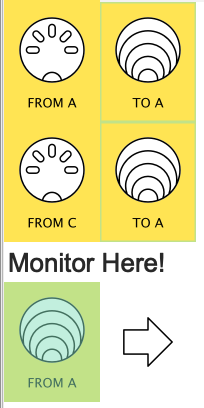
PS1. I’ve never experimented with creating a Transpose Map externally from a Note On trigger.
Do the two events arrive “simultaneously”?
(Easy enough to check by routing both A & C to a Virtual Out then Monitoring the corresponding Virtual In)
PS2. Now you’ve broken the mappings rule, You can use mappings to set both the Note Off Channel and the Transpose all internally, but I guess you don’t wanna go there