My Midihub is refusing to change his preset / program. I’m working with a Morningstar MC3, and I’m sending a program change. The Midihub is listening on the correct channel, the correct port is connected … I changed the values at “program change handler”, … I flashed firmware, did a reset, but still not working. Disconnected my USB / computer, … I think I did all I could?
I’m sing v1.16.1, all my events are visible in the (MC3 pipeline) monitor. I see the light flashing when I send the messages, but still no program change.
It worked fine, but then I started experimenting with virtual ports. Not sure if that is the problem, but ChatGPT told me it’s a known bug maybe related to that …
I will do that, next week. Midihub is in my studio, won’t be there before Tuesday.
But it would be very weird if the problem is in my settings. It was working in the last 6 months, without a problem. Switching programs on a simple PC command. It stopped working when I was playing with virtual ports. I loaded the manual and the support pages into ChatGPT, and after a lot of trial and error and debugging and doing all the steps and options.
I have just asked ChatGPT to write a rundown to post here, this is an overview and everything I already tried to fix it.
Thanks a lot!
Peter
Chat GPT summary:
My Midihub suddenly stopped responding to Program Change messages for preset switching.
It was working perfectly until I started experimenting with Virtual A/B ports. Since then, even after deleting all virtual routes, the unit no longer reacts to PC messages — it only changes presets when I manually load them from the Editor.
Setup:
Firmware: v1.16.1
Editor: v1.16.1 (macOS)
Midihub powered externally (USB disconnected during tests)
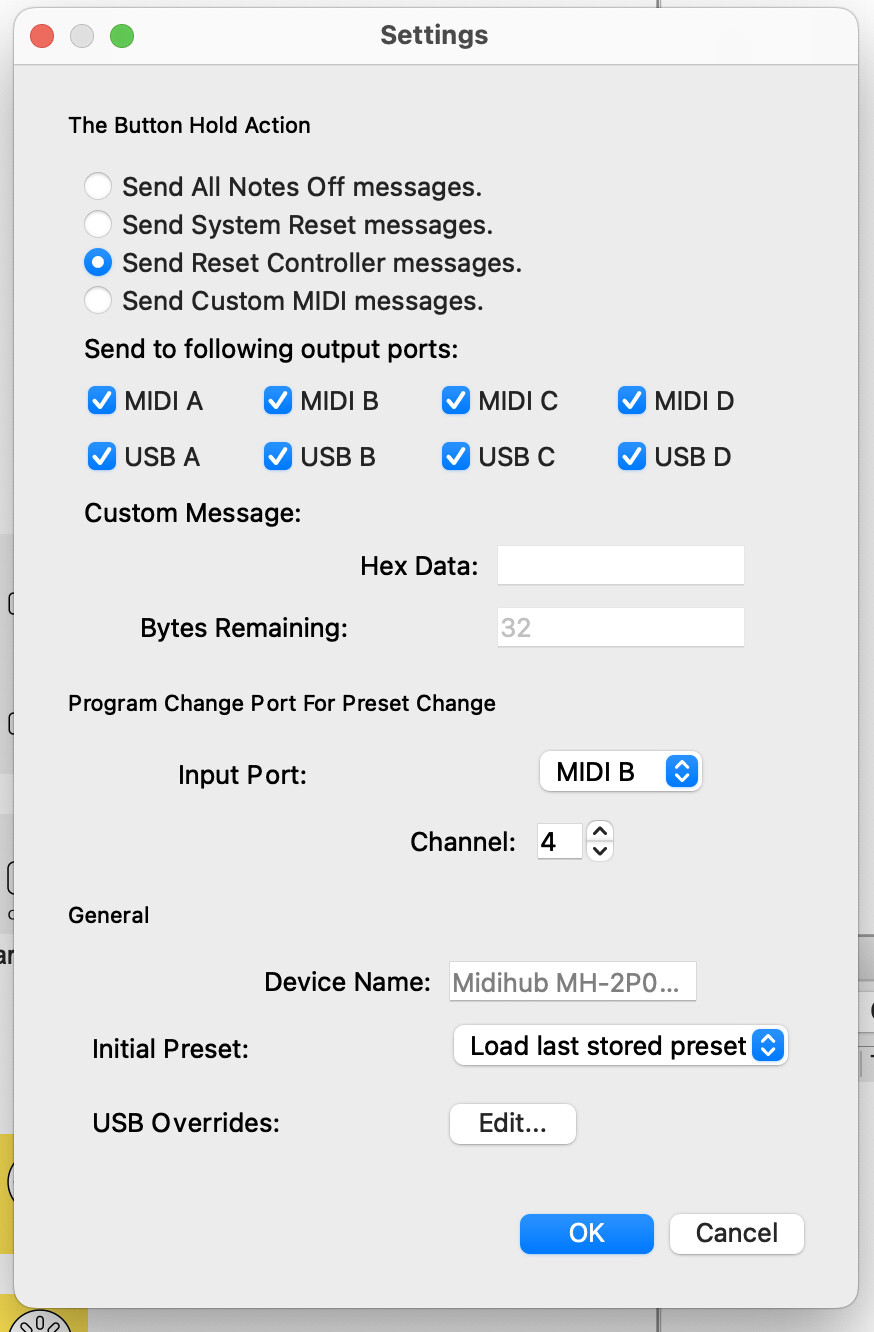
“Program Change Port for Preset Change”: Input Port = MIDI B, Channel = 4
Controller: Morningstar MC3 (DIN Out → Midihub MIDI B In)
MC3 sends Program Change messages on Channel 4, plus other PC messages on Ch 1–3 and 5–7 for other synths
Symptoms:
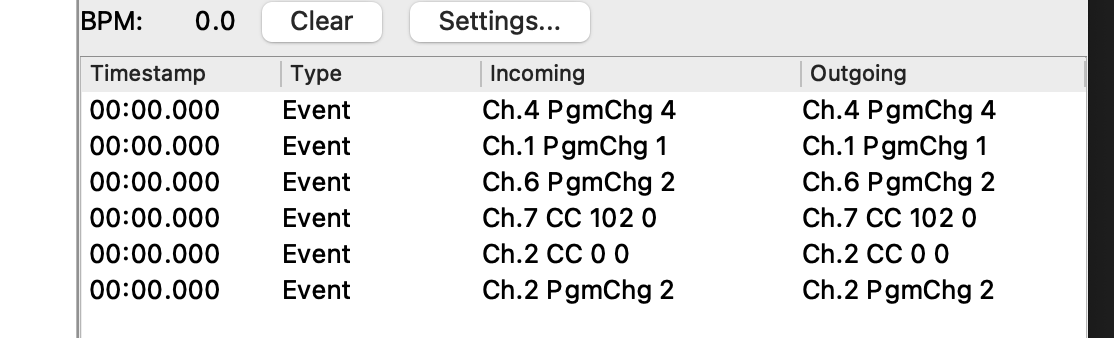
The Midihub Monitor clearly shows the correct message: Ch.4 PgmChg 6 (or any other value).
However, the device doesn’t switch presets.
If I open a preset manually in the Editor, it loads and works fine.
There is a flashing LED change when a PC arrives from the MC3, but no program change.
What I’ve already tried:
Verified MC3 output — single PC on Ch 4, correct DIN port.
Confirmed settings in Device → Settings → Program Change Port for Preset Change.
Disconnected USB and closed the Editor during all tests.
Removed all “From Virtual” and “To Virtual” pipes from every preset.
Performed a hardware reset (holding the button while powering up until all LEDs flash).
Flashed firmware v1.16.1 again using the Editor.
Confirmed that PC messages still appear in the monitor, but no preset switching occurs.
At this point it looks like the Program Change handler might be frozen or disconnected internally.
Is this a known issue with 1.16.1, especially after using Virtual Ports?
Any way to hard-reset or reinitialize the preset switching logic?
Don’t trust Chat GPT on Midihub topics. There’s no “hardware reset” like it wrote.
Virtual pipes should have no impact over the preset changes.
Could you do Device → Export Everything… and send the .mhd file to us via personal message or just upload it here? Also which MIDI port do you want to use for this function?
I set up one MH with your .mhd to respond to MIDI_IN B, channel 4
I set up a 2nd MH to send PCs sequentially (eg 8,7,6… or 1,2,3)…
…then via button (ie. jump from any preset to any other)
Everything worked just fine
So the issue is in the hardware of my Midihub
Dunno: @Giedrius may have soft diagnostics, etc to take you through.
When you get back to your studio, it might be worth trying out different ports, cables, etc. just to add more feedback
Also...
…as the MC6 connects for editing via USB it’s worth seeing whether it shows up in MIDI Patchbay on your Mac.
If so see whether it can send messages to MH for test purposes.
Although this is not a solution, it may give more info to people who know more than us!
Simply that, just as you inserted a screenshot image into a reply, so you can upload or just drag certain file types into your reply.
These include .txt, .csv, .mhp and .mhd
It’s fixed! I don’t really know why, but there was a fuckup in my External Program Change setting. It had to be set to the port labeled as “MC3 port”, channel 4, but it was set to MIDI B, channel 1. And at the same time I had the idea it had to be MIDI B, channel 4.
I promise: I don’t drink.
Thanks a lot and I’m sorry for the confusion here.
 …
…
 There’s no “hardware reset” like it wrote.
