Hi everyone!
I need your help with the following,
It’s not very easy to explain, but I’ll do my best :),
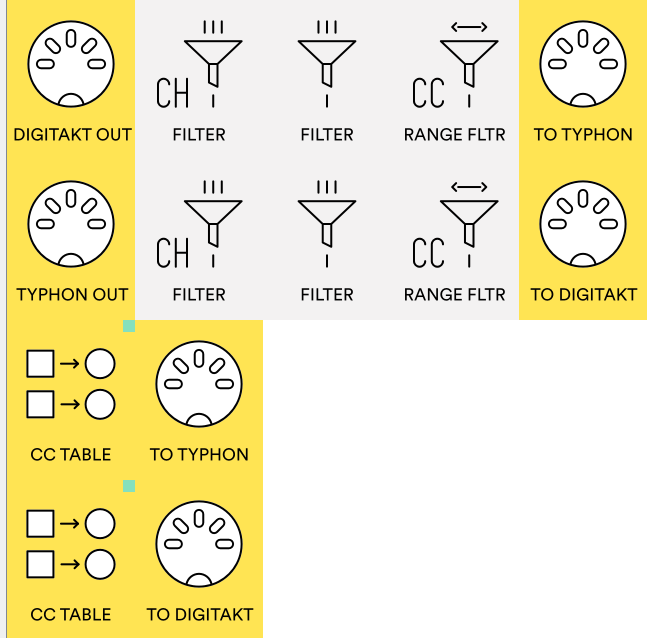
The current connections are:
Digitakt 2 → MidiHub → Typhon
Typhon → MidiHub → Digitakt 2
I want the CC messages from the Typhon’s cutoff (CC74) to be sent to the DT2 (to Knob 1 on the filter page of the MIDI track, which is mapped as CC70).
At the same time, I want the CC messages from this Knob 1 on the Digitakt to be sent to the Typhon and control its cutoff knob.
Why do I want it this way?
Because I prefer using the Typhon’s physical knob (type and response) to control the cutoff, but I also need that knob to influence Knob 1 on the DT2. Otherwise, when I have p-locks on the DT2 that change the cutoff value and send it to the Typhon, those changes won’t follow properly because the values weren’t updated.
The problem, obviously, is that this creates a CC message loop, which causes data processing issues, and the Typhon’s cutoff knob stops working correctly.
My idea is that only two communications should happen, and on the third one there should be a block to prevent the loop from continuing. Does anyone have an idea of how to solve this?
Thanks in advance for the help.
Best regards
So you need CC74 value on Typhon to be in sync with CC70 value of Digitakt 2, whenever these are changed on either device?
Do these devices automatically forward the same CC to the MIDI output too? Or do they ‘consume’ the message and it’s not sent out from it?
The Digitakt 2 receives CC70 and forwards it as CC74. The Typhon receives it and also forwards it as CC74.
In the communication between the Typhon and the Digitakt 2, I need to insert a CC remap (74 → 70).
I noticed that if I turn the Typhon knob relatively slowly, things work quite well, the value on the DT2 gets updated, and I can still move the DT2 knob and control the cutoff on the Typhon.
The problem happens when I turn it faster: it gets jammed on the DT2 and on the Typhon as well. The cutoff stops affecting the sound, as if it gets stuck at certain values, and it only resumes after I pass over those values again.
Does Digitakt 2 do this remap on its own? Does Typhon do that too? Can this be disabled?
Could you upload your current Midihub preset here? 
On the Digitakt, the knob itself is controlled using CC70, and it is mapped to control CC74 on the Typhoon. So yes, it does the remapping itself. The knob has its own CC when controlled externally, but it always sends the CC that we have defined, in this case, CC74. It never sends CC70; that one is only for receiving.
Hope this is clear, as it is a little confusing.
CC message loop.mhp (636 Bytes)
The Typhoon sends and receives on the same CC74.
If you’re asking whether the Digitakt 2 receives on a different CC than it sends, no, that cannot be disabled.
If you’re asking whether sending/receiving CC messages can be disabled, yes, it can be disabled on both machines.
File attached, thank you so much for your time!
Ok, I’m still not sure I have a clear picture. 
Let’s break this down a bit, please let me know what happens when:
- You turn the performance knob on Digitakt2, it sends: …
- You turn the Typhoon’s cutoff knob, it sends: …
- If Digitakt2 receives CC70, does it forward it to its output? Or does it only update its internal parameter value?
- If Typhoon receives CC74, does it forward it to its output? Or does it only update its internal parameter value?
If DT2 or Typhoon remap the CC number, can that be fully disabled? (We’ll have Midihub do any necessary remappings)
Ok, please give this preset a try:
CC message loop CC Table.mhp (569 Bytes)
It uses CC Tables in “Takeover” mode and external MIDI mappings to try to keep the values in sync, also it should avoid “jumps”, so the other control knob is required to ‘overtake’ the old value before it gets changed. If this is not desired, the change the Mode of both CC Tables to “Immediate”.
I tried to match the channels as I saw in your preset. If the preset does not react, click around the pipes and see what’s happening to the MIDI events at that location in the MIDI Monitor. If CC Tables don’t produce any outputs, edit / remap the CCs to your controls.
Hi, I’ll try to test it today, Really appreciate your help!
Hi again! It didn’t work, thanks for your help. I’ll leave this idea for another time and move forward in a simpler way ;).
In the meantime, I noticed that the DT2 also sends CC70 through the channel that’s set to receive messages from the external controller (as long as the “encoders destination” field has the “ext” option selected). I saw that this CC70 comes immediately before CC74, so I did a remapping and can say that this way the two knobs were already working well in sync and without lockups.
However, I also discovered that this way it stopped sending the p-locks from the DT2 to the Typhon, since those were being sent via CC74. So I gave up, hehe. Until next time.
I’m pretty sure there’s ways to get this to work though.
Do you happen to have Claude, Codex or other such AI desktop chat programs? We have a beta in progress where Midihub Editor is accessible to these LLMs and they can actually probe, inspect, simulate and modify your presets through just using the chat - they might be able to see actual MIDI messages and come up with some solution. If you’d like to give that a try, let me know.