I’m having trouble programming it though…
Shouldn’t it be as simple as create several pipelines (like in the attached file) and add a transform pipeline on each that converts that specific PC message to the one i indicate?
It only appears to be working for one of them while the rest do not change
Midihub 2025.12.10 .mhp (423 Bytes)
hi @choponster01, remember that because you’ve got parallel pipelines, every PC will go through every pipeline.
Test this yourself:
-
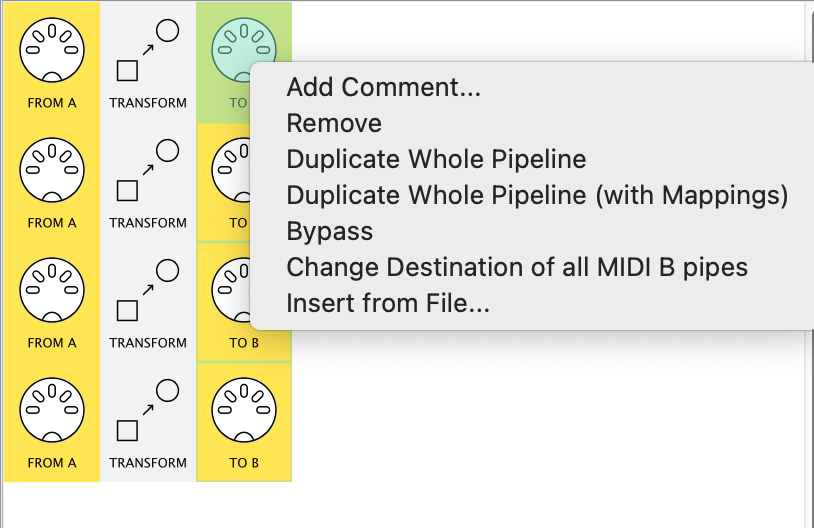
Change all the MIDI B OUTs…
control click gives you this menu to do them all at once!
-
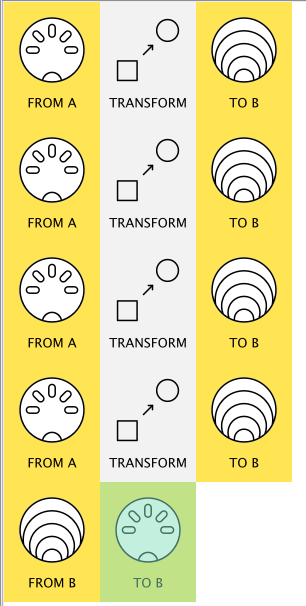
…and add another pipeline to funnel all the 4 flows into just one MIDI B OUT:
-
Now when you send the 4 PCs in you’ll likely see the problem by monitoring the MIDI B-OUT
fixing it
If you’ve got several more to do, there are a couple of ways to to do this sort of PC “remapping” in one or two lines
Just adapting what you’ve got, though, try this:
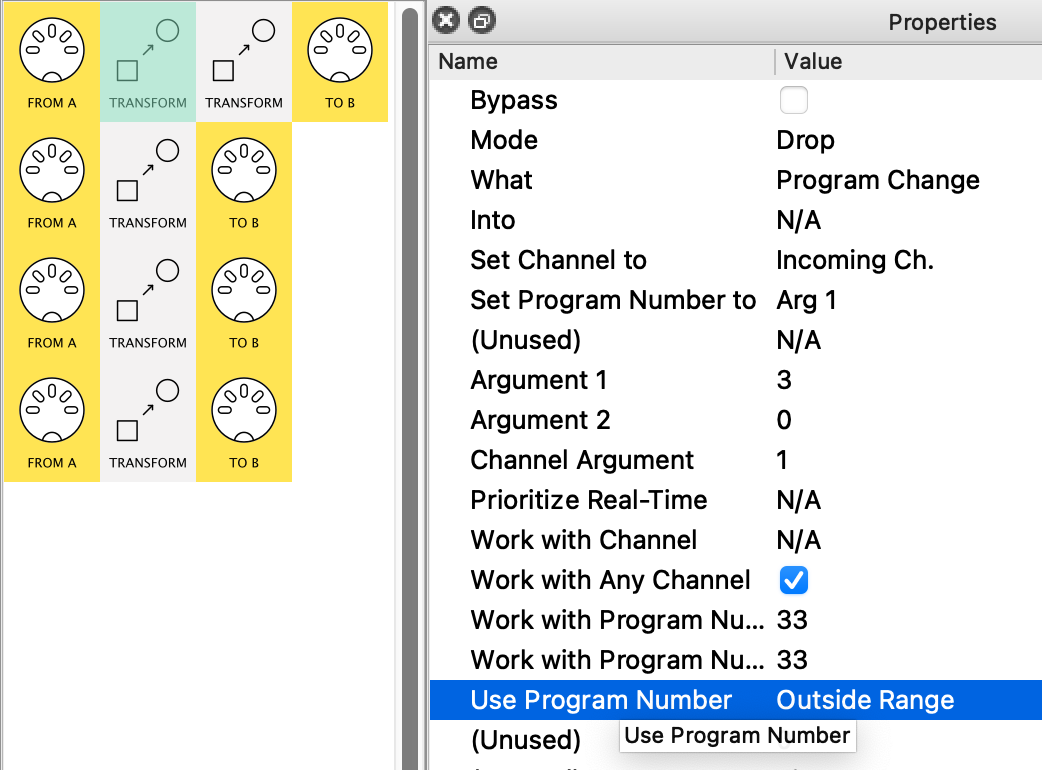
First, use option/alt-drag to make a copy of each Transform (drop it right next to the original)
Then, change the first Transform in each line like this:
- change
Use Program Number → Outside Range
- change
Mode → Drop
lastly, change Mode → Replace in your 2nd Transform
This means that each pipeline only lets a given PC in…
…and replaces that with the one you want
If, after checking this out, you fancy learning about another way, let us know how many PC “remaps” you need
Thank you so much for this!
In total i would need around 36 PC remaps per preset. If there is a more efficient way to do it, I’d love to hear!
Yeah, @choponster01, you might just want to move beyond 1PC per pipeline for that!
The best way for you will depend on your mapping table:
I think so far you had
-
32 → 4
-
33 → 3
-
34 → 6
-
35 → 5
all maintaining Channel.
If you lay them all out in order, it’ll help decide the best strategy(ies!)
(patterns save pipes!)
At first glance, it looks like a job for 3 CCTables:
-
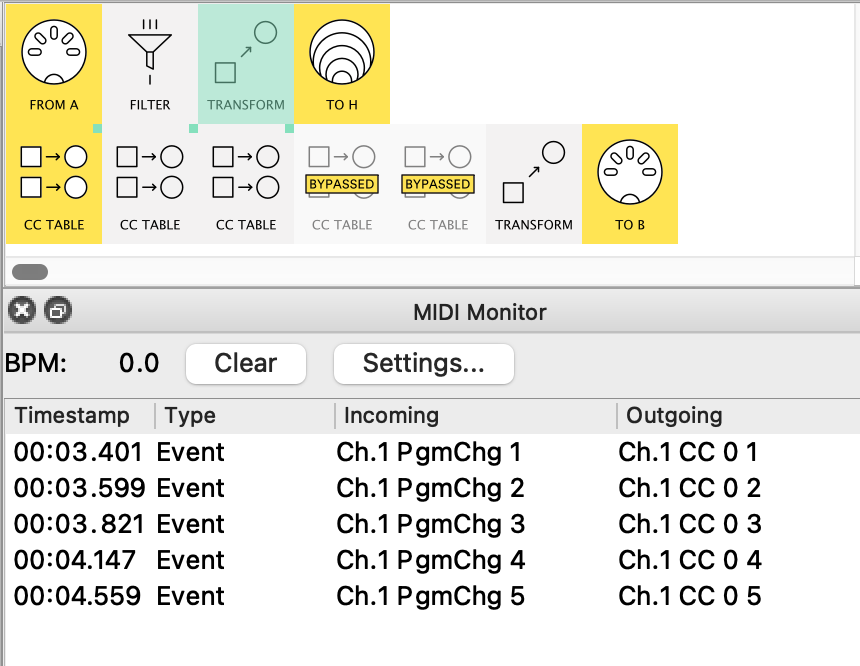
A → Filter(PC only) → Transform (PC → CC: CC#=PC#, value=fixed) → virtual H(say)
-
CC Table (1-16) → CC Table(17-32) → CC Table(33-36) → Transform(CC → PC) → B
all CC Table mappings Scale , range irrelevant.
|
(just one way…)
but a few sub-patterns might save a lot of mappings…
I am a bit confused on how to do what you are describing. is there any downside to having 1PC per pipeline? I’ve attached my preset below as a reference
Midi Hub PC Transform Trial.mhp (1.9 KB)
also why in this pipeline is the original PC message still being sent to outgoing? I want it not to be sent and instead to be transformed into the new PC message.
because you didn’t do this bit:
Insert After|Before adds a new message to the flow.
Replace removes the original (see tutorial here.. )
.
I am a bit confused on how to do what you are describing.
Sorry, I was just giving you the shape of a more compact solution. I had it in mind I’d show you some more detail when I saw your PC pairings.
is there any downside to having 1PC per pipeline?
On one hand, whatever works!
On the other, more compact solutions are often easier to maintain and de-bug.
Plus they leave more pipes for other things you might later incorporate.
Now I’ve got your lines I can see what your (PC In, PC Out) pairings are.
I’ll come back to you…
Here’s what I meant Andris @choponster01.
These are all the pipes you need.
let’s walk slowly through it:
The CC tables (five are needed– not 3!†) need mappings to work:
†each CC Table creates up to 8 CCs
-
I create the mapping CC from the Prog Change
I use CC#0’s value to “carry” the info about the PC#
(check out how by inspecting the Transform in the preset below)
-
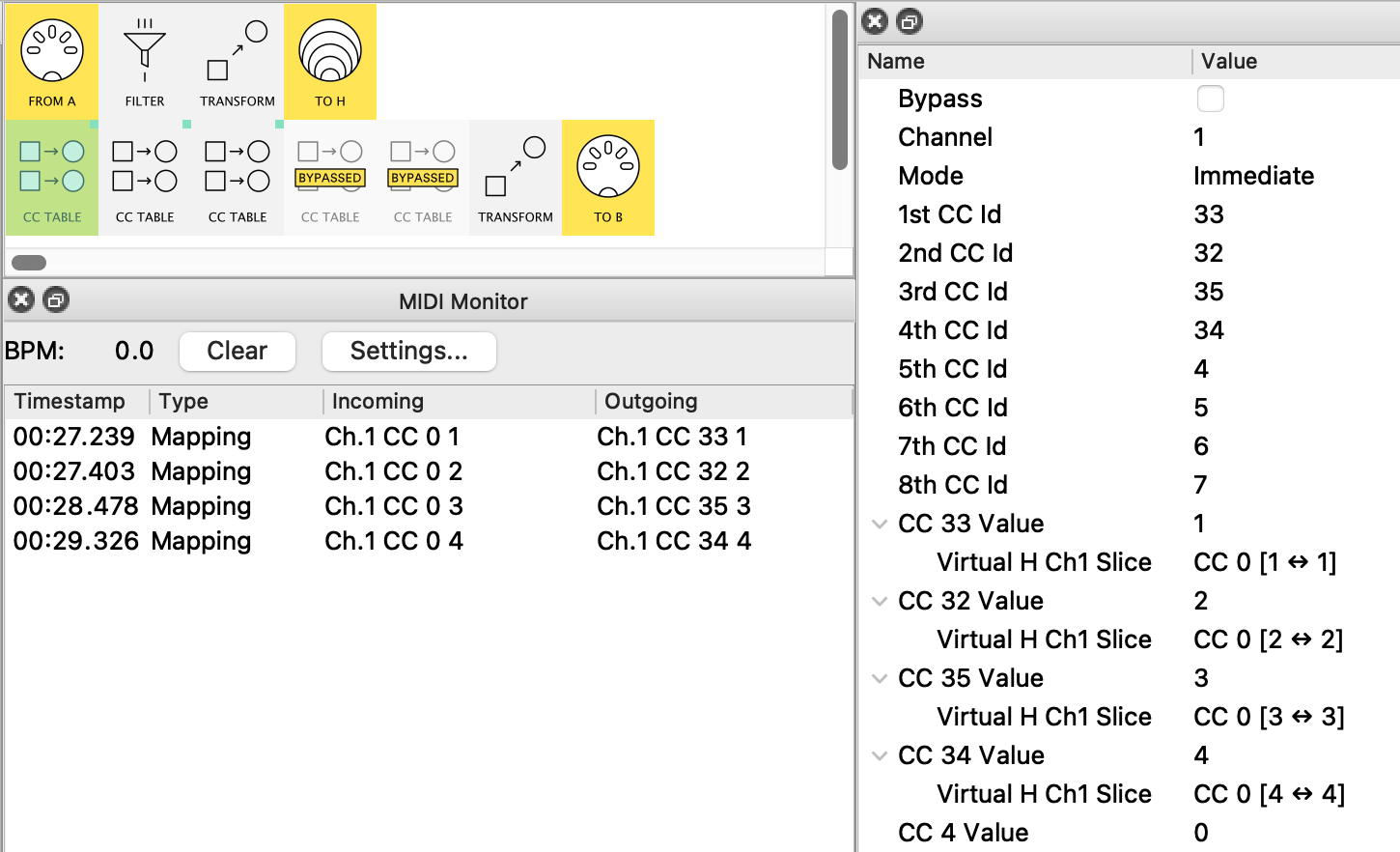
The first Table will handle the 1st 8 values (I’ve mapped 4 as an example)
Notice the CC Ids I’ve entered a the 1st 4 PC no.s you want in your list.
See how I use a Slice mapping with just one value – the incoming PC value
So the Monitor shows incoming values 1,2,3,4 → CC’s 33, 32, 35, 34 respectively
(nothing happens with the others cos I haven’t mapped them: add (+) those maps yourself and try it!)
-
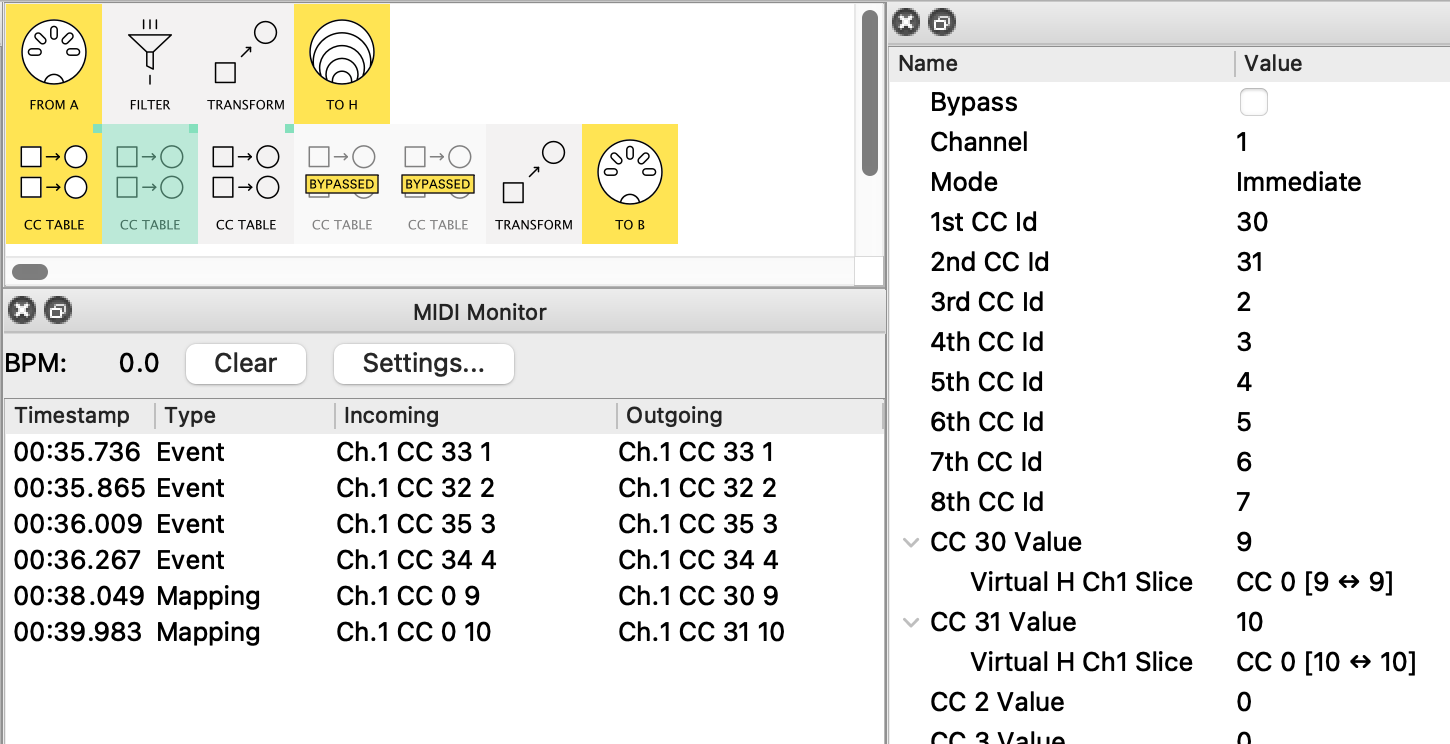
Looking at the same run with Table 2…
…we see the CCs created by Table 1 (labelled as Event),
then the new Table 2 CCs (labelled as Mapping)
Again, I’ve only mapped a couple of rows and left the rest for you!
-
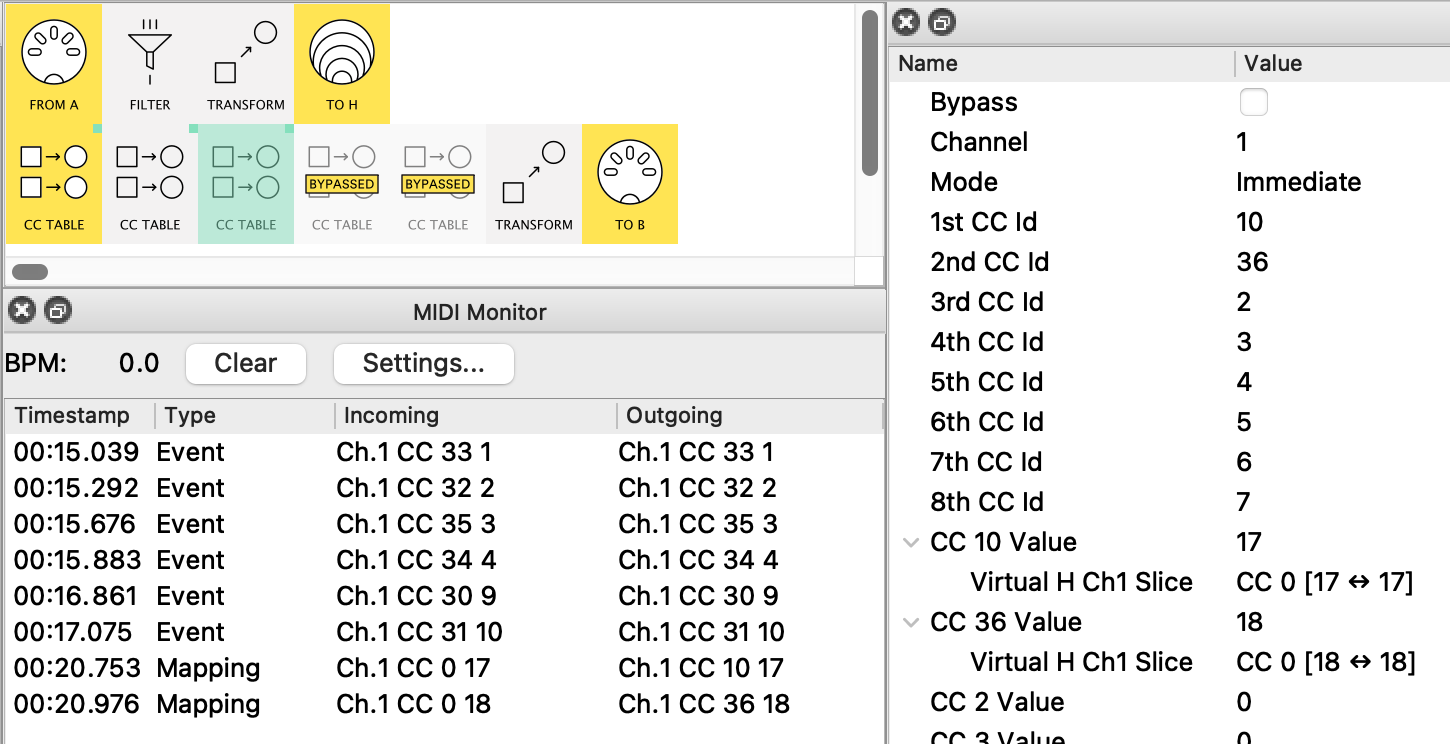
And so on with Table 3
(PS. I disabled Tables 4 & 5 just to say they’re as yet totally unmapped)
-
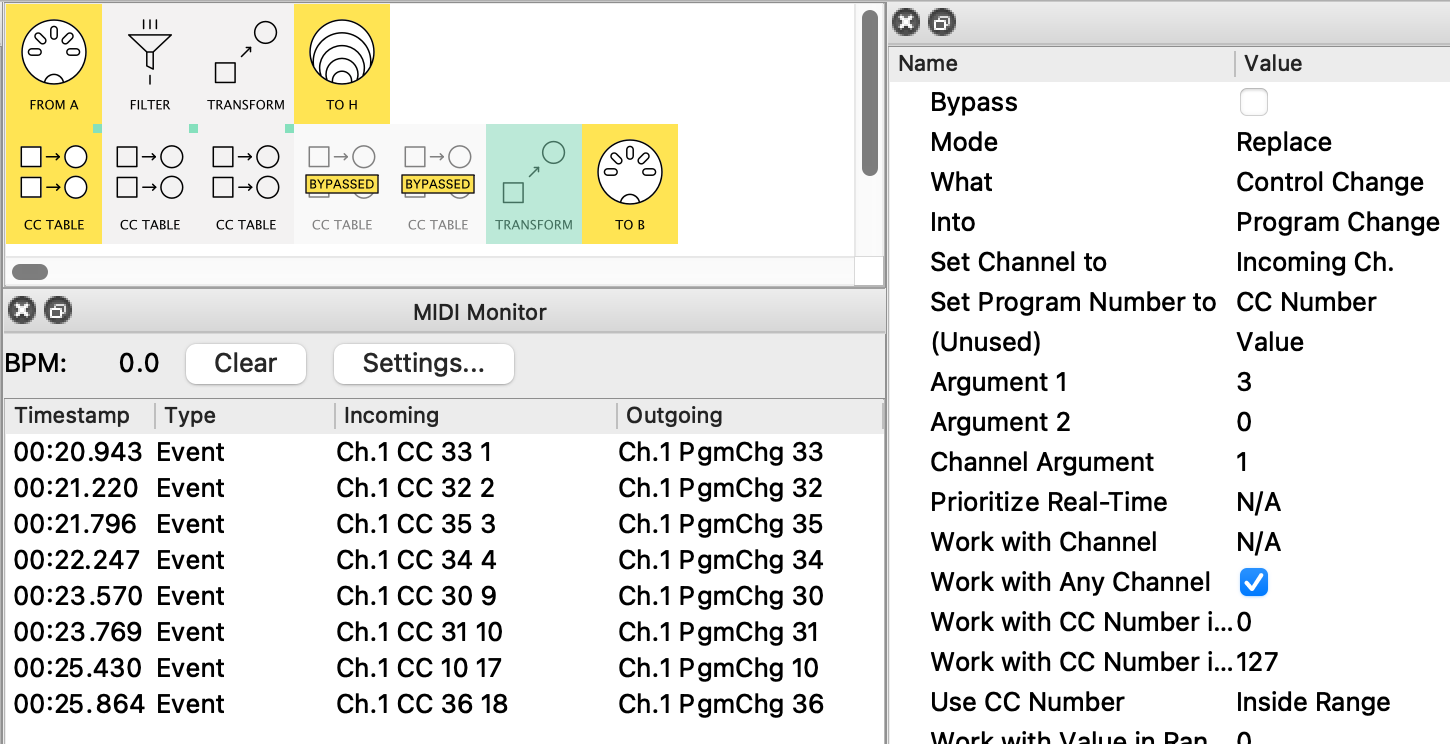
Finally, All the CC’s are brought together and Transformed into CCs
I like the fact that, although the Incoming CC value isn’t used by the Transform, it serves as a check that we haven’t made a mistake in our pairing!
Here’s the preset:
andrismattson_PCmap_by_CCTable.mhp
Take some time monitoring the 3 main stages so any new ideas start to make sense
Update: I noticed that your pipelines used MIDI B for PC#19 onward. The CC Table version need a separate input pipeline similar to pipeline 1 to handle this