Hi all,
So i ordered my midihub today. And downloaded the editor to learn it.
I know the Midihub allows up to 8 presets to be stored. But I had an idea:
Is it possible to build one large preset file with multiple pipelines (e.g., 16 different setups with custom note scaling, transposition, CC routing, etc.), and then use Program Change messages from a USB MIDI keyboard to activate or bypass individual pipelines?
That way, instead of switching between Midihub’s 8 presets, I could simulate many more configurations within a single preset — each triggered by a Program Change. Essentially:
“Program Change 0 activates pipeline 1, bypasses the rest; Program Change 1 activates pipeline 2, etc.”
Can this be done?
And is there a clean way to bypass/unbypass pipelines via Program Change, maybe through MIDI mapping?
Thanks in advance – curious if anyone else is using Midihub like this
Hey @Lawand1200, welcome to the Midihub community.
Yes, this is possible and has been done before, I believe.
“Program Change 0 activates pipeline 1, bypasses the rest; Program Change 1 activates pipeline 2, etc.”
Can this be done?
Yes, (and repeat process for each switched pipeline option)
And is there a clean way to bypass/unbypass pipelines via Program Change, maybe through MIDI mapping?
Midihub’s ability to map nearly every pipe’s property would be used. This type of mapping is restricted to Note On and CCs so you would use virtual mappings to translate your Program Change into the designed CCs. (1 for each independent group of lines)
If you wanted to use Midihub’s PC → Preset change, you would restrict your “internal” PCs to 008 → 127 or use a different port.
curious if anyone else is using Midihub like this
Yes that would be interesting if other users want to chime in.
(I think some have but can’t remember who)
Hi resonotter.
So i recieve my midihub.
Its really Nice.
Regarding the experiment. Its seems that you cant midi map anything but cc and midi note to the bypass.
Transforming doesnt work for the incomming message to transform anything like program change to midi note/cc for the midi map on bypass from and external midi controller.
Maybe im doing something wrong where? You said that it could be done right?
Hey @Lawand1200
here are two simple examples:
Lawand1200_V1.mhp
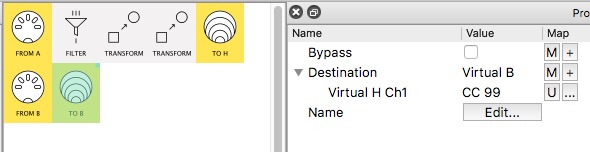
V1 uses two PC → CC Transforms, creating two values for the two chosen PC messages (PC 76,77)…
…these go to Virtual H which is used to map the Destination in the 2nd pipeline
Lawand1200_V2.mhp
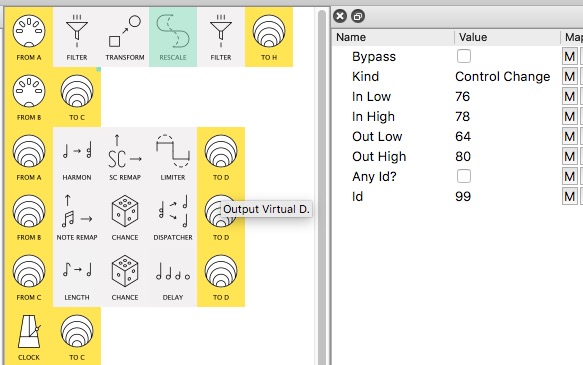
V2 does much the same but here we use the pattern in the PC numbers (76,77,78) to just use one Transform for 3 outcomes (64,72,80 = vA, vB, VC)
My examples just map one virtual output for simplicity.
Once you’ve experimented a bit, you might decide to map to enable/disable (Bypass) the inputs of different pipelines allowing you to put a given input to a variety of uses.
PS I’ve used Filter twice in pipeline 1, to ensure only the message types we want come in and go out. This is not strictly necessary but is quite good practice while developing and testing
PPS. all the other pipelines are just examples of different functionalities to toggle between.
Be aware that Midihub will, sensibly, switch off any current Notes when you toggle.