Hi there - I’m new to Midihub, but I’ve already managed to build some pipelines doing funny stuff and read the tutorials.
Now, one of my ideas is to switch banks and presets on Yamaha CP-88 and via Midihub generate bank and preset changes for Roland V-Synth and Roland SE-02 (and then the same for more synths, but let’s keep things simple.)
e.g. I want to chose Patch 3 in Bank 38 on the CP88 and make the V-Synth switch to patch 35 in Bank 1 and make the Roland SE-02 switch to patch 48 on the User Bank (Bank 4)
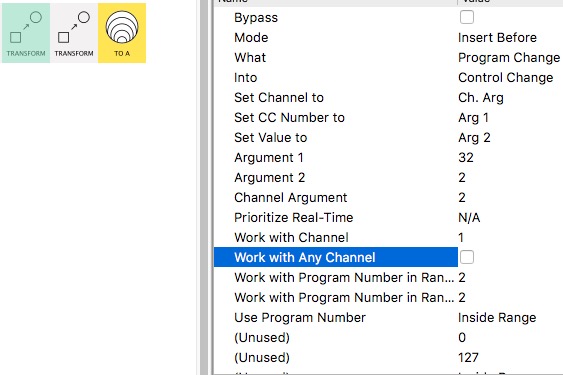
How do I do that? I understood that it involves Transform Blocks and that Program Change should be transformed into Control Change and then transformed back to Program Change. But I don’t get how exactly to do the whole process. Is it explained in detail somewhere? Is there a Midihub Preset to start from?
CP88 has 40 Banks of 8 Patches - values are:
MSB CC#0 63
LSB CC#32 0 - 39
PC 0 - 7
Roland V-Synth has 4 banks of 128 patches - values are:
MSB CC#0 87
LSB CC#32 0 - 3
PC 0 - 127
Not necessarily; the best approach it will depend if the pattern when you “switch banks and presets on Yamaha CP-88” can easily be ‘translated’† to the pattern of changes on the other devices.
†···
('mapped' is the correct word here but don't want to get muddled with the Midihub meaning!)
Is it explained in detail somewhere?
No.
I’d like there to be a tutorial on “How to use Transform”, so let’s use your excellent example to write a section in it!
First:
What messages will go CP-88 → Midihub when you “switch”?
Please post a MIDI Monitor screenshot of that input port.
Also give details of whether the Channel remains the same.
Maybe leave a few secs between each change so you can link those messages in the screenshot with the next part
do the changes in order (if there is one) to make it easier to see patterns in the outcomes
Second:
Detail precisely (including what channel) what message you want each of those incoming messages to send to trigger to the two outgoing synths’ changes
unless the manuals is super clear you might need to do some testing
o… the CP88 is sending a whole bunch of stuff when I push the button “Page +” (bank change from Bank 37 to Bank 38 Program 2, screenshot 1 and 2) and then push the button “2” (Program Change to Program 3, screenshot 3).
I see the Program Changes, but can’t spot the bank changes in all of this, which is what I need.
I have connected CP88 on IN MIDI A, V-Synth on Out MIDI A and Roland SE-02 on Out MIDI B, V-Synth receives CH1, SE-02 receives CH2, but it doesn’t really matter on which channel to me.
Your test Preset with Note on → Program Change does work to step through Programs. If I can do the same thing using “+” and “number”, i’m already happy…
correction: “… the CP88 is sending a whole bunch of stuff when I push the button “Page +” (bank change from Bank 37 to Bank 38 Program 2, screenshot 1 and 2) and then push the button “2” (Program Change to Program 3, screenshot 3).”
I’m sorry, this was too fast, or rather, I’m too dumb :-(. Maybe I get it if I see all the properties for all the blocks…
And, I somehow need to be able to send Bank Changes?, since I have more than 8 Presets in my CP88 I want to use…
It might be best if you upload the list/table of what PCs IN → what CC#0,CC#32,PC OUT
This makes it clear what the complete task is.
since I have more than 8 Presets
I don’t know where the restriction of 8 comes from.
EDIT:
somehow need to be able to send Bank Changes
according to this the CP-88 does!
(also says it only sends PC0 → 7 (hence 8, I guess?) )
OK, this changes the scenario quite a bit.
When you’ve found out how to enable Bank Changes then we can start to look at what your IN → OUT(s) list will look like
just noticed this.
Well done for figuring out how to get CP88 to send Bank info.
I think this will need a strategy writing for you (see below)
A few questions first:
Have you checked it’s actually sending these when you change set (CP88 seems to have different modes of working)?
So SE has no program for some songs? Does this mean that it’s not getting notes at all or is the notes source for SE separate from CP88 so we don’t need to worry about routing?
And SE needs no CC#32, just CC#0 then PC? Before, you mentioned values 0,…,3.
Why the solution is not trivial?
This is purely because we need to combine the values of two messages in a way to give a single unique “answer” that we can then use to create messages to send to MIDI A and MIDI B.
So, possible, but a little subtle.
I’ll test something out while I await your confirmations…
yes, CP88 is sending CC#0 and CC#32, when I switch programs inside a live set (0-7, meaning 1 - 8) or outside (banks 0 - 39, meaning 1 - 40)
in some songs, SE isn’t used at all (so it can rest on the bank/program from the song before, and then switch for the next song to the appropriate bank/program)
yes, I monitored the SE, it just sends (and receives, I guess) CC#0, but not CC#32
Excellent, I think I have a solution for you
(got the problem-solving bit done, just want add enough “settings mappings” to get a few of your “answers”)
btw, I thought you had more than 8 presets.
PS. if you want to upload a spreadsheet proper, the site accepts archive (.zip) files
I do have more than 8 presets, but I was lazy & I thought, if I will look at your solution, I can hopefully build the solution for the other presets (?)
Thing is, I do need to know the full possible range of the Incoming CC#0 & CC#32 to be sure my strategy is going to work:
If Incoming CC#0 varies from 63 or
Incoming CC#32 differs by 16 or more…
…then I need a different approach
Let me know.
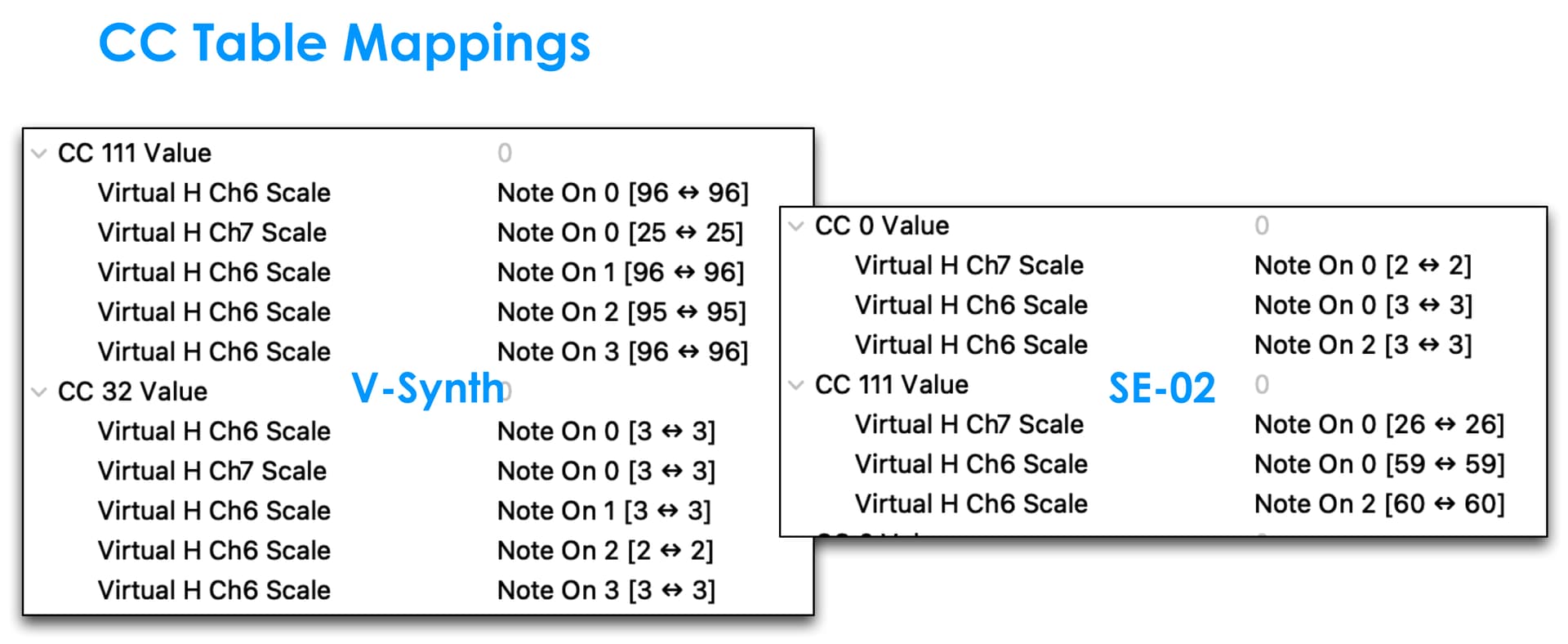
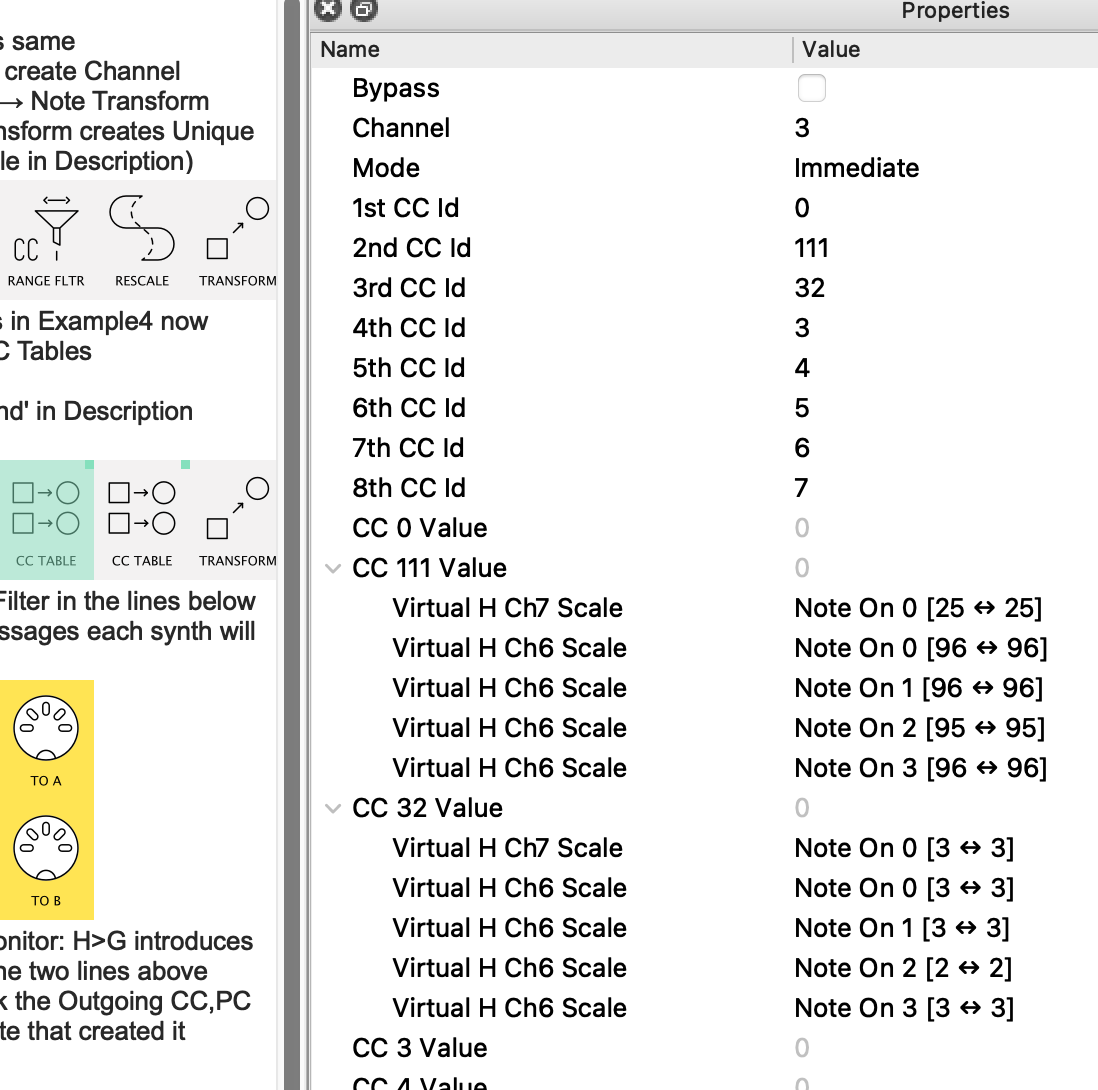
My current method is going to use CC Table so you might want to study that.
(I’m just running into some unexpected behaviour with CC Table which I may need to raise with Giedrius. Hmmmm )
I will write more detailed notes later but in brief:
It is not finished…
…but I have written enough so that, with careful scrutiny, you can add the extra Transforms in pipeline 2 & 3, to complete your table❖ and test.
Basic Notes
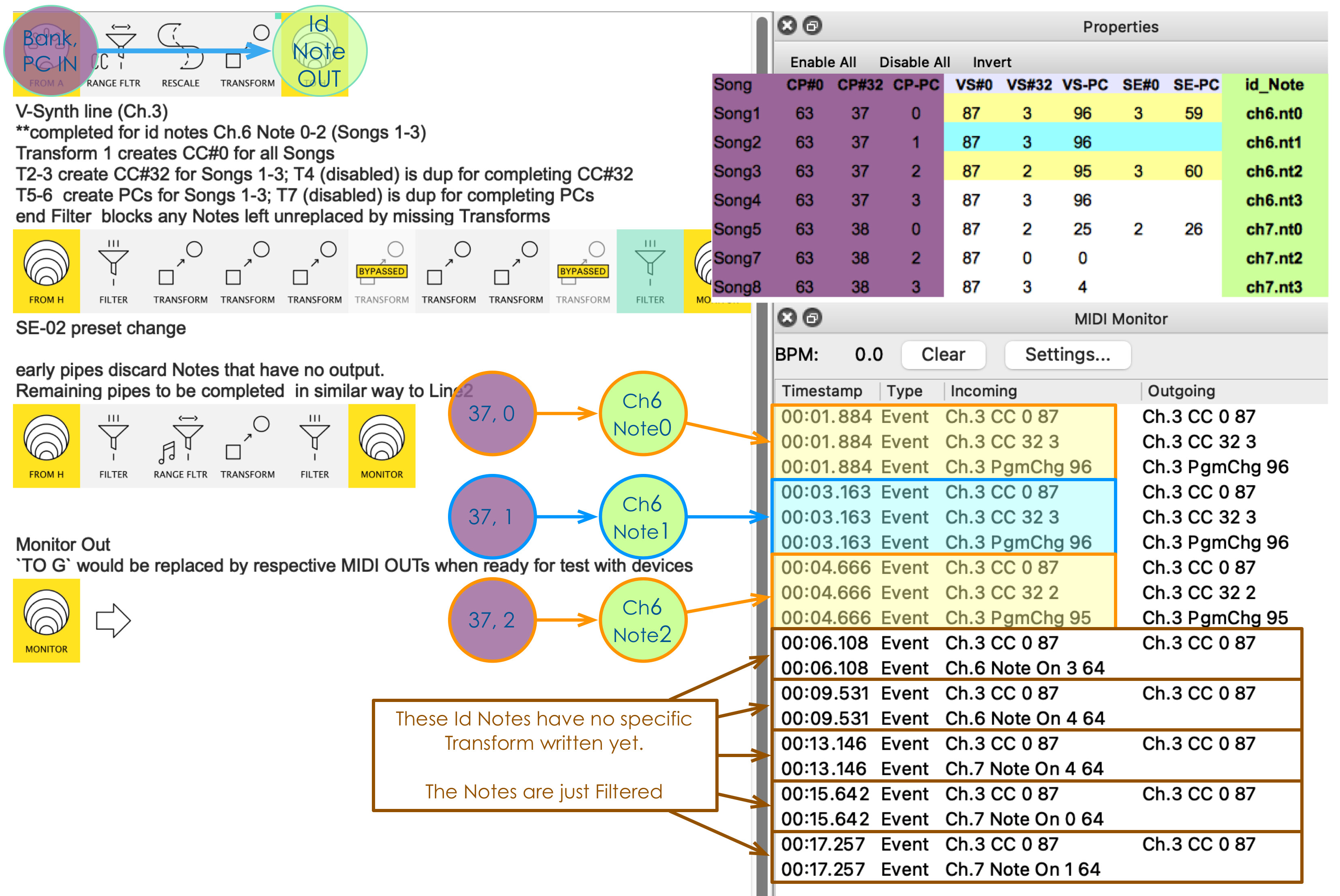
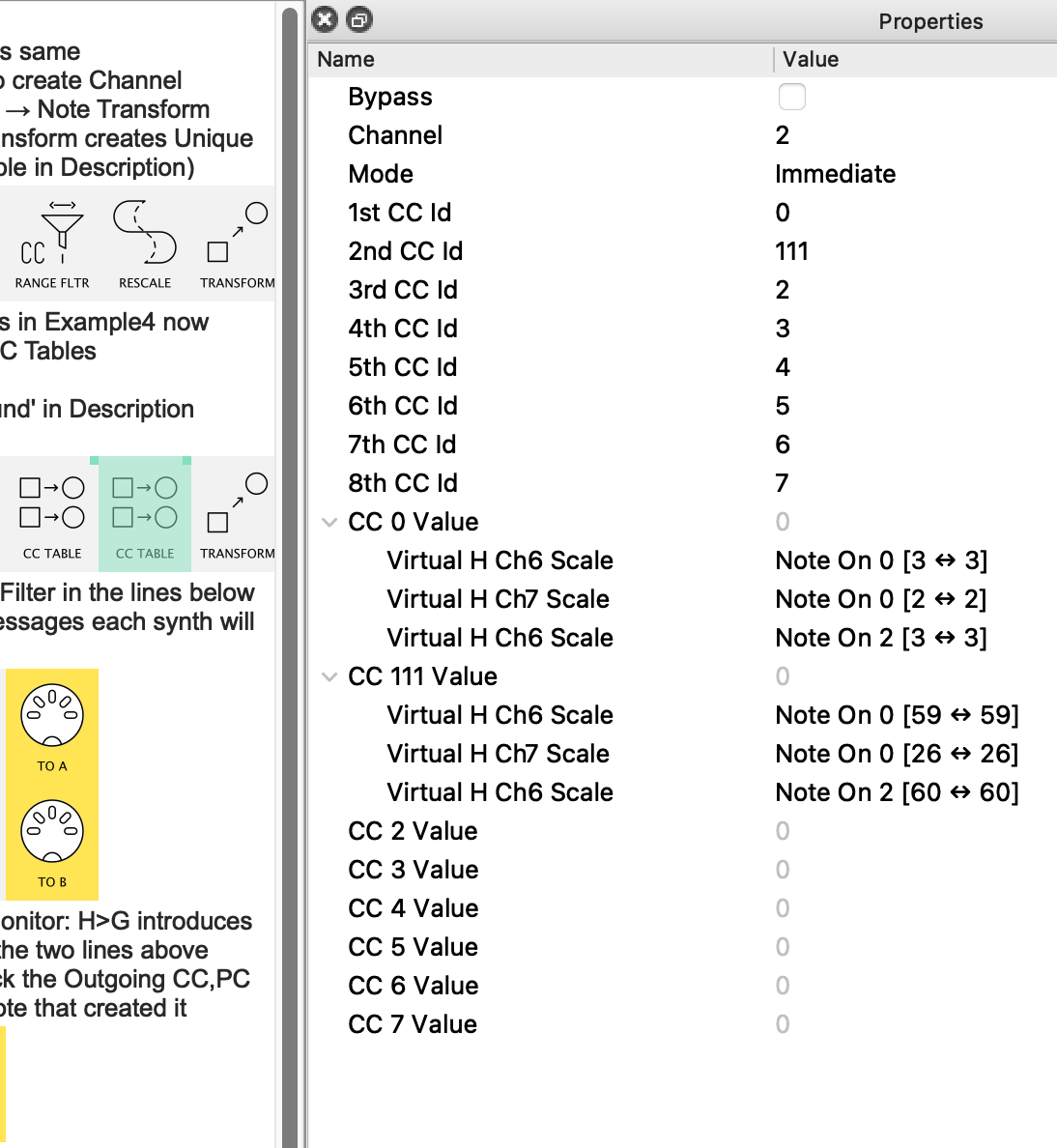
Pipeline 1 uses CC0 & PC to create a unique “Id Note” to pass on to pipelines 2 & 3.
Its only clever-ish thing is to Rescale the CC0 to create values to set the Channel Number of the “Id Note” thus making it unique for each incoming (CC0, PC) pair. Don’t edit this pipeline!
Pipeline 2 takes this note and – stage-by-stage – creates the necessary CC0 & PC for V-Synth. This has been done only for the first 3 (CC0, PC) pairs/ “Id Notes”
Pipeline 3 has only the pipes necessary to block the Id notes that will do nothing.
The other Transforms can be figured out by alt-dragging from Line 2, then adapting the properties.
Both 2 & 3 end in virtual G as it’s probably best to methodically check you’re getting the right numbers out before changing the Destination and hooking up the synths!
I’d strongly recommend Monitoring each pipe in turn as you send in one (CC0, PC) pair at a time. Skipping between similar adjacent Transform pipes in Line 2 will make it clear which task (ie. cell(s) in the table) each is achieving.
Here's a summary diagram
including the table I based my work on.
the Monitor is focused on the selected Filter in line 2
i loaded your mhp file MIDI Hub… I think I understand what you did here, but something is not working… when I click on one of the CC Tables in the 2nd pipe, I lose connection and get an error message: “Lost connection to Midihub Sync error 29.”
also, the light in the Midihub blinks with every signal from the CP88, but monitoring sometimes drops out…
Sorry to hear that @groove_role.
Beyond my understanding, I’m afraid.
I’m sure @Blokas will advise shortly.
I wrote that in Editor 1.16.1 on a MH running firmware 1.16.3 so I assume you’re on the same (check the bottom right of the window when you’re connected)
Apart from physical stuff like other USB cables, not using a USB hub, etc,
you could try the following just to see what happens.
Hey, could you verify if you are running Midihub Editor version 1.16.1 (Help → About or Midihub Editor → About) and Midihub Firmware (shown in bottom right corner when connected to Midihub).
Does the CC Table issue happen every time you try that?

 o… the CP88 is sending a whole bunch of stuff when I push the button “Page +” (bank change from Bank 37 to Bank 38 Program 2, screenshot 1 and 2) and then push the button “2” (Program Change to Program 3, screenshot 3).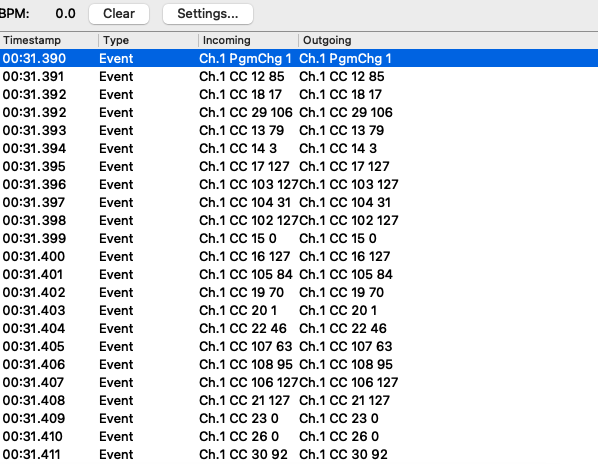



 )
)