Here is a .mid file with your preset applied. You can see there is more separation between notes due to your preset blocking some of the extra “pre-notes”.
midi_with_reso_preset.MID (729 Bytes)
Here is a .mid file with your preset applied. You can see there is more separation between notes due to your preset blocking some of the extra “pre-notes”.
midi_with_reso_preset.MID (729 Bytes)
Sorry, file doesn’t contain the “pre-notes”
here it is as a .csv:
mustangmidiguitarreapermidi.csv
Might be that your DAW doesn’t like stray Note Off messages so it stripped them out.
If need be, give me a MIDI Monitor .csv of you playing into MH.
I’ll see about converting it.
Filter out everything apart from the Notes On & Off.
PS. When you play an open string does it still give a “pre-note”? I hope so!
I’ll take a look again tomorrow (GMT)
Yea that is strange. Here is a .csv with nothing applied to the MIDI stream. All the 0 Velocity notes are when I press a fret button but do not pluck the strings. Anything with velocity is when I actually pluck the strings. It seems like there are open string “pre-notes” even when I pluck the open strings. Thanks for your help. I feel like addressing these pre-notes will solve both my issues in Renoise and Reaper. Thank you for your time.
MustangMIDIunfiltered.txt (7.6 KB)
Thanks.
So to check we’re on the same page here:
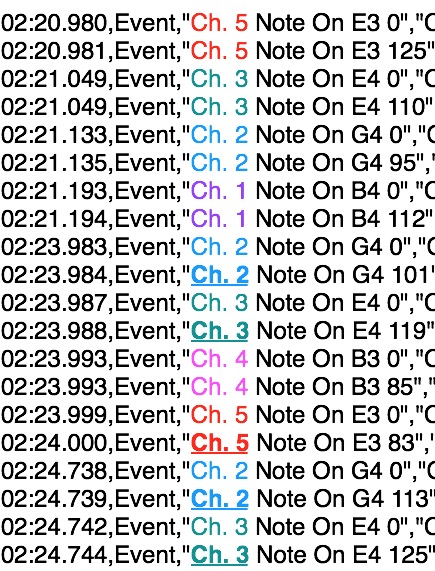
A whole bunch of pre-notes start at 01:59.999
Not all these are open strings; Ch1 pre-notes include E4 B4 D5 C5
“proper” notes and their preceding pre-note partners start at 02:20.980
But then we run into a problem:
there seem to be missing/no “true”-note offs (or strictly, Note On vel=0)!❖
then, at 02:25.478 we seem to get notes closed
(although events like 02:26.708 seem spurious: Explain!)
then there’s another chord
❖Now this might be consistent with a string ringing until it is fingered again, but it may need a modified model.
Export as CSV with Note display as is
then, without selecting another port (!  ) change View → Note Value display to Note Number and
 Export as CSV again.
Send both files
Thanks.
So that first string of notes are when I am fretting a string without plucking a string and when there is velocity I am plucking the strings which are the only thing on the controller which transmit velocity info. There is always an open string pre-note before every single note whether a string is plucked or it is just fretted. Even without plucking 2 string note-on messages are transmitted however it doesn’t seem to trigger my MIDI Instrument unless I am in the mode which doesn’t involve the strings. This is why I have been a little pessimistic about solving this as it seems really complex and don’t want to take up too much of your time. I do appreciate your help and it has really helped me understand a lot more about what is going on.
In that picture you have posted I think I am just strumming the open strings which I can see has a 00 note before each note is triggered. Sorry If I’m not helping much here.
Let me know if these help, and as always thank you so much for giving this a try.
MustangMIDILongerRun.txt (27.8 KB)
MustangMIDILongerRunNoteNumber.txt (27.7 KB)
Aah, I was just checking the previous run so I missed this post.
So I’m guessing these are not intended to create any sound.
In my set-up, all these notes are ignored.
OK, I’m currently pretty happy with Nalma1_Polyphonic_ Mustang_PreNote_Remover.mhp
It works like this
Every Note Off on every Channel is blocked (dropped)
When a Note On, the next Note Off on that Channel is allowed
After this Note Off is received, any further Note Off messages on that Channel are “re-blocked”
The implication of this is that the system should be OK with stray Note0’s and work fine if a True Note0 is followed by a NoteOn on the same channel.
I’ll do a test on the longer run and then post.
hey @Nalma1 tested your MustangMIDILongerRun log.
It left one of the Drop Transforms on Bypass:

which concerned me but turns out that fits your log (check out the last Ch6 note)
SO I think we’re good:
Nalma1_Polyphonic_ Mustang_PreNote_Remover.mhp
It’s set to MIDI-B IN and USB-A-OUT. Change these if needed but not the Virtual.
Only the top 3 pipelines are functional; the rest are testing/monitoring (as before)
It works as summarised in prev post
Take a look at the Length Pipe:
As the Comment hints it doesn’t need to be that long
You might like to make it longer if you’re able to watch the Editor while slow testing…
…but then shorten it to not exceed your shortest played notes
Flick between the two Transforms at the end of the Note_Off and Note_On pipelines
Note the similarities (and minor differences)
See that they both create CC#101on different channels
Now Monitor the first mapped Transform in pipeline 1
See that it only works with Ch.1.
See also the Bypass mapping. See that it’s Ch.1 CC101
Now play a Ch.1 note in
See how it Drops the preNote but then becomes disabled waiting for the true NoteOff…
…then see how it becomes enabled again after the expected Note Off message.
Study each mapped Transform in this way and the Transform at the end of pipeline 2,
and you’ll start to see how those two unmapped Transforms create the magic that makes this preset work.
Once you’ve had a good explore, shorten the length (ie. the Length property of the Length pipe) so it doesn’t break with staccato notes! 
Always save the preset with unBypassed pipes.
Have fun exploring!
Slava Midihub! 

Hey Resonotter,
I have been a bit busy and just sat down to test the preset. So far everything seems to be working perfectly! No randomly extended notes due to false note-on messages and everything is recorded into reaper exactly how I play it. Thank you for your time, knowledge, and skill it took to figure this out. I was very skeptical it could be done! If it’s alright I’d like to share this preset with people who are using this MIDI guitar to let them know there is a way to make it work correctly with their DAW. Thank you again for everything and I will let you know if I run into anything during further testing.
I was very skeptical it could be done
(Oh ye of little faith!  )
)
Hey, @Nalma1, glad the poly preset works out (Don’t forget to shorten the Length.Length to fit your fastest playing style)
If you decide to share it, a good place would be PatchStorage…
…but remember the “pre-note” aspect of Mustang may not be an issue with many DAWs.
My guess is most will keep a track of and ignore unexpected Notes Off (that was the case with both my DAW and hardware sequencer)
Please check out this slightly simplified version
Nalma1_Simplified_Polyphonic_ Mustang_PreNote_Remover.mhp
Hey @Nalma1 , there’s one further improvement can be made;
Usually when messages are used for mappings, they also exist as messages in the flow with other events.
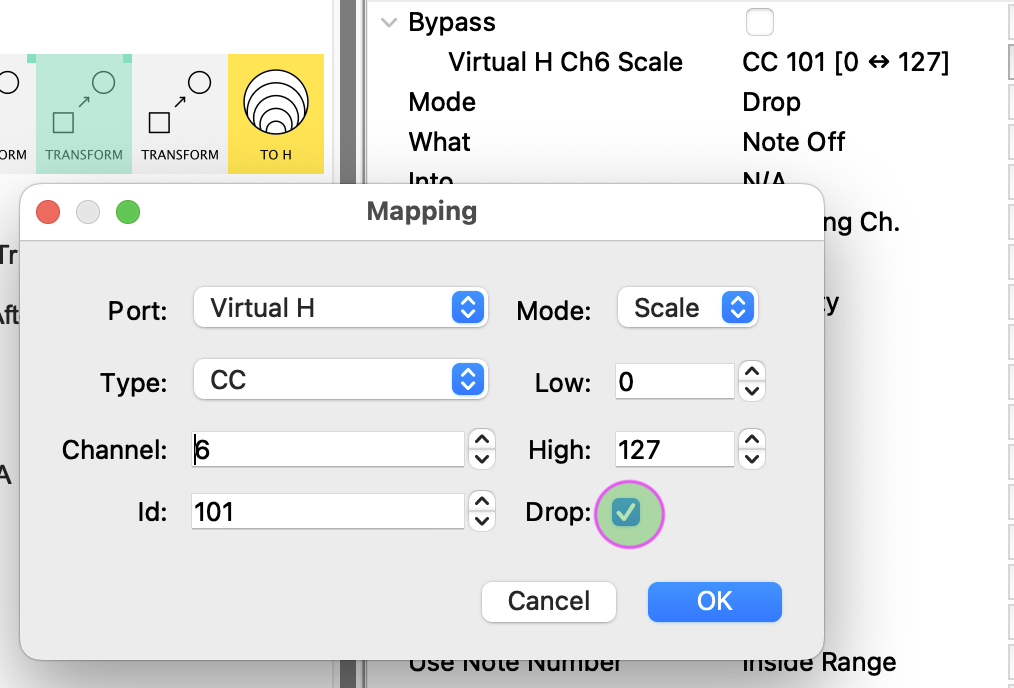
From Editor 1.16, we can now “Drop” mapping events like so:
This means that this message now goes into the Virtual H port and gets registered as a mapping…
…but it doesn’t “come out the other side” and so doesn’t clutter up the message flow for connected pipelines.
Do this for all 6 mappings and you can safely remove the Filter in the line
FROM H → FILTER → TO A
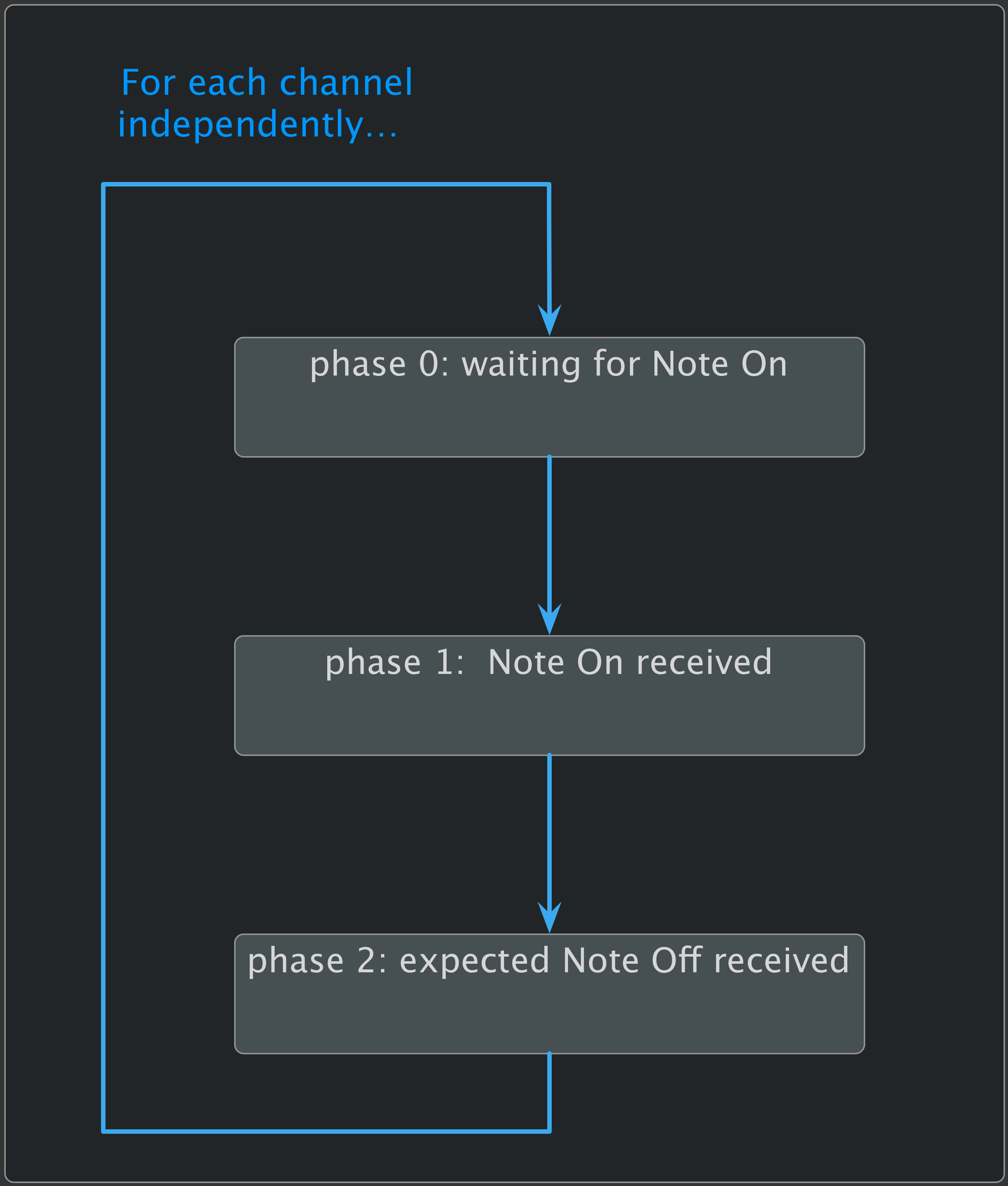
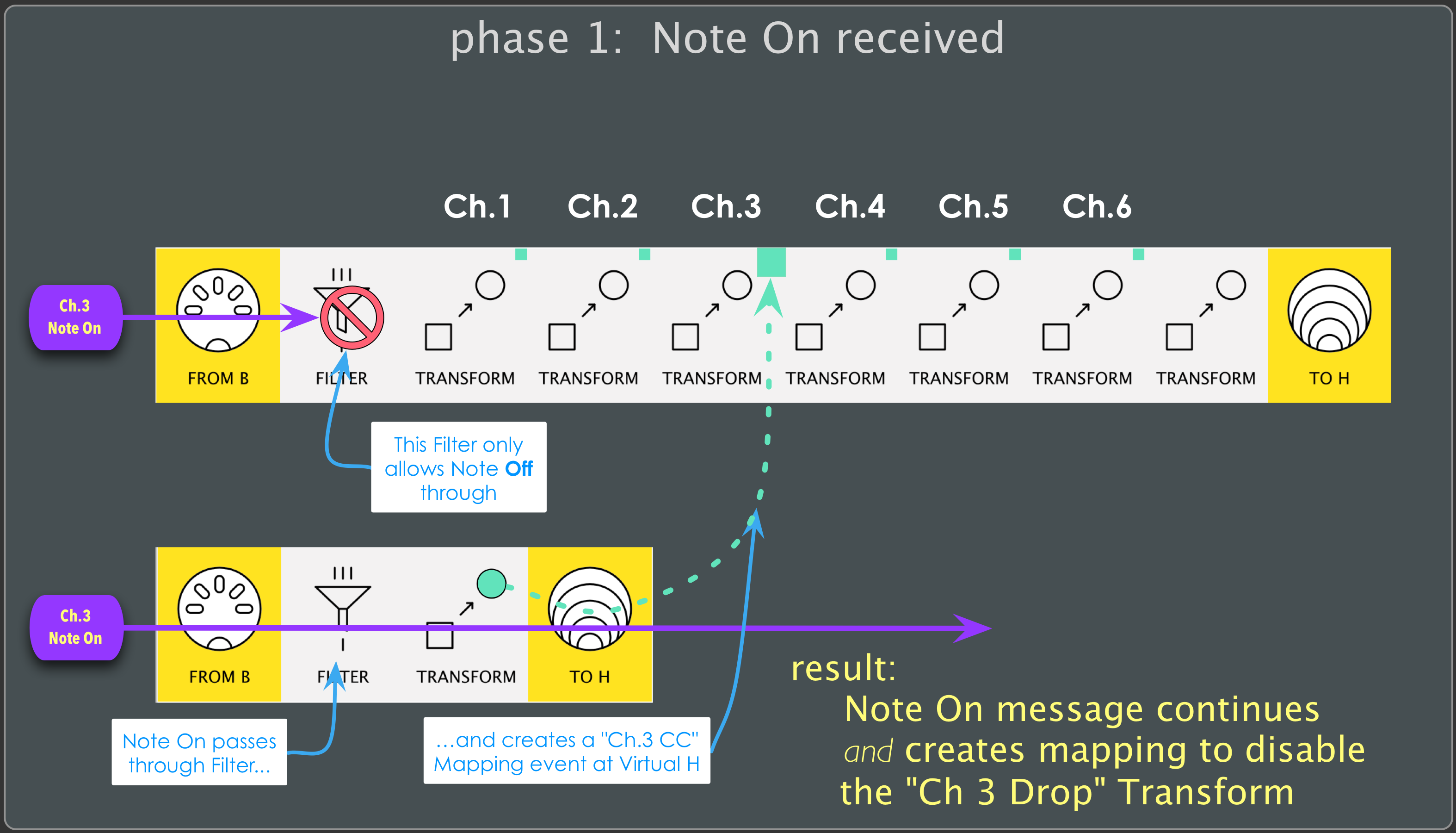
Just to wrap this project up, here’s a way of thinking about it (for yourself or future readers thinking about creating a multi-phase strategy)
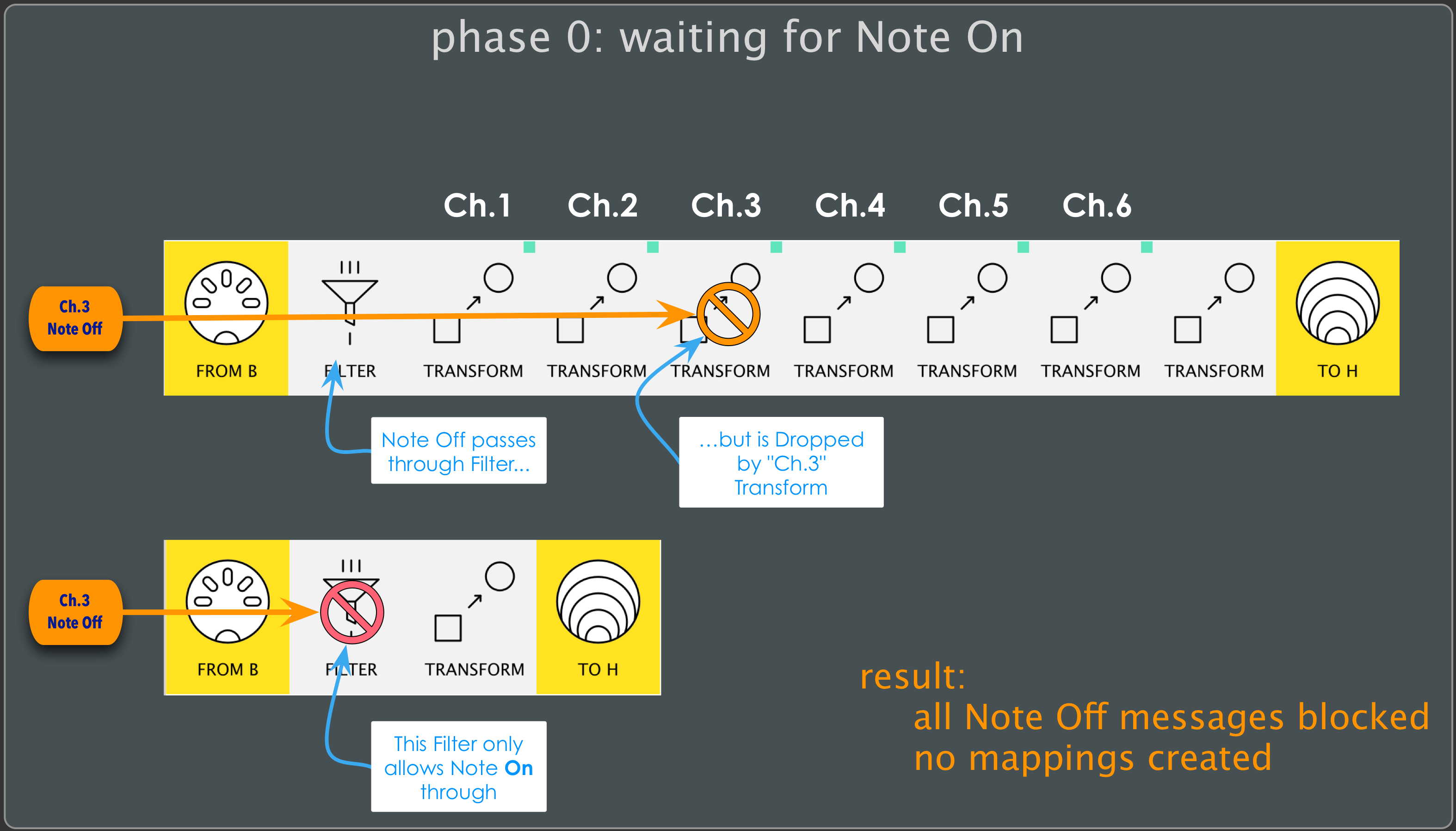
here’s what happens if a Note Off message is received while waiting for a Note On:
Similarly, any Note Off received on another Channel will be discarded by its respective “Drop Transform”
Now the interesting stuff starts to happen:
As a Note On message passes through it creates a mapping event on its channel.
This message is set to Bypass the corresponding “Drop Transform” in the “Note Off pipeline” above.
This prepares the system (for that channel) for phase2
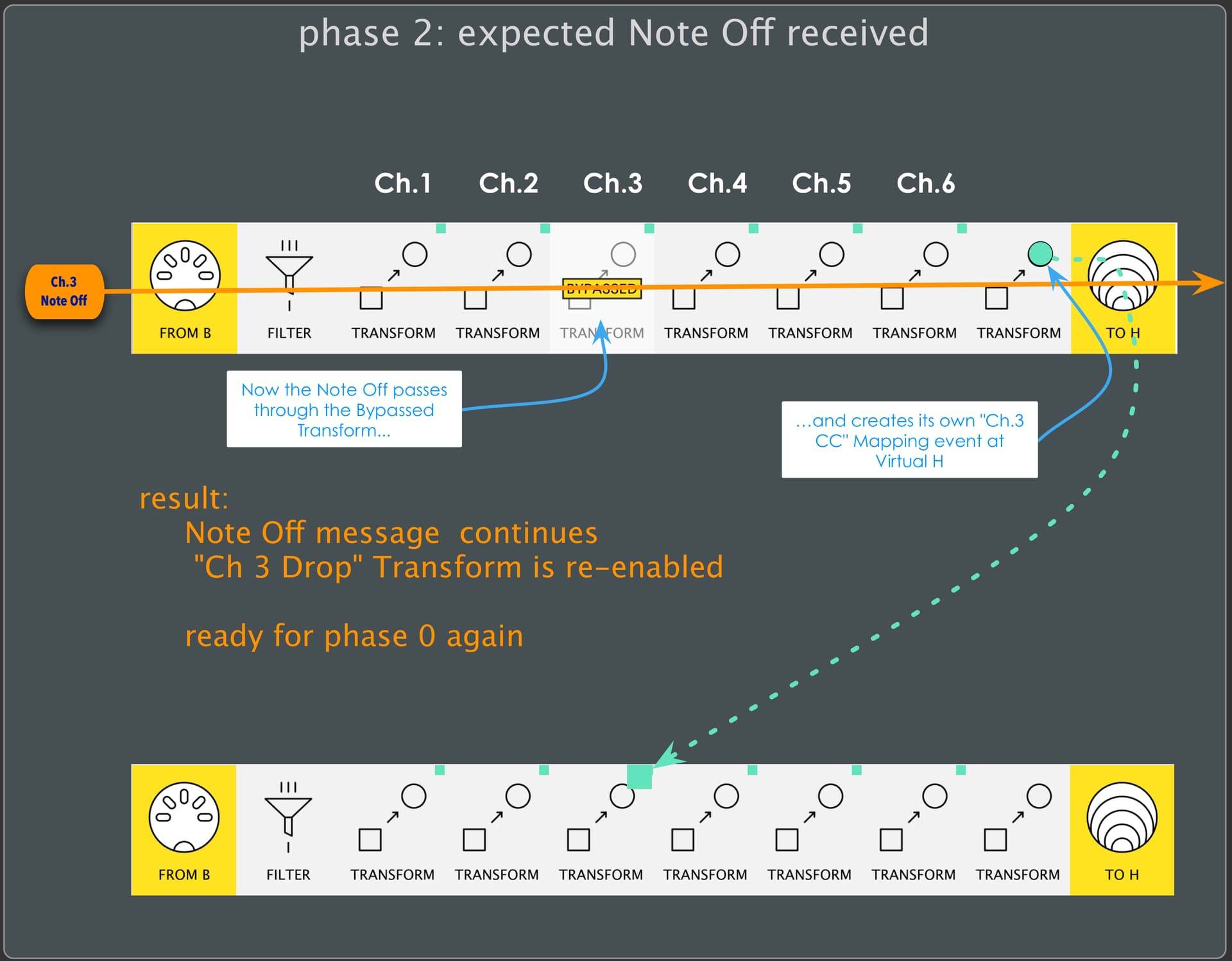
Now the next Note Off (on the channel in question) is treated differently:
Now, instead of being discarded before it reaches the end of the pipeline, it passes through…
… and, just like the Note On message in phase 1, it also creates a mapping event on its channel.
Now, however, the message is set to re-Enable the (Bypassed) “Drop Transform”.
And so the system is reset for that channel and we’re back at phase 0.
Bear in mind that each channel is treated independently. This means that the system can –and likely will– be in different phases for different channels at any given time.
Hey Resonotter!
It’s been a really busy week and I have yet to get to the MIDI guitar. I will check out these presets this weekend. I am so thankful for your time in creating these and for all of your help!