I have a bit of a niche issue I am trying to resolve:
I am using Renoise wit1h a Mad Catz Mustang midi guitar. There is an Edit Step feature which inserts notes and then moves to the next line at a desired number for example I enter a C-4 and then the cursor moves to line 4, then enter a B-4 and then the cursor will move to line 8. My problem is the midi guitar sends two note on messages when a fret button is pushed. One for the selected note and another note on for the string I played the note on. For example I push down 5th fret on the high E string and it sends a note on for A4 as well as a 0 velocity note on for E4. This activates the edit step feature two times doubling the desired cursor movement.
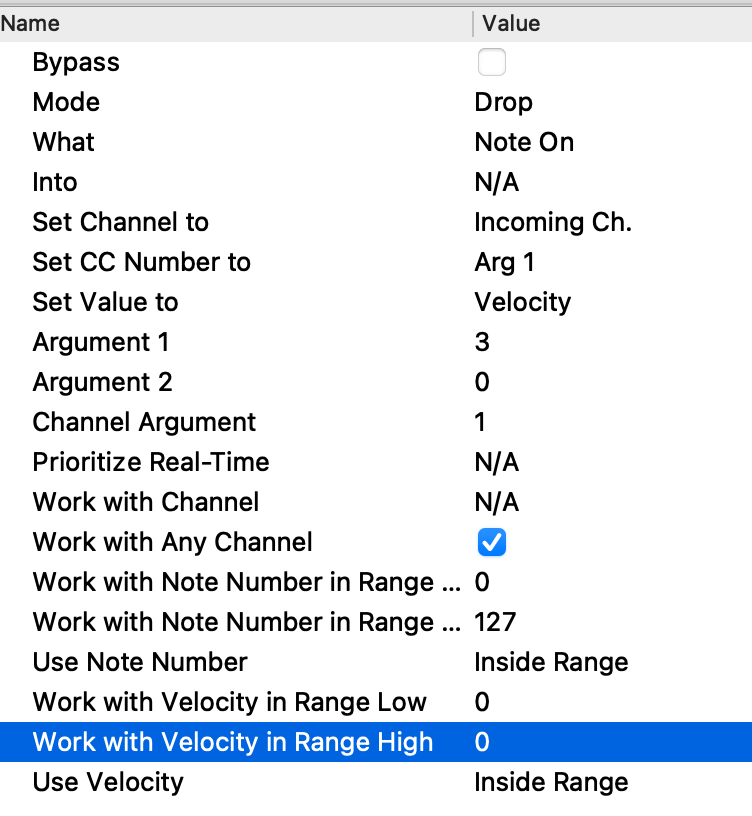
I have tried using a Limiter to block any note on below a certain velocity due to that second note on being 0 velocity but it doesn’t seem to change it. I suppose I could block the open string notes with a note filter but then it would cancel out those notes when fretted as well.
I am about to give up and just accept that’s how they built the thing which is a drag but thought I’d see if any midi hub experts might know how to fix this behavior. Thank you so much for your time and my apologies for the long winded post.
Thank you so much for your reply. I gave it a shot and it did not solve the issue. I think what is going on is that it actually sends a note-off on the string that i am playing in order to keep “open” strings from ringing indefinitely. However midi-hub seems to pick it up as a note-on message.
Basically I would like to block this initial note-off but allow note-off’s after to come through. This seems complex and unlikely. For now I will accept this is how they made the controller. If you think of any other ideas let me know. Thank you again.
If you could upload a csv file of all the messages coming in from the Mustang over a period of normal play, it may be possible to find a way
uploading
Just in case this is new for you:
select the Mustang MIDI IN port
play for a bit then without selecting any other port:
at the top of the MIDI Monitor window, click Settings... → Export as CSV file
(if you’ve used them previously, you might want to look at Incoming Filters to make sure every message is visible)
Some new users have found this site won’t accept .csv files. If this is the case, change .csv → .txt
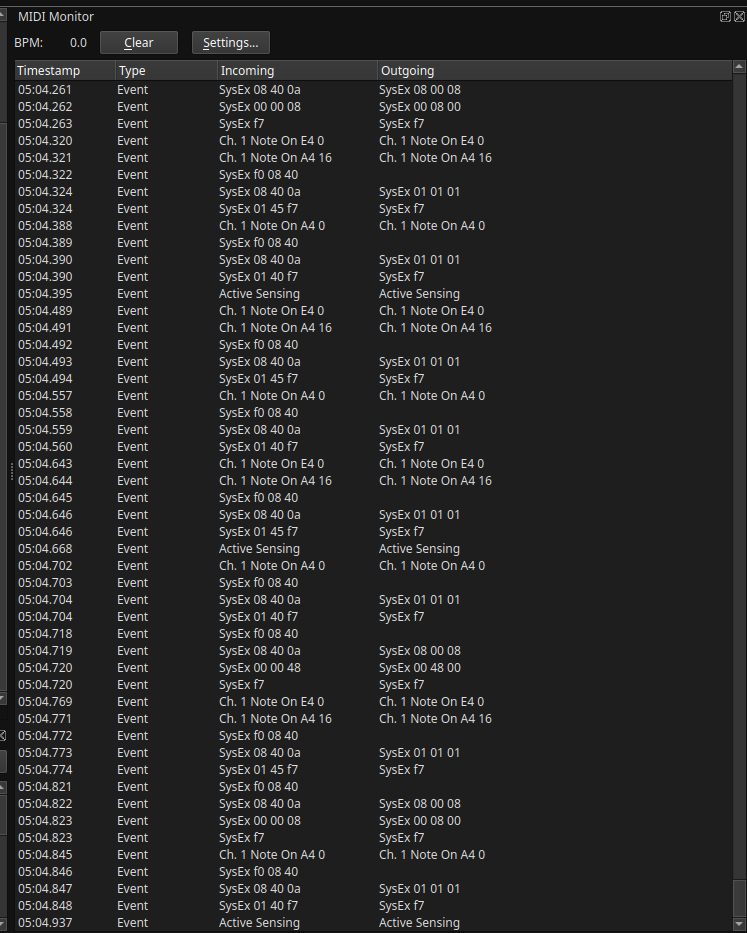
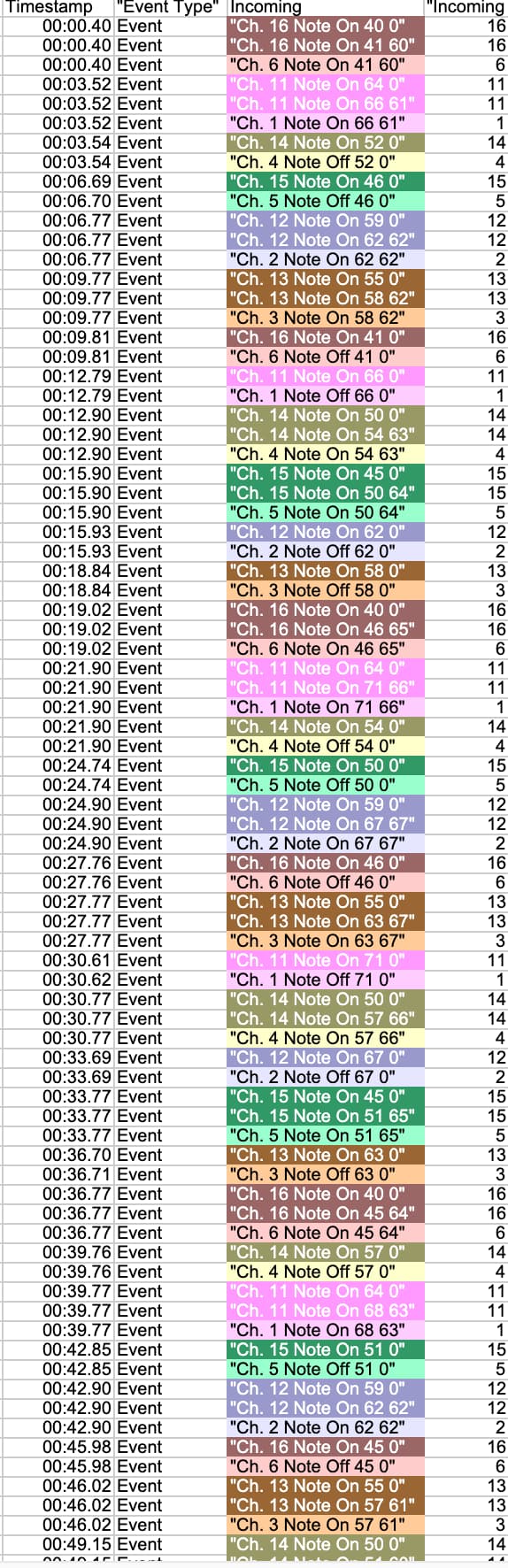
I just noticed the uploading instructions and will follow them but for now I took a couple screenshots. The first is an isolated example of the note on behavior. The second is the full list of events the mad catz mustang gives out. I have not found any of the other signals to be an issue. It really is just how the guitar is trying to mute open strings so it sends a note-on(off?) when any string is released.
It’s that first E4 0 Vel that is causing the issue I think. This happens on all the “strings” so if i played the 5th fret on the B String it would give me a B3 0 Vel signal before the E4 note that i am fretting if that makes sense. Thank you!
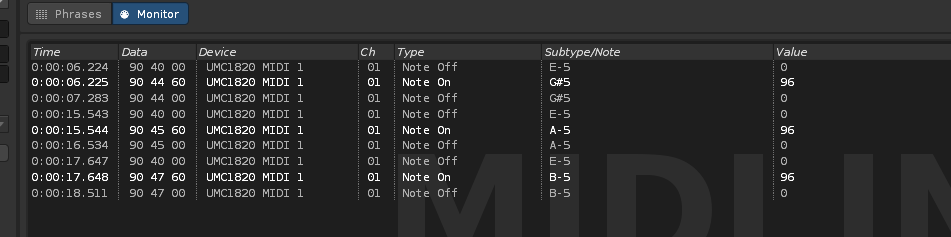
The Mustang sends out the 0 vel “Note-On”, I quote because I think its supposed to be a note-off in order to stop an open string from ringing out indefinitely. So when you touch a fret it silences the open string. Other than that I dont know why it does it. Renoise interperets these as note-offs (See screenshot below). The 0 Velocity notes are the open strings that i am fretting.
yes the guitar transmits on channels 1-6. 1 channel per string. I have used the channel remap in midihub to make it a single channel but it doesn’t really matter for my workflow whether its 1-6 or a single channel.
I play it polyphonically. I do strum it sometimes but mostly pluck it fingerstyle. But this particular setting which is a mode where just pressing buttons triggers a note without plucking a string. Almost like a keyboard but in the form of a fretboard.
My apologies this is difficult to explain as it is a bit of a niche controller. It actually works pretty well when live recording but this problem mostly happens when I am using it to step sequence in renoise. It skips multiple lines due to the multiple note-on signals it sends.
Here is a screenshot of how Renoise interprets this behavior.
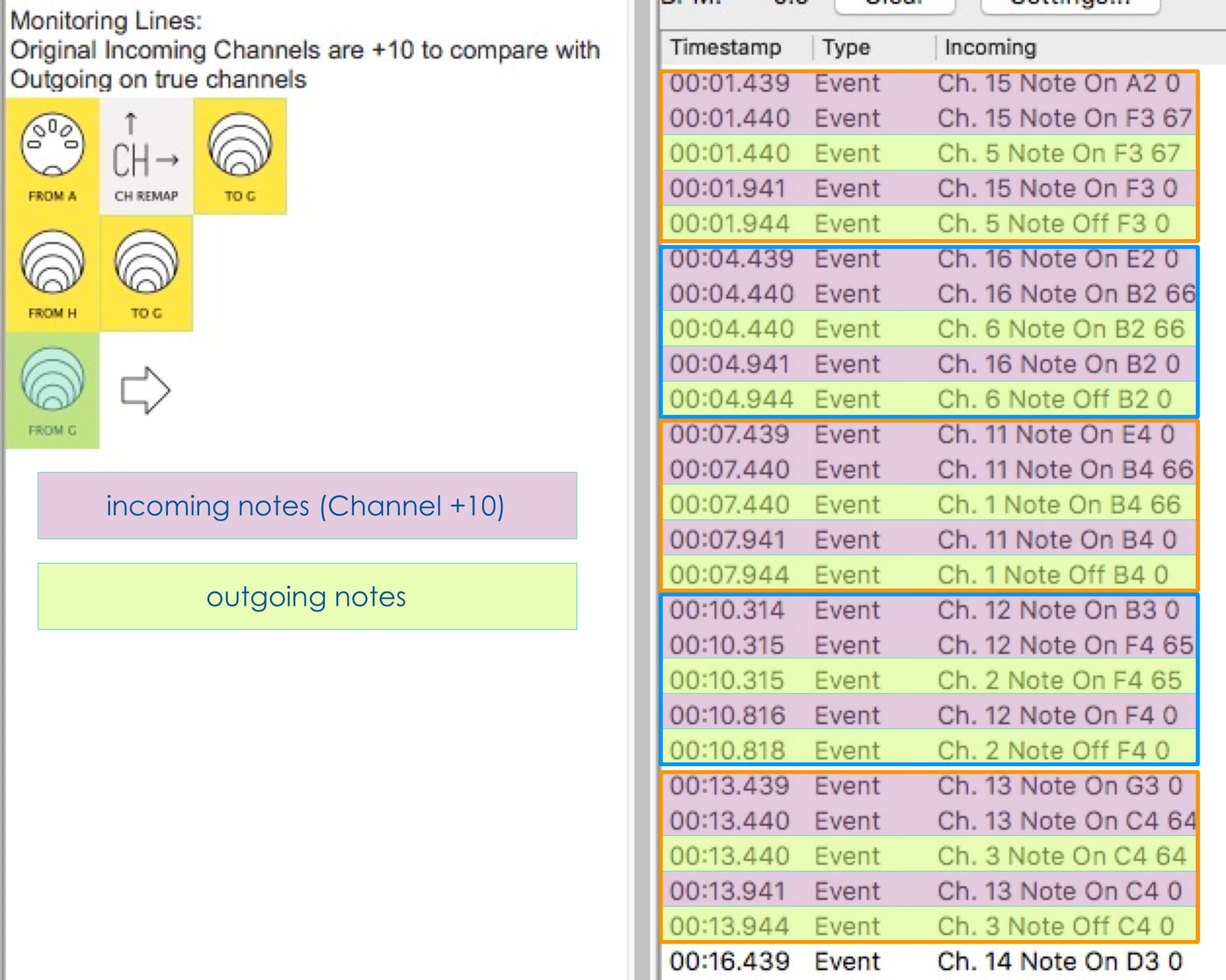
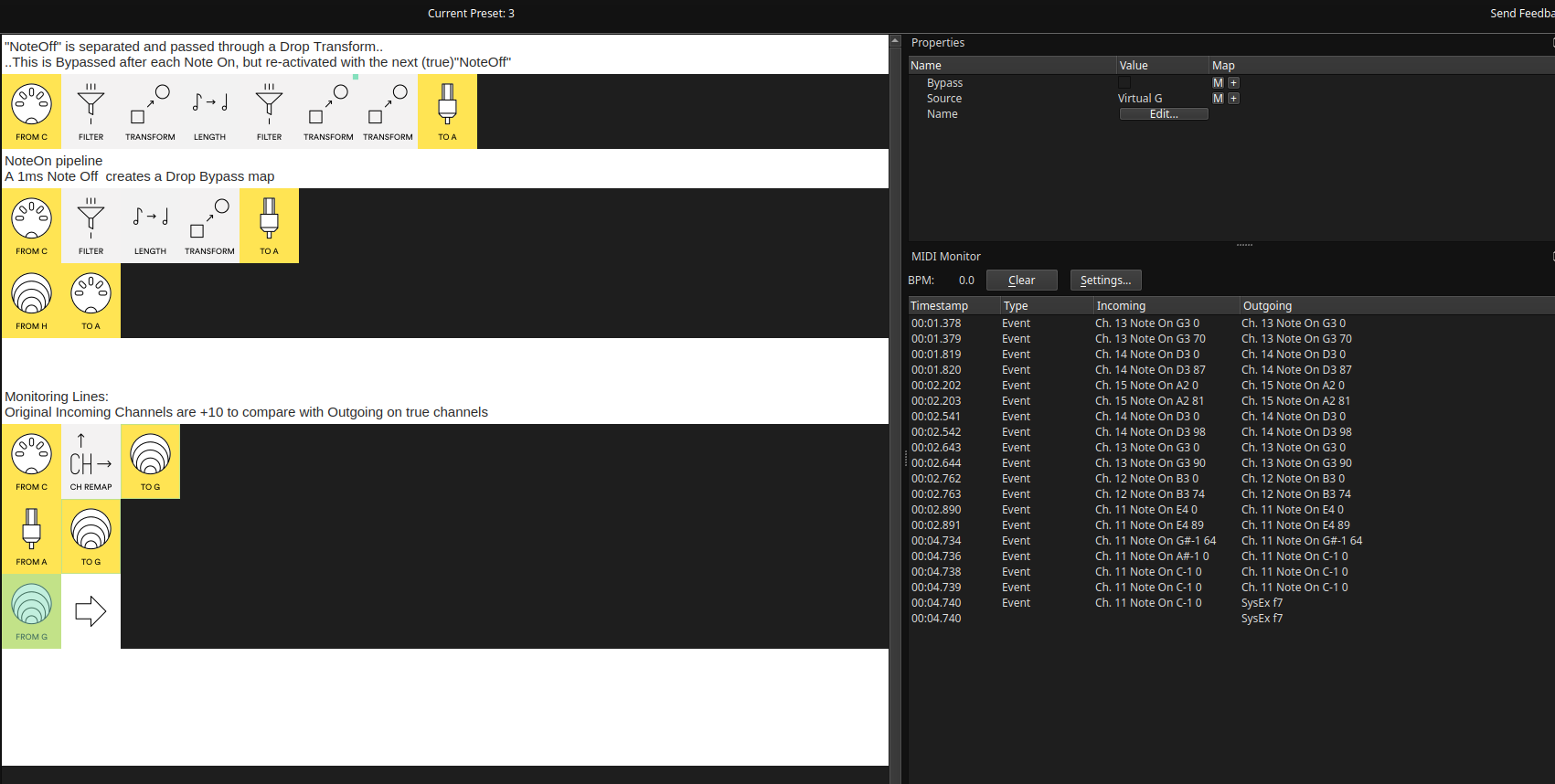
I set up a Mustang simulation to feed into this preset. This sends “pre-note” 1ms before the “true” Note On. The internal timings are based on this, so you may need to adjust the Length durations. (see also: the Outgoing “true Note Offs” are 2-3ms after the Incoming. This is an artifact of the Length pipe in pipeline 1)
The preset relies on two mappings going to virtual H (chosen because most users don’t!)
If you are already using virtual H, you may need to make changes.
This preset is very much monophonic. It will break with overlapping notes. There are two ways to use this preset with other, polyphonic, play; the simpler strategy would involve more knowledge of what controls are on hand to tell MH to “switch mode” from “sequence” to “normal play”
The Monitoring section is just for that. Once everything is checked and hunky-dory it can be deleted.
Hey I am really appreciative of this, However I am not totally sure how to adapt this to my system. Do I just change the In’s and Outs to the appropriate ones on my system? I will experiment with it to see if I can get it working. Thank you!
Hey! I’ve only had a small amount of time to test. It seems to do what we are looking for but the notes are sustaining indefinitely, so I think there needs to be some kind of note-off. I will take some more time to test out the patch and follow up if I notice any other strange behavior. Thank you so much.
Just to check:
this is when the preset is being used purely for the one-note-at-a-time sequencing purpose?
needs to be some kind of note-off
There are Note Off messages sent after the Note On of the same note number.
(these are the last lines in each block in the coloured Monitor shot in post 10)
please
select the FROM G input as in that shot
play enough notes to indicate the issue
upload the csv/txt file and
the .mhp preset you are currently using
that should give me a clearer idea of what the issue is.
It has taken me a bit to get back to the studio to test this. I may not be understanding completely. Here is a screenshot showing me trying to utilize this preset you sent. From C is the MIDI Guitar. Please let me know if I am missing something. From the G monitor output I am only seeing note-ons messages. Thanks again!
Wow thank you Resonotter. This is definitely some MIDI Hub magic. It seems to be working in the way I was hoping but as you say it does break down when using chords. In Renoise the sequence just gets stuck and doesn’t move forward when I play multiple notes at once. Is there a way to make this work polyphonically?
Good.
When I said you could change in’s & out, I meant physical ports.
(as rule, when adapting a preset you’ve not written, take a good look at any mappings and what their ports are)
Yes, that’s what I would imagine would happen.
Now, I had the impression that removing the “pre-note” was just when doing Renoise Sequencing (I know nothing about this, btw). Do you want to drop “pre-notes” in all situations?
As it happens, I wrote a polyphonic version about two weeks ago. It’s more tricky but more crucially…
As before Notes received on Ch11+.
here they’re shaded dark with white text to distinguish
Notes Out Ch1-6 in paler shades, black text.
My tests have all been done with generated notes not real playing.
If you’re ready for the polyphonic version, I’d rather test it first with a .mid file from your playing style ( “pre-notes” and all) straight into a MIDI DAW recording (not via the preset).
You can post an example here or message me with it.
Hi, Thank you again. I am new to this level of routing and did not understand how your preset worked, especially the virtual outputs. This is helping me learn a lot more about this which is great.
Here is a .mid file of me recording MIDI in Reaper. You can see that the notes are all “connected” which seems to happen because of these “pre-notes”. Everytime I play a fret the “pre-note” extends and connects to other notes played on the same string. Its hard to explain, maybe I will record a small video of what it looks like when recording, But I do want you to know this is “not” how I would like it to be. My goal is for the MIDI guitar to record midi just like any other keyboard would with appropriate note-ons and offs.
Your preset actually seems to solve some of this so I think it would be interested to send a .mid showing what happens when I use your preset, But I think due to it not being polyphonic every note past the first one where the bypass is triggered starts doing the original behavior. Thank you so much for time and effort to help me make this work right. Other than this issue it really is the best MIDI guitar experience I have found and if there’s a way to make it perform correct MIDI recording that would be so cool.