Trying to play a string of chords with only one switch

Hi everyone,

So, I managed to get it to play chords based upon single switch presses, ie button 1 - Cm, button 2 - GM etc. But I’ve come to realise I’m just not good enough to do a lead part with right hand, bass with left and then chords with my foot so I’m looking for another route.

Is it possible to have possibly 3 buttons do the following:

button 1 - plays chords sequentially as the button is pressed,

button 2 - plays the previous chord in case I accidentally double press and overrun,

button 3 - resets the sequence?

Thanks in advance

Pete

Yes, it is Pete @solidsnayke.

It involves some trickery before the part you’ve already got.

As it’s a little convoluted, I’ll upload a proper example based on what you want as your progression.

Please detail the sequence of chords you want and the trigger notes for Forward, Backward, Reset respectively.
(the exact note numbers would be useful so we get the correct octave..)

Note Length/Notes Off

A crucial question is “what tells the synth to stop playing the current chord?”
The easiest way (for Midihub) is to have it held as long as you keep your foot on the button.
But this is a pain, I imagine.
The next easiest way is if your synth responds to a “All Notes Off” message. Let me know if this is the case. (if you’re not sure I’ll upload a little test to find out)
The third way involves complications I’d rather avoid

Amazing!

If I give you say 4 chords, notes etc. I can work the rest out maybe?

Is there a limit to the amount of chords possible?

Keeping my foot on the pedals for the duration of the chord would be the easiest option for me too.

Gm - 55, Dm - 50, Cm - 48, F - 53.

Is that ok?

Pete

Forgot to add trigger notes. I don’t suppose it really matters all that much. Can it be CC or PC?

In order:
If you study the 4 note → 4 chord example I’ll upload, you should be able to extend/adapt.

I will re-purpose Scale Remap as a tool to map one “id” note to the next in sequence. This therefore allows for 12 intitiating “id” notes → 12 chords

“foot on the pedal”: OK, given “CC or PC”, I will assume CC value =127 means ON , CC value =127 means OFF

I will assume Gm → Dm → Cm → F → Gm…

It doesn’t matter what the triggering messages are. Using notes/CCs just saves an extra stage


I’ll see if I can grab some time tomorrow to sketch sthg out

Thanks, I really appreciate it.

here we go, @solidsnayke

Quite a lot to work through here!

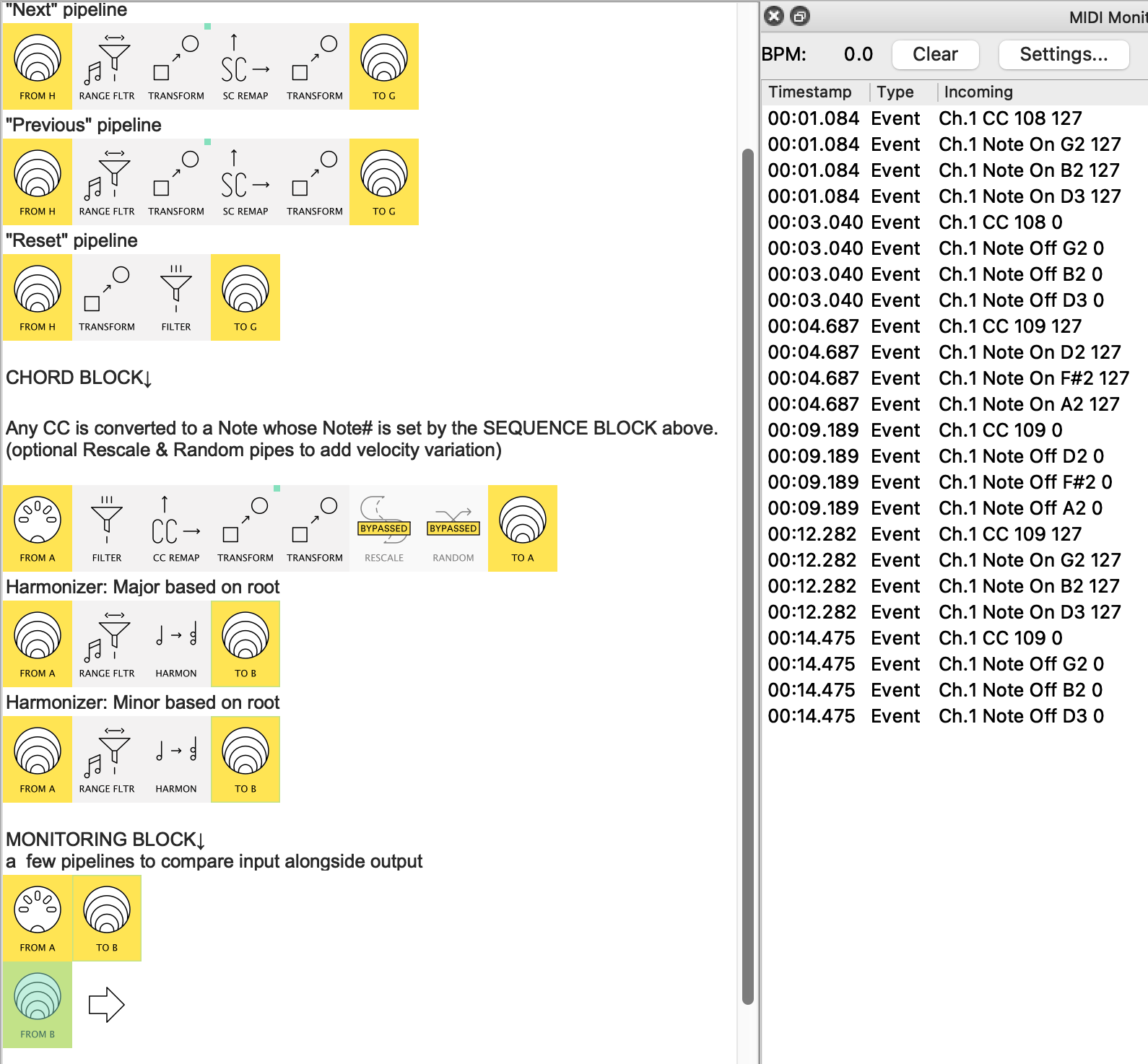
Below is an overview which will make maore sense if you Monitor each stage as you press the 3 buttons as appropriate.


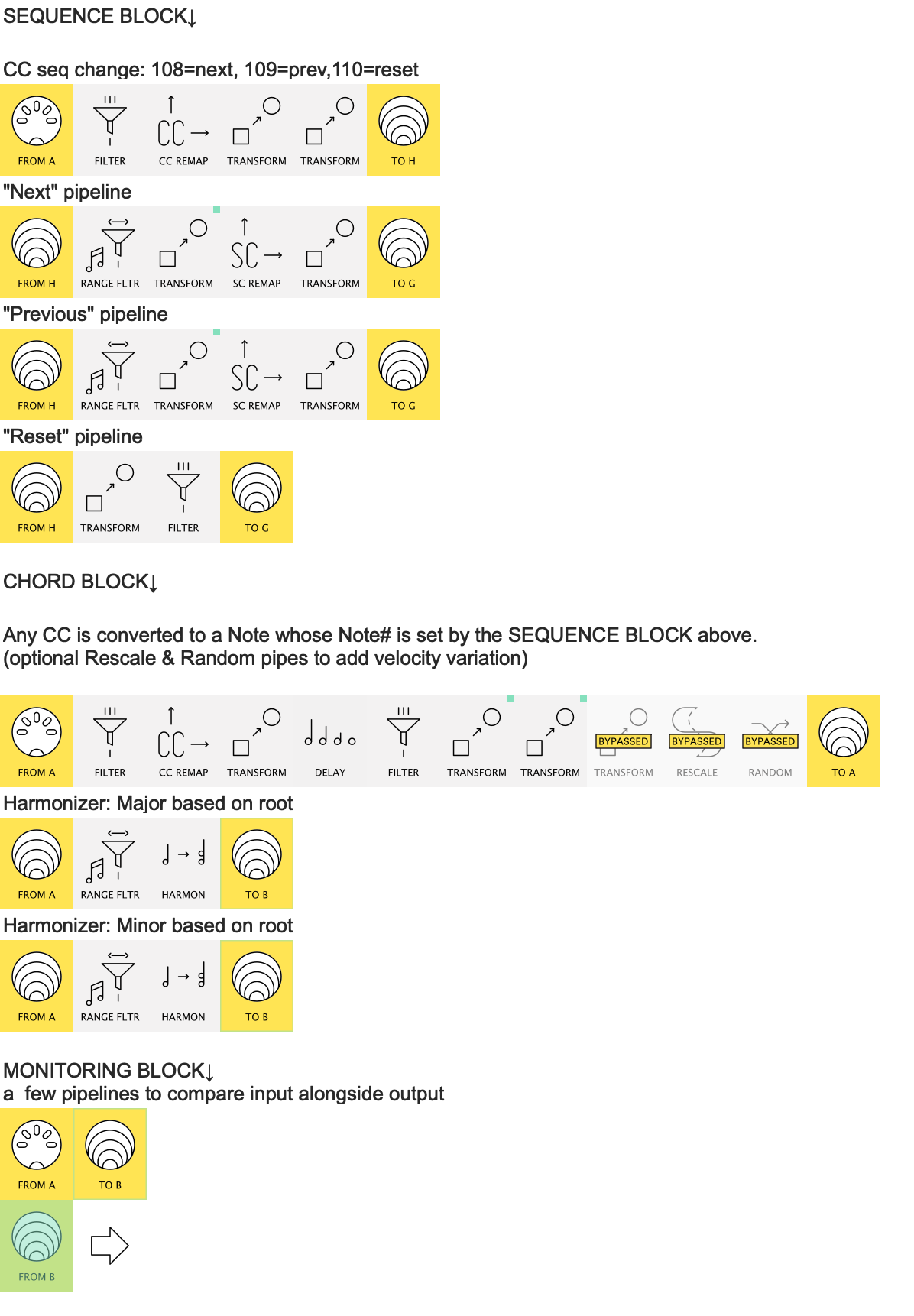
The preset(s) have two main sections:

  1. The Sequence block
  2. The Chord Block

There is also a temporary Monitoring block. This can be removed once you’ve monitored that each pedal press is giving the results that you want.❖

The two main sections share no messages whatsoever (see that the Sequence virtual-outs, H&G do not appear in the Chord inputs).
They are only linked by the mapping that the Sequence section produces.

The Sequence block

Here each of the 3 incoming CCs create a Note On with the same number.

  • These three notes are then dealt with in separate pipelines.
  • The “Next” & “Previous” pipelines Transform the incoming Note (#108/109) into a NoteOn with a mapping value.
  • this Note passes through a Scale Remap which changes the current Note# into the Next/Previous Note#
  • this new Note# is then used to create a mapping (Ch16 CC110 @virtual G)… .
    …which then updates the 3 Transforms (with green corner squares)
    …which sets up the system ready for the next button press.

Scale Remap
The Scale Remap and the mapping that’s made from its output is the core of the sequencing.

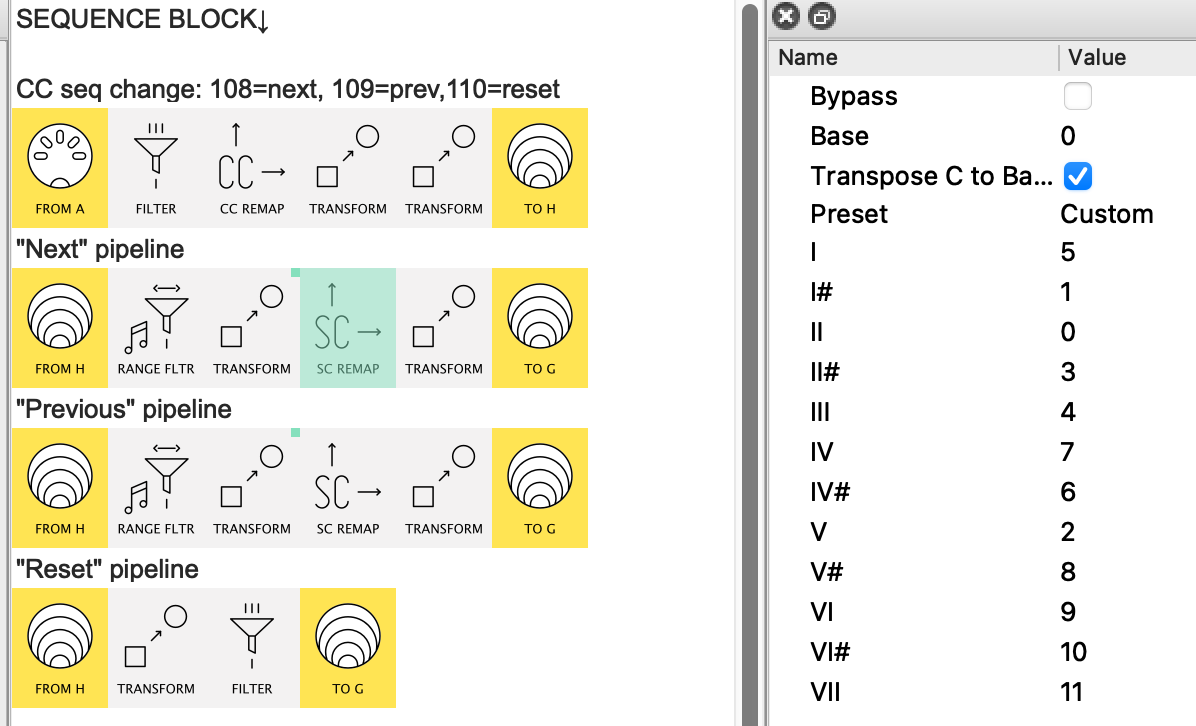
Here’s the Scale Remap for “Next”:


This doesn’t work in the designed musical way– forcing all notes into, say, the Blues Hexatonic scale.
Here we use it for data manipulation; to go from one state to another:

  • So G is note 7(V) in the C scale starting with C=0.
    See that 7(V) → 2 which is (II = D).

  • Then 2 → 0 ie. I = C, and

  • 0 → 5 ie. IV = F, and finally

  • 5 → 7 taking us back to G

This gives the cycle G → D → C → F ( → G)…
..which we can then use for our chord creation

The Chord Block

The chord block uses the incoming CC and transforms it into a note whose Note# is set by the processes above.

Just like your earlier patch, this note is then directed to the correct chord Harmonizer.
et voila

Two versions.

I first wrote solidsnayke_chord_trigger_sequence.mhp which was the simplest approach.
It changes to the next sequence note only when the Note Off is received

it has this issue...

namely, because it plays the chord before updating…
…(ie. after the chord, the system gets ready for the next note/chord)…
…when the direction is reversed (CC109), it needs an extra press to get back to where you were…

Which led me to design a rather more complex version 2

solidsnayke_chord_trigger_sequence2.mhp

Here we see
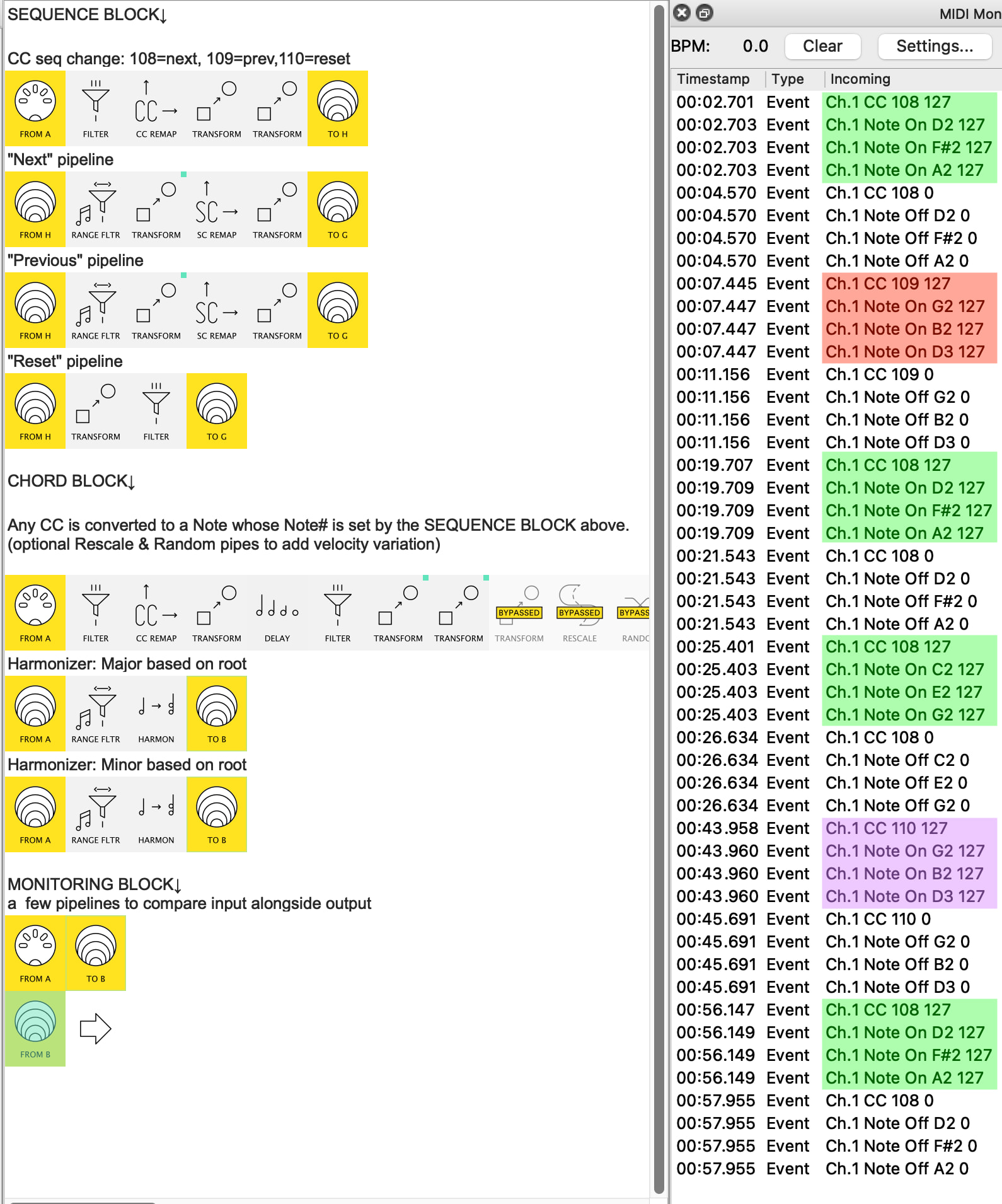
CC108 (v=127) in green, triggering the Next chord
CC109 (v=127) in red, triggering the Previous chord
and CC110 (v=127) in purple, resetting to G

I include both just because the earlier version is a little bit easier to understand.
Version2 has a few extra hoops which I won’t go into now. I’ll explain the differences when you’re ready.


❖ at present, the presets have no MIDI-out. When you’re happy and ready to play:
just disable the Monitoring A-IN and send Virtual B - IN to your chosen MIDI-OUT.
That is absolutely amazing! You did all that for me, just cos you could? I’m beyond grateful, and impressed!

Ok, so, I got it working!

So the question is, is there a limited number of steps which can be used?

The song I’m looking to use it for is Shine On you Crazy Diamond which has a seemingly endless number of chords. I just wish I understood it all better so I could build on your hard work!

Once again, thank you. I’m blown away!

Yeah, cos Scale Remap can remap 12 notes, that’s your limit❖

Not a serious issue, but also bear in mind also that some of the Harmonizer groups may end up not being based on the root note if you extend the number of notes in the cycle.

I just wish I understood it all better so I could build on your hard work!

Working through step by step is the key, IMO
feel free to ask questions either here or via message


❖ the Floyd song uses more than 12 chords it seems, but as importantly, they’re not necessarily all in the same cycle. One could conceivably use another 3 buttons to set up a second cycle.
Probably better though to have a button change presets for another similar pattern.

Have fun!

There’s an alternative solution possible with a Dispatcher pipe for up to 16 chords (limited by the channel numbers). Or maybe a Dispatcher pipe could somehow be incorporated to enable switching to the next set of up to 12 chords within the same preset.