Hi, and thank you for the amazing MIDI Hub - I couldn’t live without it and it helped solved numerous problems. Keep up the good work!
I have been trying to track a strange program change behavior on some channels when do a reset/start from my MPC. As expected the MPC sends the PgmChg that has been programmed for the track/channel but it also appears a second PgmChg to another program which I have been unable to find a reason for.
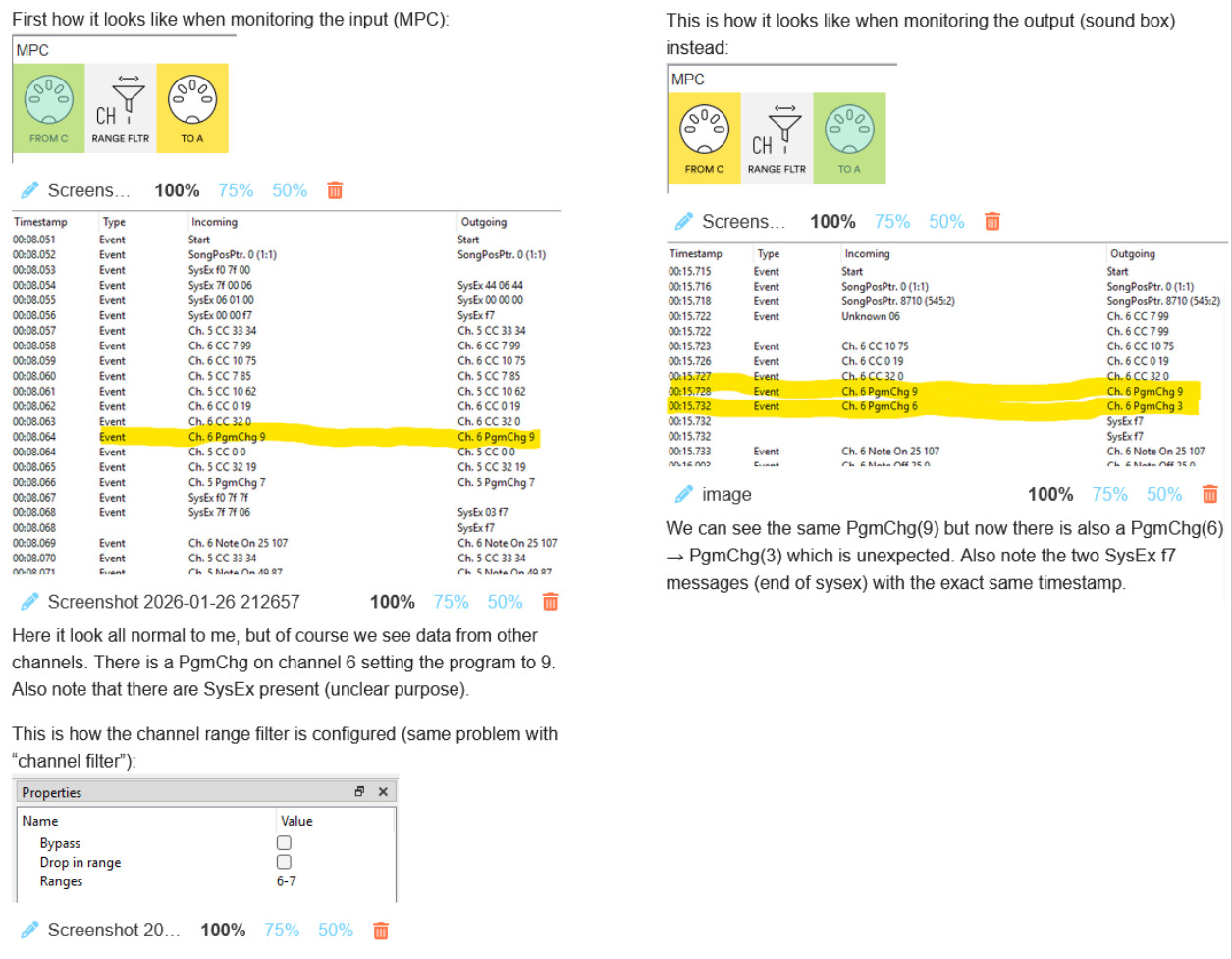
I have been able to isolate the problem to the channel filter. The channel filter is set to bypass all channels except 6 and 7. 6 is the channel were the problem is on. The problem disappears if I either bypass the channel filter all together or set it to only let through channel 6. I can reproduce this problem with a single 3 element pipeline.
Let me break it down in screenshots (it was only possible to upload a single image so I put all the screenshots in one image with explanations).
What do you think about this? Could it be something with the sysex messages being filtered partially by the channel filter creating unexpected side-effects?
I’m running Midihub editor 1.16.2 with the bundled firmware version on the unit.
Hey, could you record a raw MIDI clip of the data that’s coming in from the MPC when you get this behavior?
You can do this using [FROM MIDI C] → [TO USB A], and using some MIDI software to record the incoming MIDI. I’d recommend using MidiEditor, as a DAW might do things like keep only a single channel, ignore sysex, etc… while you should be able to catch all MIDI data with the Midi Editor, see here for the recording usage. Make sure to select all the event types to be added from the recording, especially the SysEx.
Afterwards, save it to a file (use .mid extension) and upload here.
Hi, MidiEditor hangs and crashes when I try to record the problematic reset/start-sequence (!). Works fine when I record while the MPC is playing. Will try more tomorrow. Do you know any other suitable tool for recording MIDI data on Windows?
Try using MIDI-OX - open only the single Midihub’s input port in it which is receiving the data, and just receive the data into its MIDI Monitor, right click on the contents and do Copy All and paste it into a text file that you could share with us.
I can’t believe Midihub had a six seven bug from way before it was cool. Pretty much since the initial release.
We have just uploaded 1.16.7 firmware which fixes this issue:
Before we publish it through the integrated Editor update channel on Monday, you may do the offline upgrade (download the .bfw and do Device → Flash Firmware…)
There’s also a one half fix for SysEx event display in the MIDI Monitor pane. The other half is going to be released with the next Editor update. It’s only a display issue, the data itself is all fine at the MIDI level itself.
Ha ha, there are always some corner-case bugs lurking there when you think you have everything perfect. Thanks for the quick response. Verified latest firmware, and everything is working fine. Big thanks
 Pretty much since the initial release.