Try two Rescale pipes in line, with Kind = Note Velocity and different range parameters:
In [0; 127], Out [0; 3]
In [0; 3], Out [0; 127]
It should end up creating stepped values, but some further adjustments are probably needed to get the exact range you defined, but anyway, it’s a start.
Ah, clever solution. The exact ranges are not super important to me but the downside here is that a big range become zero which is interpreted as “nothing”, no note at all. A 127 step remap would definitely make it easier to only map zero to zero but this is a good solution anyway.
From @Giedrius suggestion, if you ignore the 0->0 part (they are only Note Off’s and can be leaved alone) and test
In [1; 127], Out [1; a]
In [1; a], Out [b; 127]
where “a” is number of steps and “b” is lowest output velocity you want.
Another (not very elegant) way if you want exact input ranges and output velocity, Transform Pipes that replace velocity in range [a; b] with [b] will work:
Yes, Johan is correct, if you use 1 as the lowest value, then the 0 velocity stays 0, while the rest of the velocity range then gets quantized into usable steps.

 The exact ranges are not super important to me but the downside here is that a big range become zero which is interpreted as “nothing”, no note at all. A 127 step remap would definitely make it easier to only map zero to zero but this is a good solution anyway.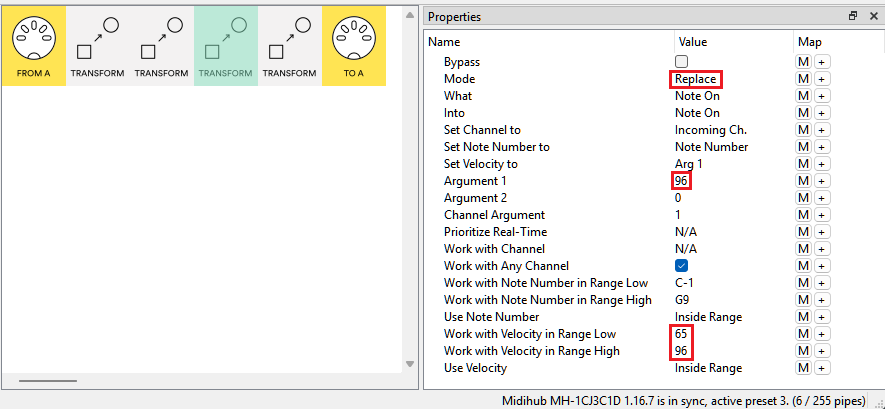
 When the king does a ps…