I am trying to create a stand alone setup that will allow me to trigger midi chords from crumar mojo pedals (outputs single midi note.) so pressing one pedal (I.E. C note) on the foot pedal would play a full C chord on the alesis keyboard. I would also want to know, how to have it discern playing a major chord vs a minor chord as needed.
I wanted to know that the midihub would facilitate this and how?
Thanks in advance.
Hey Dave, welcome to Midihub forums.
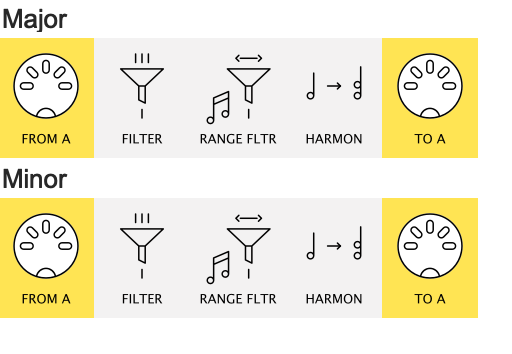
a simple place to start experimenting would be this
simple_chord_example.mhp
where certain notes are allowed down a pipeline with a Harmoniser pipe set to a Major chord…
…while others are sent to a Harmoniser set to Minor.
It’s probably overly simple as it assumes that the incoming note is the root note of a chord:
-
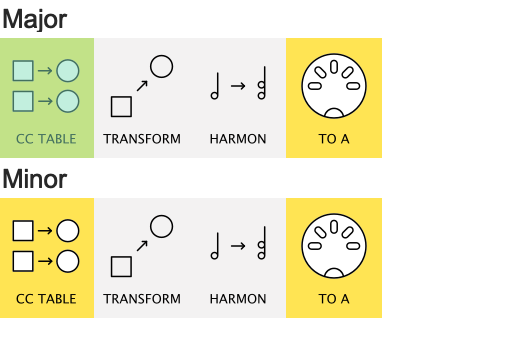
As the Crumar has 13 pedals you might want a setup where, say, each minor pedal plays a minor chord but where the root note is of your choosing.
-
For that, more flexible, approach I would go for using CC Tables mapped to Note On & Off messages
That solution would look something like this
(more flexible and powerful but a couple more ideas involved)
Thank you for the reply. I understand the basics of the explanation but will admit that my use of midi is from many many years ago and was in a much more simple application IE using a keyboard to control a sound module.
So ill rephrase some of my question and try and get more details of my hopes, needs and expectations. Keep in mind that I dont have a midihub at this point and am exploring if it will do what I need relatively easily.
-
I want to be able to play any chord from its appropriate note on the mojopedals in either a major or minor voicing. So F pedal on my mojopedal would play an F cord from my alesis keyboard and I could choose between major or minor. The patch selected on the keyboard would of course dictate the sound.
-
Im assuming that all the config is done connected to a pc and after that, the device would operate stand alone
-
is midi hub a good choice for my technical needs
Thank you so much for your time and patience.
Dave
Thanks for clarifying that.
The answer is yes, Midihub will serve this purpose quite happily.
I’m not linked to Blokas but have been using their devices for 5 years now, so can recommend Midihub without hesitation (or self-interest!):
-
It is ideal for creating presets (patches) that will take any limited set of incoming MIDI messages from the MIDI source you have at hand…
-
…and using them to generate the messages you need for your project and destination devices.
-
quite often users start off with a simple discrete task to solve then realise “Wow, I can get Midihub to do this as well!”
People vary in how quickly they become confident with the Editor, but you’ll get help here…
…and nowadays there is an AI assisted Editor.
So if you prefer, all you need to do is look at your gear and think through the detail of how you want to use it in performance.
If I get time later, I’ll sketch out an imaginary usage for chords in some scale to get you going.
if at some point you have the time and willingness, id love that sketch. Thank you for your info so far.
As it happens, Dave, I currently documenting a Patchstorage demo of the CCTable version.
It’s just a simple 5-chord version (played from consecutive white keys) but that’s enough to show the idea.
I’m doing a proper write-up as I want it to be clear for a non-user, a CC Table beginner and general users.
(watch this space  )
)
your awesome and thank you for your efforts. I look forward to reviewing it and “understanding” it 
Im just starting to review but have a question. if you set up certain chords for a song, can you set another preset for another song and change it somehow live? so for example, song A uses Am G and F and song B uses C#maj E and Gm, can you select preset live for each song that you have created prior?
yes, you’ll need a device that can send PC#0-7 for the 8 presets.
then in Device → Settings.. you tell Midihub what port and channel to listen to.
Thx for the query – it’s set off a whole new train of thought
Hey @dcheitel, Dave, Just a thought:
At a push, if you don’t have anything else you could set up to send a PC#0-7, it would be possible to run a MIDI cable out from Midihub back to itself and then use the Crumar back to itself.
this would obviously need dedicating at least one Crumar note to this task.
Be aware that, because one can change a preset’s settings (via mappings again) one preset may have switchable banks of chords.
Dedicated keys could also be used to set tap tempo in Midihub (if you don’t have a delay pedal to send MIDI clock to MH), and do stuff like toggle an Arpeggiator on/off.
Lots of possibilities.