Effects pipeline

Hi there,

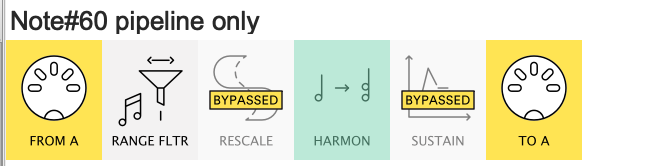
I’m new to this community. I have a Roland SPD 30 going through midihub to a microkorg2. Out of the 8 pads available, I used 4 pads to create a different chord with each pad. A little background is the SPD 30 transmits true note value. I also have a dp 10 plugged into the hihat ctrl input to create cc64 sustain on each chord when the pedal is pressed. I was successful in creating a pipeline with range filter, rescale, harmonizer and sustain in the pipeline. When the pedal is pressed the chord sustains and stops sustain when the pedal not pressed. The sound stops from one pad and started on the new pad when a different pad is hit, so there is no stacking of the chords when multiple pads are hit.

My goal is to use the 4 remaining pads to create different effects on the chord that is sustained. Every time I try to ask chat gpt or copilot to help with the pipeline, the effect is on the chord pads, bleeding into the chords and has no change when the effects pad is hit.

Can anyone offer some suggestions that might point me in the correct direction to make this possible? Hopefully this is not an impossible goal to reach.

Hi, @Eric can you give examples of what you mean here?

Please upload your preset:
At first glance it looks like you should use Note Range Filters on two pipelines to separate the “chord” pads from the “effects” pads, but a bit more detail would be useful…

(welcome to Midihub forums, btw :smiley:)

4 chords good with 1-5 first attempt at fx lfo 4_16_26.mhp (810 Bytes)

Hi @resonotter Thank you for the response, I was delayed responding because I got sick

Chat GPT and Copilot both built effect pipelines for the 4 remaining pads consisting of note range filter, transform (note on to cc), LFO, channel out. One version did not have an LFO. Other versions have a channel remap after the cc or some have a remap from the sustain pedal (dp-10) to the input of the LFO treating the pedal as a gate for the command of the cc64 sustain. No matter where the remap is put in the pipeline, the green box stays green regardless of the sustain pedal position. I learned that the green box should only be lit when the pedal is pressed. I did also learn by accident that the patch voice from the keyboard (sound source) can make the pipeline work correctly or fail.

The effect pipelines were supposed to be filter wobble, format sweep, tremolo, shimmer. Another version has filter cutoff, resonance, expression, and delay. The goal was to take any of the control changes and link that effect to a pad to effects the sustained chord.

I uploaded the current settings from midihub at the top of this reply. The current program has the working pipeline of the 4 pads each producing 4 different chords. It also has the start of the note range filter that corresponds to the pad true note value that is sent for the fx pipeline. The spd30 can change the true note value that is sent, I was just following the directions of AI, which almost worked for the chords pipeline.

I can type more details about fx pipelines AI came up with if you want. So far, none of the iterations have worked. Any help with how to program an effects pipeline would be greatly appreciated.

Thanks for the preset & the extra detail:
I now understand that the other pads are meant to trigger CC modulations in microkorg2 (rather than say, add extra MIDI ‘effects’ to the notes themselves within Midihub :smiling_face_with_sunglasses: )

So let’s look at what you want in two parts:

  • the chord section
  • the CC section

I’ll take these in reverse order

CC section

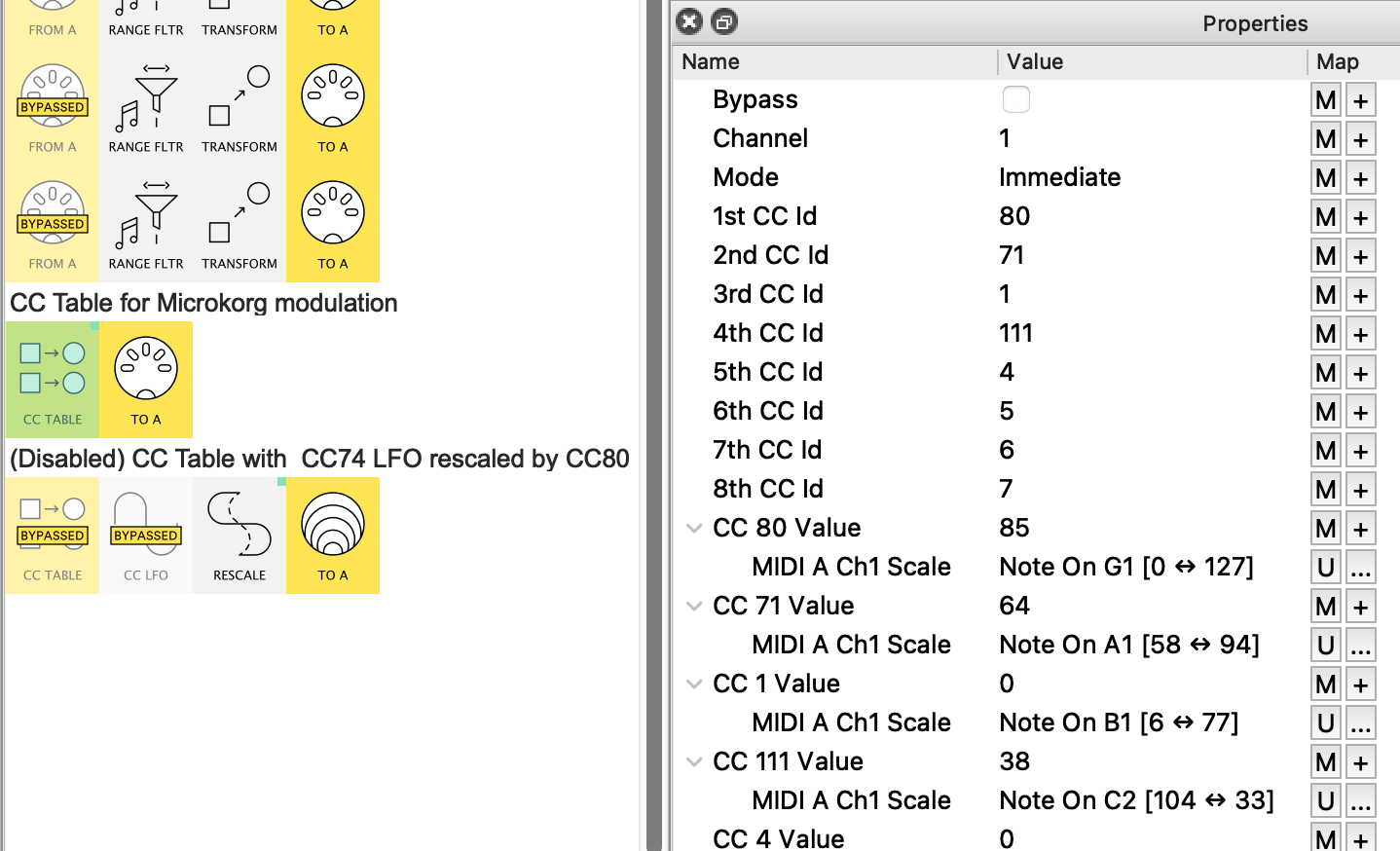
In the preset, the Note On → CC Transforms all set the CC value from the Note# or Arg2.
This means that the value is fixed for a given note.
I suspect this is not what you want.

Try creating something like this instead:

AI is unlikely able to make up shit about this particular knowledge (yet :winking_face_with_tongue:)


I’ve mapped the 1st four rows by:

  • clicking the Map (M) button for the CC value then

  • hitting the trigger pad

  • Then I’ve Edited ( button) the range on some mappings, for example…
    • CC71 Resonance is scaled to 58 → 74
    • CC111 Mod Control2 is ‘reverse’ scaled 104 → 33
    …just to give the idea that you can tweak ranges to use velocity as you want
    (it can even be just one value like 45 ↔ 45!)

This one line will suffice to give you direct Note → CC modulations.

The second line would use Note G1 to modify your CC74 LFO, but we’ll leave that until you decide it’s useful enough to make some decisions about

Chord section (questions)

Did you want the CC64 pedal to act as Sustain?
What green light?
AFAIcan see, hitting say C3, F3 at same time will give two chords. Is this so?

Hi @resonotter Thank you so much, The program almost worked!!

The updated program is at the bottom of the response
I finally got a chance to sit down and try it out. Im impressed with the approach, this was the first time I was able to hit the fx pads and see all the program changes come through.

After I programmed the table for modulation, the monitor saw each separate fx command from each pad. When any chord was sustained, three of the effects (80, 1, and 111) did not make a change. When any chord was sustained and 71 was hit, the effect came through and stayed on any of the 4 programmed chords. It was still there regardless of the sustain pedal on or off.

As of right now, cc64 is working on any of the chords on the chord section. The chords do not stack which is what is desired. The sustain only happens when the pedal is pressed prior to hitting the pad and any chord will stay sustained indefinitely until the pedal is released.

I would really like to understand how you learned this programming language so I can some hopefully have some success with midihub also.

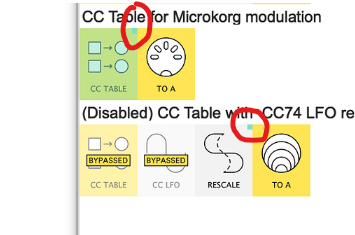
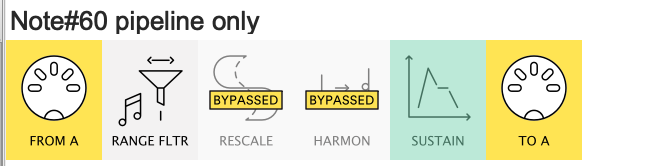
The green light is circled in the screenshot. AI told me it should only be lit when the sustain pedal is pressed. In your screenshot, it was lit all the time so I left it alone

4 chords good with 1-5 first new fx mapping 4_28_26.mhp (808 Bytes)

The green rectangles actually indicate that these pipes have MIDI mappings assigned to them.

Like many other users (I assume), I came to Midihub with some understanding of MIDI.

From the start, I found the pipes and pipelines metaphor quite intuitive; giving the idea that one pipe might change the message stream and pass the results onto the next one, or that flows might be split or merged.

Beyond that, the main thing is doing little trials while making good use of the MIDI Monitor (initially at every step!) then re-reading the Context Help when necessary.
Because the whole thing is pretty logical, each time the MIDI Monitor shows something you didn’t expect, that leads to a new bit of learning.

The Step-By-Step tutorials were written with this sense of learning by doing

on AI

I worry that AI “recommendations” seriously interfere with this learning process.
Mainly cos it discourages the active learning-by-experiment I hint at above.
And, I suspect, they encourage passive consumption and acceptance.

Moreover, it’s wrong:
We can say with some confidence that nearly all of the source material for Midihub patching comes from precisely this forum. Yet iAI makes claims which have no foundation anywhere here or in reality…
Green mapping corner square is an excellent example.
Start simple and build up!

It’s more like those colleagues you learn to avoid; the ones who brag about how much they know but bullshit when in doubt.
I prefer those who say “Not sure about that, let’s find out”!

I’ll come back to your preset in later posts…

Hey, Eric
I saw this and looked back at the preset with this question in mind:
What is doing the note sustain?
the SPD-30 is designed for hits, ie. short notes - as such, it may send a Note Off when the pad is released (or automatically after say 50ms)
so the sustain pedal may work entirely internally and Midihub doesn’t need to sustain the notes for you.

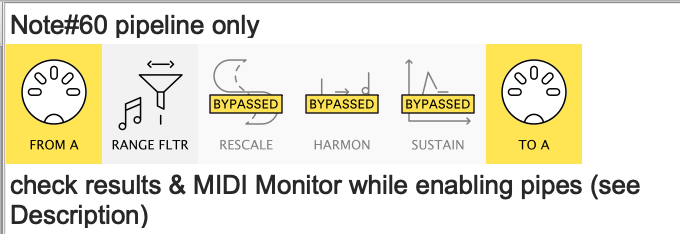
I think it’s worth testing with this one line preset
1 chord good? 4_28_26.mhp
so. here we’re testing just one note, no effects.

With all these pipes disabled…

…just the C note will get through.

When you test hitting pads with and without the pedal, MIDI Monitor will show when you get a Note Off.
(the Note Range Filter would be a good pipe to select to MIDI Monitor - you’ll see it filter out all the other notes you hit)

So my guess is that enabling the Sustain pipe will make no difference; all the “sustaining” is going on inside the SPD

This would mean that the Harmonizer by itself will do the job.

If all this proves to be true from your testing you can delete the Sustain
…and edit Note Range Filter to include the other Major chord notes.

This would mean you only need two 'chord" pipelines – one each for Major & Minor


PS. I think the Rescale is unnecessary, isn’t it? In fact, you probably want to Filter out any CCs that might come from SPD (again, use MIDI Monitor to see what SPD is sending. Does CC64 get passed on, for example? – it may have a use down the line)

Sending CCs to MicroKorg

The CCs I used were taken from your/Ai preset…

  • CC#80 I should’ve left out as it was originally only mapped to a rescale for the LFO
  • CC#1 is the standard mod-wheel CC. As such, it might be better suited something continuous like pressure/aftertouch which SPD may not offer
  • CC#111 is Mod Control2 so this may depend on what this is currently assigned to in microKORG

…so decide which CCs you want set via the 4 remaining pads and what range you want for each.
( the full list of CC#s that microKORG receives is at the end of the manual)

As we’re talking about setting modulations by hitting pads rather than, say, moving a fader, you’ll need to picture how you want it to work in practice.
For example do you want “sustain off” to reset all your CCs to default values defined by you?
Otherwise, as you’ve noticed, the setting will stay unchanged for the last hit

Hi @resonotter I did watch all the tutorials several times and they were interesting, they didnt apply to what I am trying to do to start out. The focus seemed to be on merging signals, running multiple devices and watching the tempo clock add up somewhere in the pipeline. I want to talk to one device and make it do lots of different things.

AI was responsible for tricking me into believing this device can make all my dreams come true :zany_face:

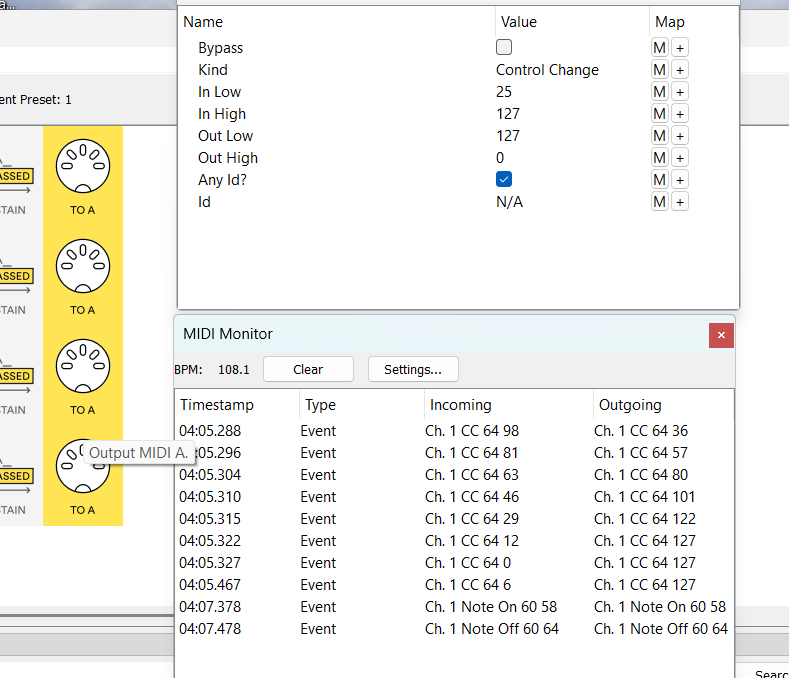
Hi @resonotter The SPD 30 transmits Note on, Note off and CC64. The pads are the note on/off and the pedal is plugged into the hihat control change input. This is the only input that sends a cc, all other inputs have many other functions that I didnt think I could find a use for. The rescale is necessary because the signal of the pedal is reversed, rescale fixes that issue. You were correct about the sustain pipe. It isnt necessary so its bypassed now.

I really like the idea note range filter including other chords, Im not sure how to program that? I was assuming it would be done in harmonizer?

The first screenshot is taken at rescale, pedal pressed, one chord pad hit and pedal released. Because of the deadzone with the pedal, AI suggested to leave the low input at 10, I went with 25.

I had other screenshots showing monitor, I wasnt allowed to post all of them :sob:

Let me know if you want to see what is in the monitor at each step

The cc table shows cc xx value (where the mapping is) and changes it with every pad hit. I think that is tied to velocity because it matches the value of incoming and outgoing

The effect still stays on the chord pad indefinitely once the effect pad is hit

AI had actually suggested the sustain off to reset the cc which sounds like that would be a good idea. I could never get the mapping to work before so I was never able to get sustain off to reset the cc.

My plan was to go through all the cc’s one by one to see what effects I liked on different patches and have a pipeline that allowed it to happen.

There is another trick the SPD 30 has which I havent attempted yet. It will transmit two different note values from the same pad. I have never been able to spot the condition on the spd 30 that makes it change from one true note value to another. I still think its velocity that makes the change. As of right now for simplicity, both conditions transmit the same note.

Thank you again for the support. I really feel like this idea can work since you have been helping me

Well, many users find that Midihub does things for them they never imagined so depends on your dreams.

I’ve messaged you with a working preset; when we’ve ironed out the wrinkles we can post it here.

I had imagined your sustain pedal to be a simple on/off type
So does is sustain notes in SPD itself? the screenshot suggests not.
(Btw, The Sustain pipes would’ve worked if you mapped the Pedal On property to the pedal input, then edited the mapping so it was Scale 127 ↔ 0)

btw, the forum allows you to upload 5 items at a time, so just do them in batches

the preset sent has two examples.
The abilities of both the SPD and Midihub to respond differently to velocity bands gives you some interesting options

That’s a topic for when the basic functionalitly is cracked…

The ‘Reset’ FX values

I’m interested in how this sounds:
at present you should be able to successively change a setting (say, cutoff) by repeated hits of the pad while a chord is held,
then, when the note off arrives, the setting will return to a default immediately.

So this might be OK or might be weird depending on stuff like ADSR Release, etc.
Making stuff smoother is a whole new ballgame…
…but there are other options (now I think about it)