Triple Midi Pedal - Programming "Pedal Zones" / mapping / ranges

Hello.

I’ll get straight to the problem.

I have a Roland RPU-3 pedal, that has 3 TRS cables, one for each pedal.

I’ve connected each one to a MIDI Solutions Pedal Controller, and then connected them to DIN 1, 2, 3 on the midihub.

I am basically gonna use this setup to sustain different parts on the KORG PA5-X arranger.

What I am trying to achieve using the midihub:
Each pedal will have 3 pedal zones.

0-54
55-100
101-127.

Each of this zones will send a CC 64 (Sustain) message on a particular channel.

Pedal 1:
Zone 1 ( 0 - 54) will send CC 64 127 on Channel 3
Zone 1 ( 55 - 100) will send CC 64 127 on Channel 1
Zone 1 ( 101- 127) will send CC 64 127 on Channel 5, 6

Pedal 2:
Zone 1 ( 0 - 54) will send CC 64 127 on Channel 5, 6
Zone 1 ( 55 - 100) will send CC 64 127 on Channel 1
Zone 1 ( 101- 127) will send CC 64 127 on Channel 3

Pedal 3:
Zone 1 ( 0 - 54) will send CC 64 127 on Channel 1
Zone 1 ( 55 - 100) will send CC 64 127 on Channel 3
Zone 1 ( 101- 127) will send CC 64 127 on Channel 5, 6

One of the issues I’m encountering is due the continous flow of messages on the pedal.

I did have a solution for this using the Midi Solutions Event Processor, but I decided I’d really love the MidiHub for a change.

Basically using the EVP, I would use the trigger message function, that would only trigger a message when it would detect that a particular message of your choice had a value between a range you selected.

Using the midihub, the closest I got was using transform messages to “map” the zones, had to use two transform messages for each zone, one for going in the “range” and one for coming out of it.

After that I had a transform that would switch between the CC Number and the CC Value, so that I could use the range filter, 1- 126.

Almost a perfect solution. Unfortunately, I can’t find a way to only have messages trigger once per range. That leaves me with CC 64 0 messages for the whole range…

The PA5-X is really not that great when it comes to support and midi reliability when it comes to more complex setups like mine,

Roland FR-8X, MidiHub(Pedals) → MioXL → PA-5X, Montage M6 , some lines ran thru EVP and back into the Roland for some registry modifiers.

This would be my file, without the last transform to switch back to normal CC 64 messages.

test map pedala.mhp (577 Bytes)

Would greatly appreciate the help.

Hey, @mariusturneanu (and welcome to MH forums :smiley: )

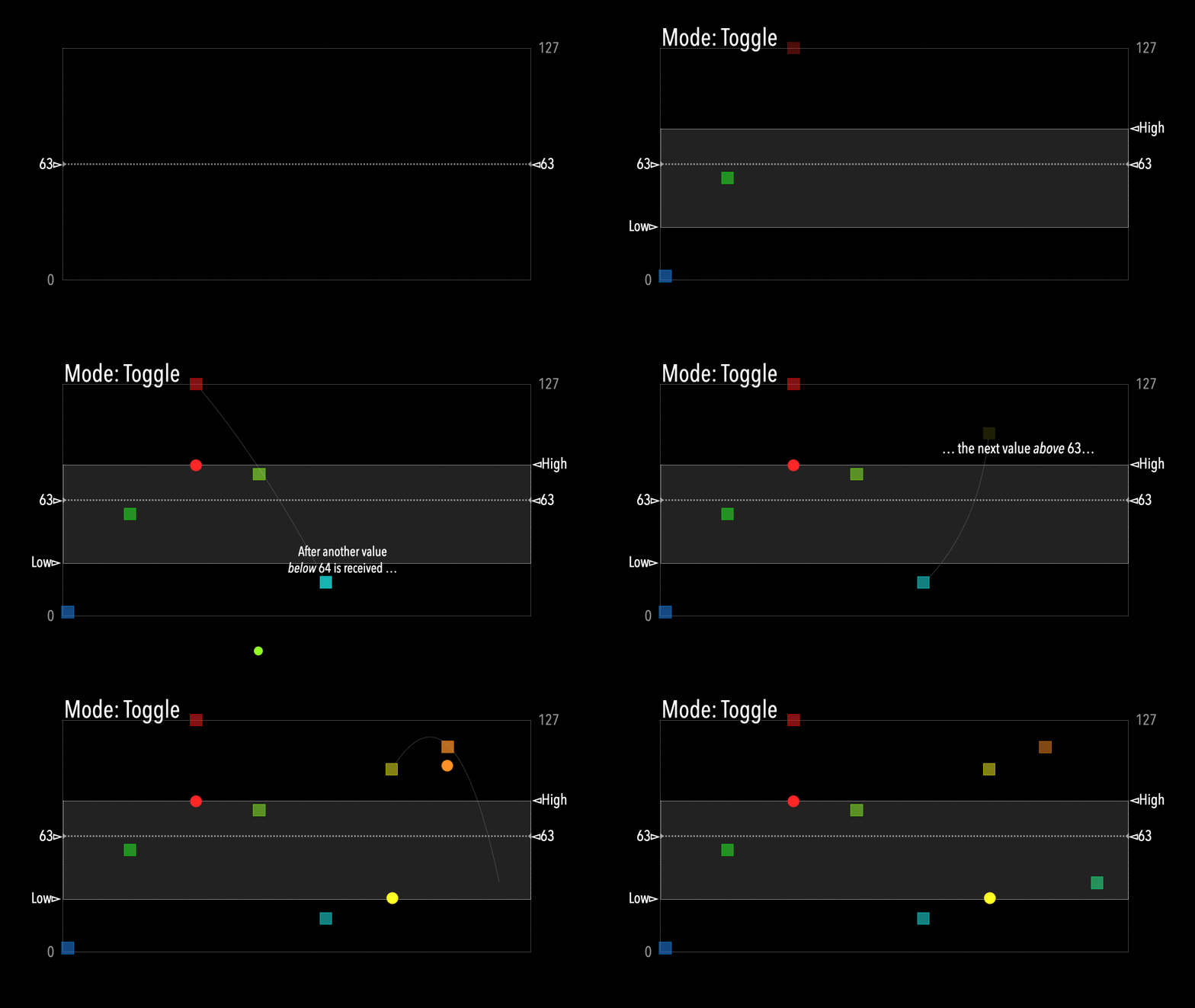
I wonder if we could adapt your CC output to fit CC Toggling behaviour?

Check this out:

Toggle+-

see how only one value is output when the incoming value crosses the threshold.

This means that, if an intermediary stage scales its output to…

  • reject → < 64
  • accept → ≥ 64
    … then later Transforms/CC Tables can use the reduced outcomes to produce the “once per range” outgoing message you want

All sounds a bit devious, I know: I’ll try to upload an example later! :smile:

tbc…

Hey, @mariusturneanu, could you clarify: did you want the pedals to send CC 64 = 0 once when outside a given channel’s 127 range?
So for e.g Pedal 3, Channel 3 gives CC 64 = 0 when incoming CC is 54 or 101?

This seems to be the intention from the pipes, but I wanted to be sure


Plus, I’m working on the assumption that CC 64 on Channel 6 is a copy of CC 64 on Channel 5
(I think that’s what you intended the last two Transforms in each pipeline to do)

OK, @mariusturneanu , I think I have a solution.

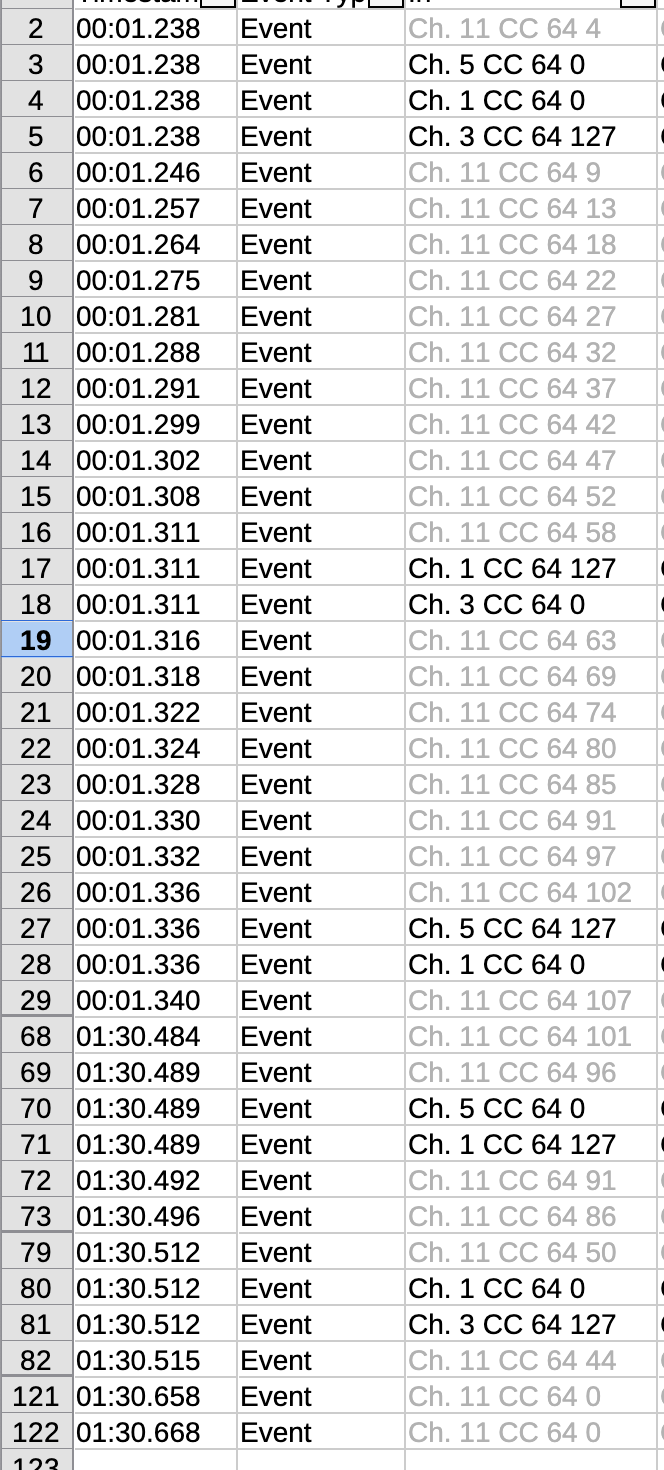
Here’s a Monitor list where the Incoming CC64 from the Ch1 pedal (pedal 1?)

things to note:

  • I’ve made the Incoming Ch1 CC64 channel 11 and made it pale grey to distinguish
    Plus, my encoder skips values when turned fast…
    …and I’ve also hidden some rows for ease of reading

  • the results show the outcomes for one pedal-down then pedal-up

Do these results look about right?

With this approach we have 11 outgoing messages for about 50 incoming

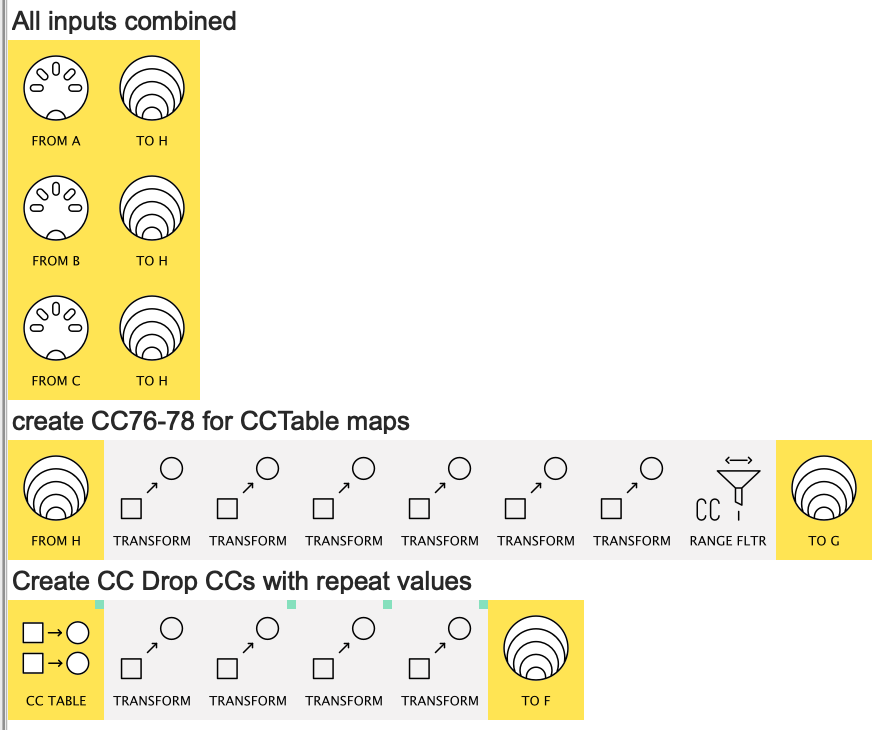
Here’s the important pipework


(CC Table mappings not complete, Ch.6 duplicate Transform not yet included)

Not uploading the patch right now in case I’ve misunderstood the precise spec.

I’ll take a second look once I’m know that I won’t be sending something incorrect
(in English we say "“Barking up the wrong tree” :laughing:)


Hey @Giedrius, while I did use CC Table for this, to get the “different values only” part I fell back on a 1.16 version of the Discarder idea just to get the job done.
It felt like leveraging the toggle mapping idea would need another stage of abstraction; What’s your hunch?

The CC LFO pipe in passive modulation mode with depth = 64 0 should pass through CCs only when the value changed from the last seen value.

I think the Slice mode of MIDI mappings should work in favor for implementing this functionality, in conjunction with the CC Table - you can split it out to different CCs based on the incoming CCs value ranges, so different parts end up controlling different things.

@mariusturneanu, when should CC 64 0 events be sent out and which channels?

1 Like

The CC 64 0 should be sent as follows;

Pedal 1:
Zone 1 ( 1- 54) will send CC 64 127 on Channel 3
Zone 2 ( 55 - 100) will send CC 64 127 on Channel 1
Zone 3 ( 101- 127) will send CC 64 127 on Channel 5, 6

When the pedal reaches 0 thats when a CC 64 0 is sent on channel 3

When the pedal goes from anything in between (55-100), 54 or anything less than, thats when a CC 64 0 is sent on channel 1

When the pedal goes from anything in between (101-127), 100 or anything less than, thats when a CC 64 0 is sent on channels 5 and 6.

So when the pedal is anything between 101-127, three CC 64 127 have been sent on all channels.

Going back down the range CC 64 0’s are sent accordingly.

The only thing is I only wanna disregard the specific messages, as I’ve written in a reply above, once we exit the message’s range.

OK, just to check I understand absolutely correctly, your set-up could be shown as a table like this:

  • So, going up the range, once a given Channel gets “Sustain On” message is stays On…
  • hence by the time a given is fully down, all channels are “sustained”
  • and so the pedals only differ the “sustain order”
because my first solution...

…had independent non-overlapping “sustain zones”:


cos I assumed that Sustain was ON only within each zone

PS. I’ve added “Zone 0” (= 0) just for consistency between channels x zones when thinking about the best design

Please confirm so I can decide the best way forward.

Yes that is correct, and exactly what I am trying to achieve.
@resonotter

OK, do you want to look at adapting my all channels-in-one approach to fit your scenario?

Or wait a bit while I see how @Giedrius’s ideas pan-out in your case?

Quick Thought: does the RPU-3 always send every value 0-127 even when a pedal is pressed down really fast?

When pressed realy fast not really, but I usually do need to play it in between ranges to achieve a fuller and more unique folk sound with the cymbaloom, guitar acting as pads etc etc

If I knew it would always send every value I could probably just range the transform to 55-56 for example, but unfortunately its not something it can achieve, at least not plugged into the pedal controller.

1 Like

Hey @mariusturneanu

Here’s the Slice → Passive Mod approach:

pedala_PassiveMod+Slice0.mhp

I’ve only done the mappings for Outgoing Channel 1 for reasons explained below.

The preset uses some Midihub ideas that may be new to many.
Use the explanations below (including in the Giedrius section) and work through the detailed Comment lines pipe-by-pipe to get a fuller understanding.

Monitor Demonstration

details

Here’s a slow sweep of my “Pedal 1” fader:

I’ve used a separate Monitoring CC Table to replicate the Incoming MIDI A-IN CC64…
…for only for key ranges:


(which is why you don’t see all the results)

The key thing to spot is the matching switch-over values:

See how the Outgoing 127 is in the same millisec as the Incoming 55 on “pedal-down”:

and the Outgoing 0 matches the Incoming 54 on “pedal-up”:

You, of course, will be able to hear the results as well as see them on the Monitor :grin:

Here’s a super-fast “down-up” movement:

PS. the extra monitoring will be unnecessary in the end.
Keep them in place for now. because they can be used to report any unforeseen problems!


Completing the preset

All the necessary pipes are in place.
You need to do the mappings for CC Table 2 (Ch.3) & CC Table 3 (Ch.5)

CC Tables are a great development, but they do need care to make sure they match your set-up.
They are time-consuming to re-edit if you change your mind!

I have worked on these assumptions:

  1. the inputs are :
    • MIDI A Ch1 CC64
    • MIDI B Ch2 CC64
    • MIDI C Ch3 CC64

  2. the Zones match the table below


    Where "A.1 [0-54]" is shorthand for MIDI A Ch.1 CC 64 Slice Low=0, High= 54
    (explanation of why I use CC63 and CC64 below)

Please check the Table for the Channel 1 column against the mappings I’ve done for CC Table 1 (Ch 1)…

...as seen here

(I may have made mistakes which you may see much quicker)

If all is OK, fill in the mappings for the other tables and you’re ready to test.


Hey, @Giedrius
Give this a scan when you get a minute, please :smiley:

Here’s one (not fully mapped or tested) version based on your suggestions:

rationale
  • As Slice mappings don’t do scaling (that’s why I first discounted Slice), I need a different CC (63) to distinguish the “will be zero” values from the “will be 127” values

  • that means I need to transform both the “zero” (ie CC63) and “will be 127” values to (CC64) 0 and 127 respectively.

  • Then, because LFOs❖ are always Ch1, I use the “de-channel” → LFO → “re-channel” trick

Now, I could have made 3 pipelines with Ch1 CC Table generator, but each would still need the two " → CC64 =0|127" Transforms and a Ch.Remap.
So I went for this more compact strategy

❖ LFO Depth = 0, btw

Does this make sense or have I missed a better way (again! :smiley: )?

PS. Thanks for reminding me to look again at Passive Mod; it’s given me a suite of ideas…

1 Like

This looks great! Great use of channel to CC Id changes for doing this all in a single line, I would have ended up probably using up way more pipelines. :slight_smile:

1 Like

Cheers, my hunch was having the CC Tables with the proper Channels would be easier to keep track of when adding mappings.
Let’s see what Marius makes of it.

I’d like to hear the 4 voice result when it’s all done: I’ve never heard a cymbalom!

1 Like

Correction - the Depth should be 0 instead for letting through events only when the value changes.

yeah, like New Value + 0 x LFO :smiley:

btw, Giedrius, as in this case the pedal messages are flowing thick & fast, should the LFOs be on 128Hz so they are sampling asap?

In Passive Mod, it is not relevant, as it’s immediate, processing happens always upon event coming through, you can set 8Hz for LFOs doing this function.

1 Like

@resonotter @Giedrius

Thank you guys so much for your help. I’ve managed to achieve what I wanted, and the solution actually managed to noticeably reduce the crashes that the PA5-X suffered so often (tho they still happened, so if you happen to be familiar with the Arranger I’d greatly appreciate any input you could give).

I will get to recording a quick demo once I get used to playing exactly this way.

Meanwhile, I have another thing that would really help my playing, and that is an actionable filter that filters all Note On events when my CC messages pass a certain threshold. I’ve managed to get it working using some bypass maps on the filter pipe, but I couldn’t help but notice how sometimes, because of the way I thought about it and programmed it, it doesn’t allow me to play into more powerful parts.

For example I would wanna smash Pedal 3 into the ground and filter all the notes on channel 1 and channel 5 after the first not gets sustained, and then have the sustain on Channel 3 normally playing. But because of this logic, if I " smash " the pedal into the ground, the filter turns on before I can play any notes. Of course, I could adjust to this in time with a lot of practice, but I was wondering if there were any other solutions that I didn’t think of? Maybe delaying the filter somehow or having delay pipe sending notes past the filter pipe somehow?

Again, thank you a lot for all the help you’ve provided. Amazing product and amazing community.

Hey @mariusturneanu, glad you’ve got a solution.
Would you upload the preset so others coming to this sort of idea later can benefit from these ideas?

Adding a mp3 clip later would be great too.


actionable filter that filters all Note On events

Maybe copy this bit into a new Support Topic?
That way it gets its own title for future reader community.

with a bit more of a stepped example? I’m not sure I understand the task well enough yet.
At first glance though, try this:

  • make sure the pipeline where the bypass map is created has no notes flowing through it
  • use the map CC to create a Note On
  • add a say 100ms Length pipe
  • use that to create your Filter mapping

But, even if this does fit the plan, still need to consider when/how to open up the Filter again.

Dispatcher also comes to mind. In fact, I like that more