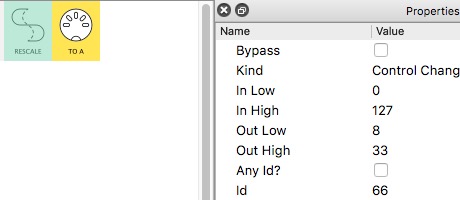
Can you set the high and low values in your pedal? We can achieve your goal with 3 pipes if you can and skip the other hassles. All that is needed is to set the high and low values to 33,8 of CC66. And set both pedals to toggle.
If you can’t, you’ll have to go to patch 4 and go through the midi monitor for every pipe in pipeline 1. Follow message CC 66 all the way through the first pipeline and take note of it’s high and low value.
Follow Resonotter’s walkthrough in the pm sent to you to understand what each pipe is doing and what the expected result is. This is very light patch so it shouldn’t take much effort.
Then do it while turning on and off the Note remap pipe (which is CC 69).
In the patch, CC69 and CC66 have no reliance on each other and it’s not possible for either one to trigger the other’s mapping. CC69 is not manipulated in anyway in this patch. It is purely mapped to the bypass. The way mappings work is as soon as the message reaches a designated port, the mapping is triggered(value passed).
CC69 in patch 4 has a destination of virtual A in the first pipeline. Because there is no corresponding input virtual port to teleport the messages to all messages die there, and any mappings to other pipes get triggered.
As an exercise let’s try this. Instead of mapping CC69 through Virtual A going to the bypass in the Note Remap pipe, let’s try to map it directly through Midi A.
Go to the Note remap pipeline in the second pipeline. Expand the arrow next to Bypass. Click the edit box on the right side for mapping CC69. Change the box that says port from Virtual A to Midi A.
Just in case you aren’t clear on how mappings work, whenever the message type, on the set channel and set id, that you input to those boxes reaches the port listed in the first box, a parameter assigned to the mapping receives the value of the message.
For parameters that are off/on, the values are 0-63 off, 64-127 on. For arguments with options, values will scale with those options, example is the output port pipe in patch 4. At value 8 through something the argument is set to Midi B. At value 33 the argument is set to USB A.
So in essence, CC69 in your case is doing one thing and one thing only. It is sending the value of either 127 or 0 to a destined port which passes that value to the bypass argument.
There are different ways to think about mapping.
Sometimes you want to manipulate that message before it hits the destination. That’s when you need to create a pipeline that transforms a message in a certain way before it hits the port that will pass the transformed value to a mapped argument.
Often you just want the value of your control to be passed to a mapped argument. In that case you can either map it to a virtual port, or the traditional method is to map it to the port your control is entering MidiHub. In our case that is From A(Midi A) .
My advice for the future is…you are not going to blow up MidiHub by playing with settings. Start a patch, insert a pipe, any pipe, run midi through it and change every setting and watch the midi monitor. Then add another and another and another etc,etc. This is the ONLY way you are going to get to grips with MidiHubs’ functionality. Until you do that you’ll be at the mercy of other people building patches for you instead of you being able to execute your latest greatest idea.
It’s especially important to have a decent understanding of how every single pipe functions. That understanding will help you craft your patches but also is really needed when trying to tailor patches from other users to your needs.