the toggle is set in the controller
Your test three patch brings us back where we started. When selecting out B, both A and B outs are active. Otherwise…ok.
I tried removing the first 2 transform pipes, and that just made everything a mess.
It can only be USB A or Midi B at any given time. Are you saying it’s not switching at all or is it switching back and forth as you press then release the pedal?
The first 2 bypassed pipes were for my testing purposes. I 'm using a pad controller with only midi notes and knobs so I have to convert the midi notes into a on/off CC button with those. They shouldn’t be relevant for your controller.
correct.
it Is switching correctly. As a toggle should behave. …but..
The closest was your first test patch. That worked perfect, except, cc 69 had to be pressed twice in order to invert notes, or not invert notes. Can you just modify that patch so that a single press will go back-and-forth between inverting, and not inverted notes?
The first patch is the same as 3 but without the toggle included for 69. You had to press the button twice because you had already set your pedal to toggle, so you were double toggling. The quick fix for patch 1 is to turn your toggle off for pedal 1 only.
Try this First! to be sure the correct transform pipes were removed.
switch test 4.mhp (1.3 KB)
Does your controller have the ability to set it’s high and low values? If it does that would be the real solution. then you would only actually need 3 pipes to do everything.
test 4 has the same problem as test 1;
switching the cc66 button to momentary; cc69 has no effect. we seem stuck on ‘invert notes’
UPDATE-I was wrong. It is more complicated than that. Suffice it to say it doesn’t work.
Test 1 almost works correctly when switching the cc66 button to momentary;
It inverts the notes correctly. Everything is correct except the original note does not sound with the inverted note on either output. That is a feature of this patch we had not mentioned.
–it does have potential problems, because the button is not as it is listed on the controller, so it could foul up other patches. But if we can make this a stop gap measure, that’s ok with me.
66 needs to stay as a toggle in patch 1. It is 69 that needs to be momentary.
I still don’t understand what you mean by both are active. USB A and Midi B is purposely the same pipe so it 's impossible to have A and B outputting messages at the same time. Are you saying beyond MidiHub you are still getting notes at your B synth while the editor says the output is Midi A?
Can you screenshot what you are referring to when you say both are active.
damn, did I say it backwards.? I meant 69 made momentary. That is what I did in my tests. no worries there.
I don’t understand this. But then, I don’t really understand how midihub works. [I see 2 different pipes.]
But this is what happens when cc 66 is selected to output B.
When Midi notes are released from outputs uA and B. The result is both sound generators play at the same time.
MidiHib Only shows output from B because uA is a USB output so the a light does not light up. So I can’t physically show you but be assured they do.
The only relevant pipe is the 3rd pipe on the second line. The first pipeline ends with virtual A and doesn’t send any messages out, it is just used for mapping.
The 3rd pipe on the second line that is switching ports can only send out messages on the port its icon is showing. It can only be either USB A or MIDI B. IF it is showing Midi A but you are still getting notes sent to MIDI B, are you sure they aren’t coming from another connection?
Is your synth connected by USB and MIDI DIN? Unless there is malfunction in the MidiHub it should be 100 percent impossible for that one final pipe in the 2nd line to be sending midi messages to 2 different ports at the same time.
Yes, I see how it works.You are right;
the problem is pressing 69, when 66 is sending out to B; instead of inverting the notes, it enables output uA
Try putting a filter after note remap and block all messages except notes I mean(block all CCS). You have a loop somewhere in your setup that is sending back CC66 to Midi A.
Disconnect any connections to your B synth other than the DIN(midi in) connector. Are you going through a DAW? What is USB A going to? If you are sending to a DAW or vst host you have to check your midi settings.This is some issue outside of MidHub that you’ll need to hunt down.
No luck with the filter after note remap. I don’t see how there could possibly be any loops.
uA goes to Digital Performer watch routes the signal to a selected internal sound.
B to be goes to a Yamaha VL1
1 direction only.
There are no returns to MH.
The only way I can see we can solve this is if you can somehow duplicate my set up. It is really very simple. Just a sound generator out uA and a sound generator out B.
I use a controller sending a midi notes, with the volume controlled by a continuous controller, into A of the MH…[ I use cc2, breath for volume but it could be any cc]
Is that possible?
Well you have to go through troubleshooting procedures. You need to isolate every piece of your setup and confirm it’s not the offender. You have a lot things connected together plus a DAW plus throwing in the Midi Hub makes it extremely difficult to impossible for me to be able determine what’s going wrong. You need to look at your midi monitor in the daw and see what messages are going where.
Midi A is in fact a return to MidiHub. If you have a bunch of controllers and connected to Daw it’s quite feasible for you to be passing controller messages around then back into A. This patch is a extremely simple patch without hardly any room for error. If you are blocking CC’s from USB out A but still getting them at A that rules out Midi Hub sending CC66
You also need to go through the MidiHub patch and look at every setting and try to understand what it intends to accomplish and use the midi monitor religiously. The midi monitor is how you get things done. It can also be used to help you diagnose other pieces of gear.
Step number 1 is you need to isolate, isolate, isolate. Double check your pedal and make sure it is not sending out some combo of CCs when you have your pedal down. It may even be that when you press a second pedal, it is sending a message to cut the1st pedal off, which sounds like the result you last mentioned. All I can do is speculate though, you’ll have to do the hard work.
I very much appreciate your efforts.!
this shows you the entire set up.
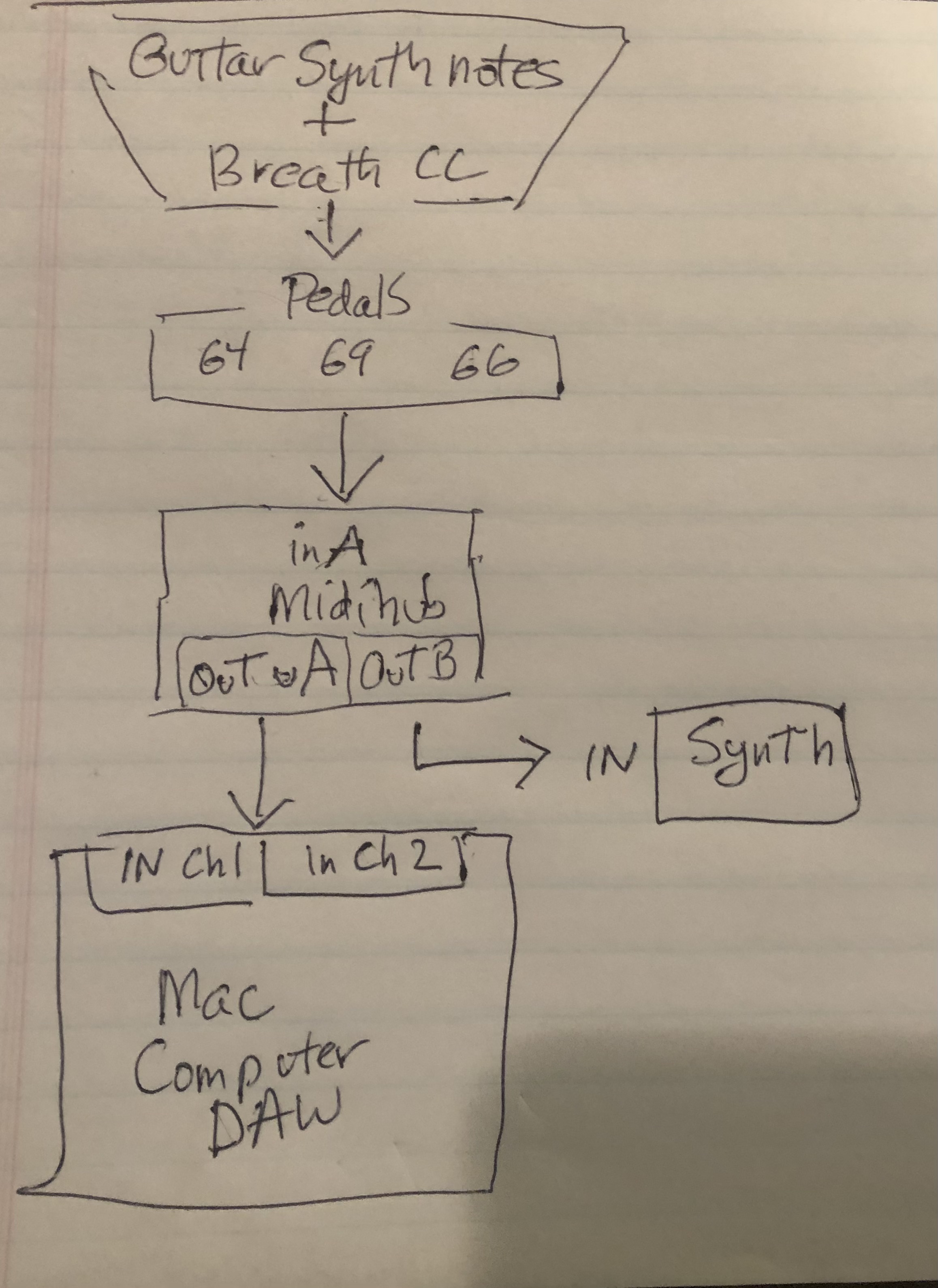
I have a 3rd party midi monitor in the computer, as well as the DAW monitor, and I don’t see any evidence of any loops. There are no other connections other than in the picture
So it remains I suppose for me to reach the point where someday I get an elementary understanding of how midi hub works.
I had a similar device years ago when I was doing films, that became intuitive to me, but it had had a very different architecture from MH. in fact, I sent a copy of the manual to G in hopes that it will influence his development of this fine product.
I will try to distill down some simpler, sub questions and pose for the group to see.
Best,
Peter
Most likely culprit is the pedal then. If the DAW is only singularly connected to MidiHub USB A and not going to your controllers in front of the Midi Hub then your right about not being able to loop. Unless it was looping through the USB port back to Midi Hub, but you have to have that port active in your patch to have that error.
Disconnect the stuff in front of the pedal. Close your Daw. Open MidiHub editor. Open a new patch. Add 1 Midi A input. Highlight it so the midi monitor is active. Hold down a pedal, release. Confirm that it’s either in toggle mode or momentary. You should see Channel-Message type-CC#-CC value.
In toggle mode you should see for example 1 message upon press and release
CH1 CC 69 127
In momentary mode you should see 2 messages. 1 when you press, then another when you release
CH1 CC 69 127 (pedal pressed)
CH1 CC 69 0 (pedal released)
Then test 2 pedal togethers. If you see this when you press the second pedal and you haven’t released or toggled the 1st pedal then 2nd pedal is cutting off the first pedal pressed.
Zero timestamp CH1 CC 69 127 (pedal 1 is pressed)
Same timestamp as pedal 1 is cutoff CH1 CC 66 127 (pedal 2 is pressed)
Same timestamp as pedal 2 pressed CH1 CC 69 0 (pedal 1 turned off)
Next day…
Here is how the pedal checks out
Toggle:
down/up

down/up 2nd time
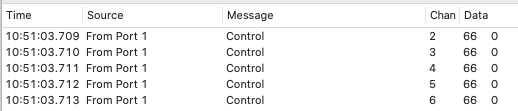
Momentary:
down/up
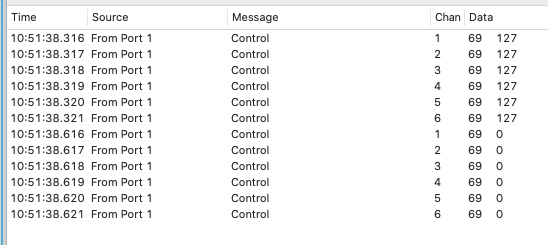
As you can see, they act as expected. This is equipment related to a midi guitar, so it sends on six channels [one per string]. But my receivers only are set to a single channel, so they should have no effect. (Actually, the mac DAW has a sound on channel 1, and channel 2-for my sostenuto patch)
The big question is what happens when both are pressed at the same time and whether or not the second pedal causes the 1st to release. I only see 1 pedal at a time pressed here.
Also weird is CC66 turns on at Channel 1 but the second toggle press skips Channel 1 and sends the off message to Channels 2-6, so CC66 never gets turned off at CH1 which means the patches here needed a channel remap pipe because I only accounted for Ch1 CC66 receiving a 0(cutoff) value.
66 is Toggle. So it would never be pressed at the same time as 69. 66 would just be at one value, zero, or the other value ,127.
Good point about second toggle press skips Channel 1 and sends the off message to Channels 2-6!
I didn’t even see that. We should fix that first, and who knows maybe that’s the problem.
So where exactly would the channel remap pipes?. Can we just a remap, say, channel 6 to channel one so that there is no potential interference with other patches? I only use this button to go back-and-forth between Aand B.
The question of pressing 2 pedals at the same time is very important. Even if you are in toggle mode but not physically pressing the pedal, the pedal is still considered pressed when it’s at its high value. So if you press a second pedal while the first pedal is toggled, your controller could be designed to turn off other pedals. What toggling does is ignore the pedals physical release. So it only goes high and low on presses. That means your first press sets the pedal high then releasing that pedal leaves it at high, but it is still technically pressed. So pressing another pedal while 1st pedal is high is equal to pressing 2 pedals together even if you are not actually physically pressing 2 pedals…
It has to be confirmed or ruled out, because one way or the other, the root cause of your problem is that when the 1st CC is at it’s high value, sending the the second CC causes the first to go low. With this patch, it’s impossible for that to happen within MidiHub. If your pedal is the only thing connected, it can only be your pedal. What’s left after that is figuring out how to properly configure the pedal if possible or account for it’s behavior in the patch, which means a more complicated patch.
Channel remap pipe is titled CH remap. Put them directly after the first pipe in each line. Leave the in ranges at default and set out ranges to 1 for high and low.
OK- tests
at MH, In A,
press/release 66 → 127, press/release 69:
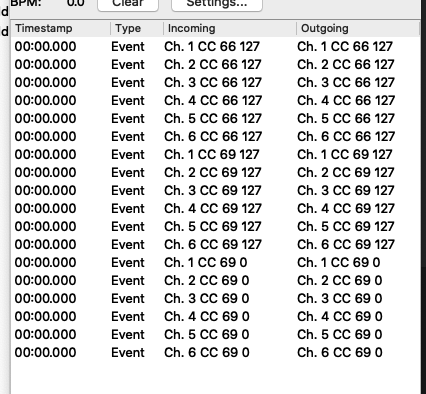
Repeating experiment with 66-> 0
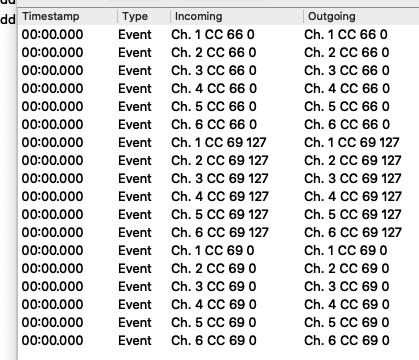
Interesting, MH Midi monitor shows all six channels one through six-
But the Mac midi monitor only shows channels two through six when 0 and ch 1 when 127.
[the DAW is closed]
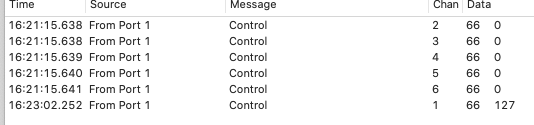
Does this mean there is some thing happening at the output of MH?
I put the monitor on the last pipe [to uA} and it was the same as the last test.
[I can’t even tell where information would go to out B, so I couldn’t test that]