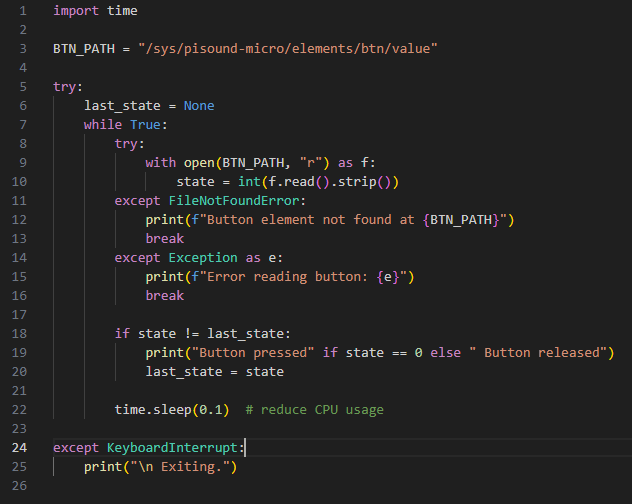
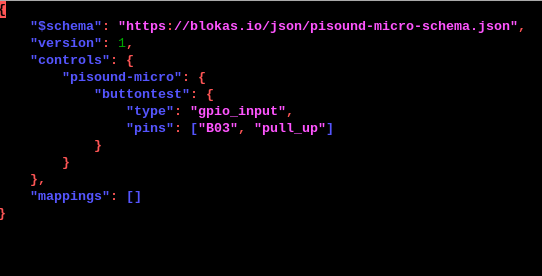
I’m sorry if I’m filling up the forum, but I’ve run into another issue and was wondering if someone could help me out. I hope it’s okay to post this here.
Basically, I connected a button on one of the Header B pins. In my case, I tried it with B05 and B01. Both buttons work for a couple of press and releases, but then it freezes, gives me a -62 time out and IO-error.
I checked the voltage and it seems stable. I also have the feeling that especially if I don’t press the button for a couple of seconds, I also run into this issue. It’s always after a few seconds it either hangs or freezes completely. Everything else is working fine. The actual sound coming out of the pisound micro works without any issues, and the adc pins seem to work as well.
Is there anything I can test or try to narrow down the issue? Or anything I am doing wrong in general?
here is my general workflow for testing:
setting up the button as gpio
echo btn gpio B05 input pull_up > /sys/pisound-micro/setup
also, I tried “pollgpio /sys/pisound-micro/elements/btn/value”
but it just shows me 1. Is it supposed to update when I press the button or would I need to restart the script button pressed to see the change?
So far it doesnt update and stays at 1, but when i hold the button pressed and run the script it gives me 0. is that correct?
Thanks a lot for you help on this.
I am sorry, B01 was a typo. I meant B10. But I also tried others tbh. And yes, that’s what I did, one pin goes to B05 or one of the encoder pins and the other one to ground.
Also, I was wondering: I had connected some components to SPI0 MOSI, SPI0 MISO, SPI0 SCLK, SDA, SCL,SPI0 CS0 and CS1. I disconnected all of them before testing, but the issue is still the same. I just wanted to double-check whether they could theoretically cause problems, or if there might be something else conflicting. I’ve only connected the wires to the pins that the Pisound Micro needs, and to be honest, everything else seems to be working fine.
This is what I am getting from dmesg.log. I tried it a few times. But the result looks similar
Please upload the full dmesg log, I’m interested to see the whole picture.
SPI pins should not interfere with Pisound Micro, SDA and SCL pins can be shared between multiple devices, but of course there is some bigger chance for errors on I²C bus in case other attached devices interfere or the voltage levels on the pins are not within tolerance levels. (when combining multiple I²C device on the same bus, some care for selecting appropriate pull up resistor values is in order. Pisound Micro has 2.2k pull ups installed)
Did you modify the I²C speed in /boot/firmware/config.txt? It would be good to attach the config.txt file too.
The config.txt seems alright, and dmesg does not contain any other errors than some Pisound Micro communication time outs. The versions listed in the log are alright.
What is the other I²C device you have on the bus? If it is blocking the shared I²C bus for long periods at a time, the timeouts in Pisound Micro’s communication can naturally occur. In case some critical communication becomes lost, such as GPIO pin function setup, it may cause incorrect operation.
Thanks again for your help with this. I actually completely disconnected all I²C devices to reduce possible issues. I had other things connected, though.
I have just literally disconnected everything possible, except the connections from raspberry pi to pisound micro. I doublechecked all wires and connection. I also connected a button just simply to a breadboard for testing. But I am running into the same issues, the problem is also that it freezes with the time and after about 30-40sec it doesn`t react to my button presses at all anymore. I am not sure if that is a coding thing, but I run out of ideas.
Also when running pollgpio like this:
pollgpio /sys/pisound-micro/elements/btn/values:
It shows me the current value, but doesn’t update when I press a button.
Is there a chance I have a faulty pisound micro? Or I didn`t do the right software setup?
It does update though when testing the adc pins.
Also I just tried connecting an encoder to B05 and B06 and it works without any issues as well. It also updates via pollgpio as expected. Somehow it just doesnt work set up as GPIO input
Also, even its probably not neccessary for testing, but when i update the micromapper jason file like that, it doesn’t work(I tested it with the type: encoder and it worked):
Ok, I will try to reproduce this issue next week, as I will be unavailable in the coming couple of days.
In a nutshell, I will test whether a gpio_input on B05 with pull up enabled can be monitored through pollgpio, including after 30~40 seconds. If you have your own code for monitoring the pin, feel free to share it here or via PM so I can try the same things you do.
Do these pisound-micro-mapper.service errors happen with the above config as in your screenshot?
I had similar problems, due to electric noise causing my poorly implemented encoder state machine to stay stucked on one state after some time. Following common denoising and state machine patterns fixed it for me.
Also check for memory leaks when you are polling. You could test if your application freezes later, when increasing tick time of your main loop or thread.
Did you try it with just a simple button switch (GPIO input)? When I use an actual encoder, it seems to work fine on my side.
For testing, I literally just connected the necessary wires from the Raspberry Pi to the Pisound Micro and tested it with a button on a breadboard, but even that failed.
I checked for memory issues and couldn’t find any problems so far. I also increased the tick time to almost a second just for testing in my script, but the result is the same. After a few attempts, it keeps freezing to the point where the Pisound driver crashes, and I have to restart my machine to get access again.
Thank you so much for your help with this. I’ve tried literally everything I can think of, but I still can’t solve it. Yes, the setup is the same as in the screenshot, just using B05. I also tried different pins. I’ve attached the script I’m using, if everything works fine for you, I might just have a faulty Pisound Micro?
So far your problem sounds similar to the one i had with my buttons, but without the pisound micro. I‘m new to soldering and decided - safety first - to test buttons, encoders and oleds directly on the pi gpios via breadboard and multiplexers, before soldering them to the micro. I had to connect pullups (ground > resistance > gpio and 3v3 > capacitor > gpio) for every button, but i guess they are already in place on the micro, not sure. You could test your button separately via your breadboard, to see if your problem is related to the micro or the rest of your setup.
What is your pi version? I migrated from pi4 to pi5, had to find some replacement for pigpio and ended up building my own gpio driver via lgpiod in c++. with shared memory for python, because none of the common libs worked as expected. You could give a try to lgpiod to see if your events are correctly processed. If you are on pi5 i can share my driver, it solved all my gpio problems and made my buttons and encoders super stable and responsive.
Hmm, interesting.
The thing is, literally everything else is working. When I test a button on the Raspberry Pi’s GPIO pins, I don’t get any issues. I’ve already built a custom 4-layer PCB, so it should have a clean connection. But I also tried it completely disconnected, just the Pi and the Pisound micro.
What keeps me wondering is that if I use the same pin (like B05) and connect an encoder, it all seems to work fine. I’m not sure what exactly happens under the hood between encoder and gpio_input.
There’s a chance that I haven`t soldered some pins properly, even though I already checked that. But maybe it would help to know which connections between the Raspberry Pi and the Pisound are especially important for gpio_input, because everything else is working. Sound, encoders, ADCs, that’s all good.
Oh, and I’m using a Pi 4b unfortunately. But if absolutely nothing helps, I might upgrade to a Pi 5, and I’d love to come back to you about your custom GPIO driver if you don’t mind.
I didn`t know that’s possible. Probably have to do some research about it as well.
Would your custom driver work with the Pisound pins as well?
It should, it uses libgpiod and should have access to all available gpios, as long as it gets the specific pin numbers. The pi pins will work for sure, the extended pisound micro pins might need to be called from another /dev/gpiochip.
On pi4, you could try to use another python library, for example pigpio.