I am working on a project integrating M8 Headless and the Blokas Pisound on a Raspberry Pi. My goal is to sync the M8 via physical MIDI with my Novation Circuit Tracks so they run perfectly in time.
For the base setup, I am using this GitHub repository: mc101-pisound.
Everything boots up and works correctly, but I am experiencing a severe latency issue. The delay is so high (around 134 ms) that it makes it impossible to get both devices properly synced. I have already tried setting the buffer size to the absolute minimum and the periods to 2 or 4 in the audio configuration (JACK/ALSA), but the latency does not improve at all.
Could anyone using a similar setup with Pisound and M8 Headless lend me a hand to solve this or optimize the system?
I am connecting the MIDI Out from the Novation Circuit Tracks (which is set as the clock master) to the Pisound MIDI In using a standard 5-pin DIN MIDI cable. The M8 is set to MIDI In: Clock+Transport. When I press play on the Circuit Tracks, the M8 automatically starts playing as well.
I measured the latency by recording the audio from both devices separately into a DAW/sequencer—comparing the click track from the Circuit Tracks against a short sequenced sample from the M8. The offset between them was exactly 134 ms.
I also tried setting the M8 as the clock master instead, but I got the exact same result
Are you recording audio by connecting either device via analog audio to the same audio input? Check your DAW settings, most of them have MIDI sync or audio delays compensation built in to align different devices, your settings may be set too high.
I’ve been testing recording both signals separately onto two different tracks using the inputs of my RME audio interface. There is no latency compensation or delay set up in the DAW.
I also tried routing the audio from the Pisound’s jack output directly into the Circuit Tracks, recording it there, and I run into the exact same problem. Plus, the difference is very audible. Any help would be appreciated!
I’m checking with jack_control dp and I get these results.
-– get driver parameters (type:isset:default:value) capture: Number of capture ports (uint:notset:2:2) playback: Number of playback ports (uint:notset:2:2) rate: Sample rate (uint:notset:48000:48000) monitor: Provide monitor ports for the output (bool:notset:False:False) period: Frames per period (uint:notset:1024:1024) wait: Number of usecs to wait between engine processes (uint:notset:21333:21333)
The period is always 1024 frames even though I change the configuration in Patchbox. Is this normal?
#!/bin/sh

# exec is used to 'morph' the shell interpreter process into jackd process, saving some system resources.

exec /usr/bin/jackd -t 2000 -R -P 95 -d alsa -d hw:pisound -r 48000 -p 64 -n 2 -X seq -s -S
systemctl status jack
● jack.service - JACK Server

     Loaded: loaded (/lib/systemd/system/jack.service; **enabled**; preset: **enabled**)

     Active: **active (running)** since Sun 2026-05-31 10:01:40 BST; 3h 38min ago

   Main PID: 941 (jackd)

      Tasks: 5 (limit: 1576)

        CPU: 10.692s

     CGroup: /system.slice/jack.service

             └─941 /usr/bin/jackd -t 2000 -R -P 95 -d alsa -d hw:pisound -r 480>

May 31 10:01:41 patchbox jackdrc\[941\]: ALSA: final selected sample format for p>

May 31 10:01:41 patchbox jackdrc\[941\]: ALSA: use 2 periods for playback

May 31 10:01:41 patchbox jackdrc\[941\]: port created: Midi-Through:midi/playback>

May 31 10:01:41 patchbox jackdrc\[941\]: port created: Midi-Through:midi/capture_1

May 31 10:01:41 patchbox jackdrc\[941\]: port created: pisound:midi/playback_1

May 31 10:01:41 patchbox jackdrc\[941\]: port created: pisound:midi/capture_1

May 31 10:01:41 patchbox jackdrc\[941\]: port created: M8:midi/playback_1

May 31 10:01:41 patchbox jackdrc\[941\]: port created: M8:midi/capture_1

May 31 10:01:41 patchbox jackdrc\[941\]: port created: pisound-ctl:midi/playback_1

May 31 10:01:41 patchbox jackdrc\[941\]: port created: pisound-ctl:midi/capture_1

lines 1-19/19 (END)
To rule out other possibilities, I’ve been trying to use the PISound’s MIDI out by connecting it to my other synthesizer, a Waldorf Blofeld. On the M8, I programmed a sequence using the MIDI out, and the same problem occurs: the audio from the M8 comes out much later than that from the synth.
I’m not sure I fully understand your setup. So you’re sending MIDI data to M8 or another synth, and measuring the time since MIDI Start to recording audio? What is recording the audio? Is Pisound’s audio input & output involved?
Sorry, I think I may not be explaining myself very well. My English is quite limited.
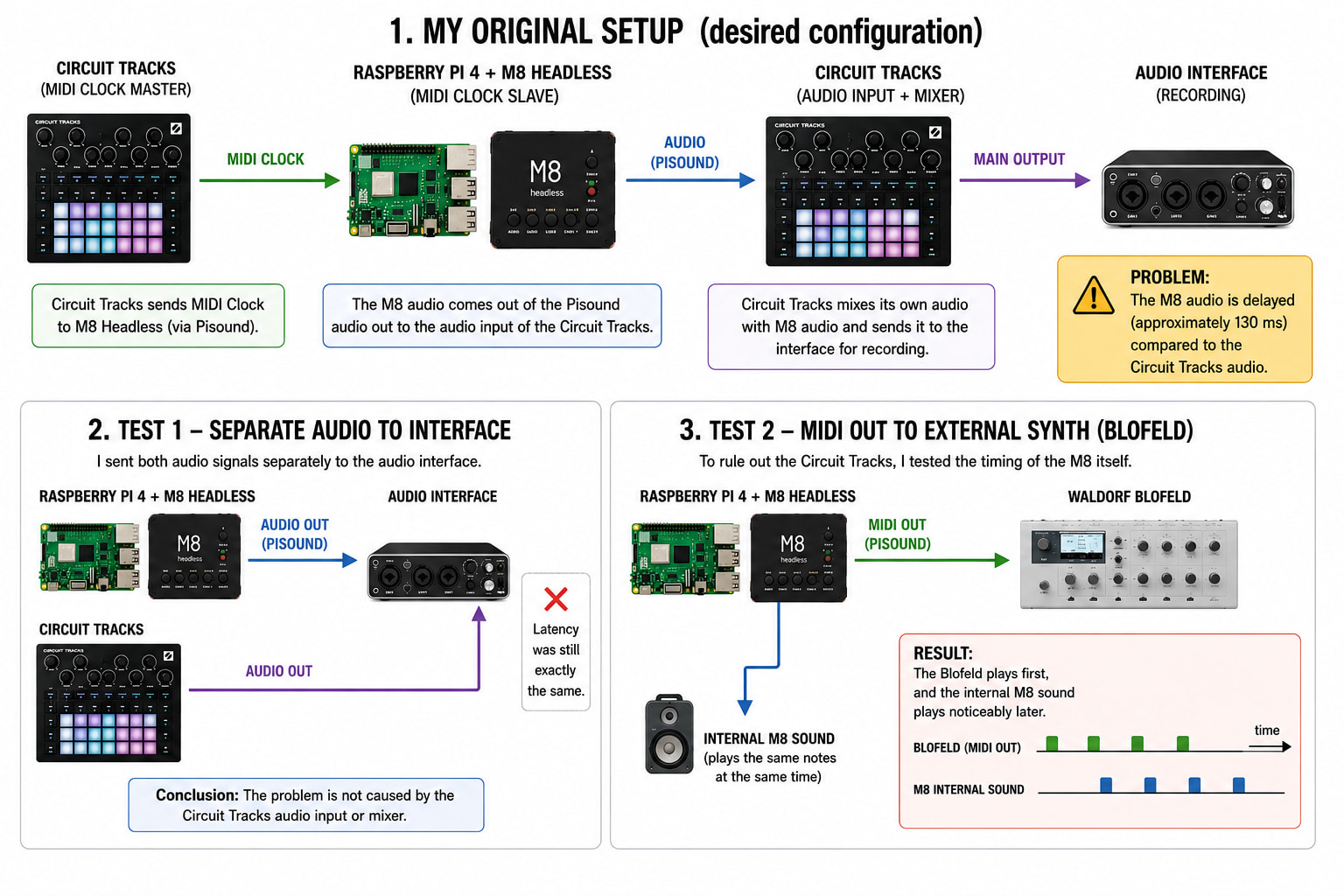
The setup I originally wanted to use is the following:
Circuit Tracks as the MIDI Clock master.
M8 Headless running on a Raspberry Pi 4 with Pisound as the MIDI Clock slave.
The M8 audio output goes from the Pisound audio output into the audio input of the Circuit Tracks.
The Circuit Tracks acts as a mixer, combining its own audio with the audio coming from the M8.
The main output of the Circuit Tracks goes to my audio interface, where I record everything.
This is the setup I would like to use.
The problem is that the M8 audio is noticeably delayed compared to the Circuit Tracks audio.
Since I could not get it working correctly, I performed several tests to try to identify the source of the problem, although my knowledge of Raspberry Pi systems is very limited.
The first test was to send both audio signals separately to my audio interface:
Pisound output → Audio interface input 1.
Circuit Tracks output → Audio interface input 2.
However, the latency was still exactly the same.
To rule out the Circuit Tracks as the source of the problem, I performed a second test:
I connected the Pisound MIDI output to a Waldorf Blofeld.
In the M8 sequencer, I programmed a MIDI note on every quarter note.
At the same time, I programmed an internal M8 sound to play on exactly the same steps.
The result was that the Blofeld played first, while the internal M8 sound played noticeably later.
For this reason, I believe the problem is not related to the Circuit Tracks audio input.
Honestly, I am not sure what else to test. It may be a configuration issue on my side, or perhaps a limitation of the project itself. I do not have enough technical knowledge of Raspberry Pi systems to investigate much further.
Thank you very much for your time and for all the help you have provided.
I’ve almost got it sorted. I spoke with RowdyVoyeur—the person who created the custom repo I was using—and he told me the problem was with the version of M8 Headless I was running. Downgrading to an older version fixed it almost 100%. Now I have much lower latency, which makes the device usable.