Is it possible to have one modifier that can remap multiple single notes? Note remap only allows a range of notes, so in order to do what I want to do I would have to have multiple pipes for each note I want to change, and then I’m worried they will cancel each other out as notes outside each range will be discarded. I don’t have my Midihub yet - so haven’t actually tried this. Nonetheless one modifier for multiple single notes would be ideal.
I thought about running them in parallel (i.e. 11 separate pipes) using the same from and to ports but wouldn’t the current Note Remap modifier end up cancelling some of these out?
On each parallel line, the same input gets processed, so each pipeline would work only with their range, discard the notes outside of it.
Of course having a single pipe capable of multiple single-note mappings would be more convenient for such use cases. We’ll think about adding something for that.
But it’s possible to achieve what you’re after with the Note Remap pipes in parallel.
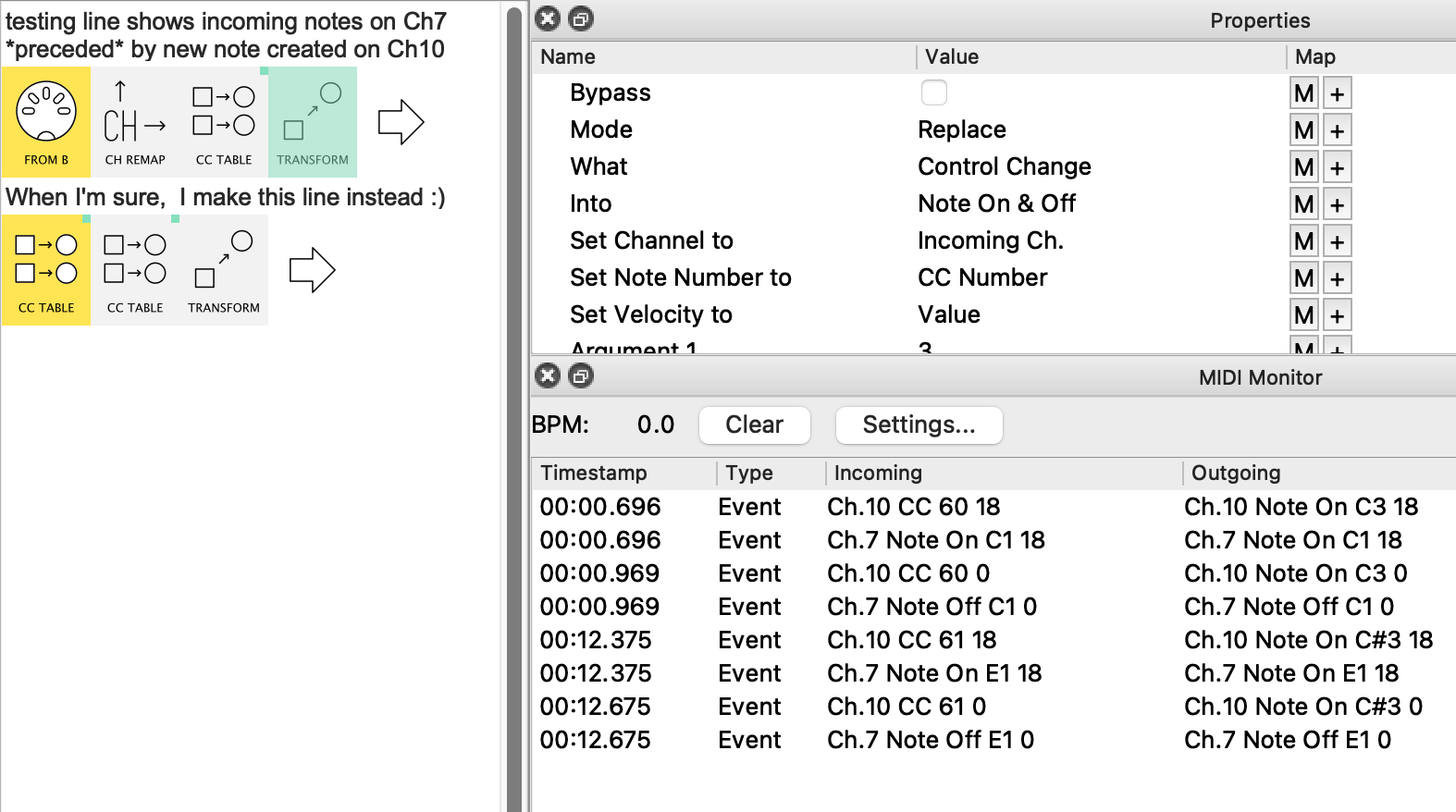
Pipeline 1 is designed for testing development only
By using MIDI IN (and Channel Remap), we can monitor the messages created alongside those that are used in the CC Table mappings
Only incoming notes 36, 40 (C1, E1) ❖ have been set
Pipeline 2 is the real deal with two CC Table pipes to cover your 11 (CC → ) Notes
Only incoming notes 36, 40 (C1, E1) and 68, 72 (G#3, C4) ❖ have been set for CC Table 1 & CC Table 2, respectively
❖ I have used Middle C = C3 for my numbers. Yours may be one of the other Note Value Display types.
You will see that the Note Offs are shown as Note On, velocity = 0. If your receiving device needs a Note Off, an extra Transform can handle this.
Slightly more tricky is when your input device sends Note Off with non-zero velocity. Let me know if you need to get around this.
 We’ll think about adding something for that.