Unfortunately the current cuurent AppImage doesn’t seem to work for me?
Could not open “MidihubEditor 1.16.1.AppImage”. Archive type not supported.
Linux Mint using XFCE like the threadstarter. I haven’t seem to have had any trouble with other .AppImage programs and I thought that was the idea of them - to be basically self-contained and work regardless of distribution, dependencies etc.
Ah, trying running from the terminal gave me a much more useful “Permission Denied” message. I just chmod-ed it and the editor runs now (from both the terminal and opening via the xfce desktop).
Very new to Linux and hadn’t struck needing to manually give permission for a downloaded AppImage before. Thanks for the incredibly quick response!
You probably just needed to let Linux know that the AppImage is a program to run rather than a file to open. In Linux you can use the chmod command in a terminal as you did:
chmod a+x NameOfThe.AppImage
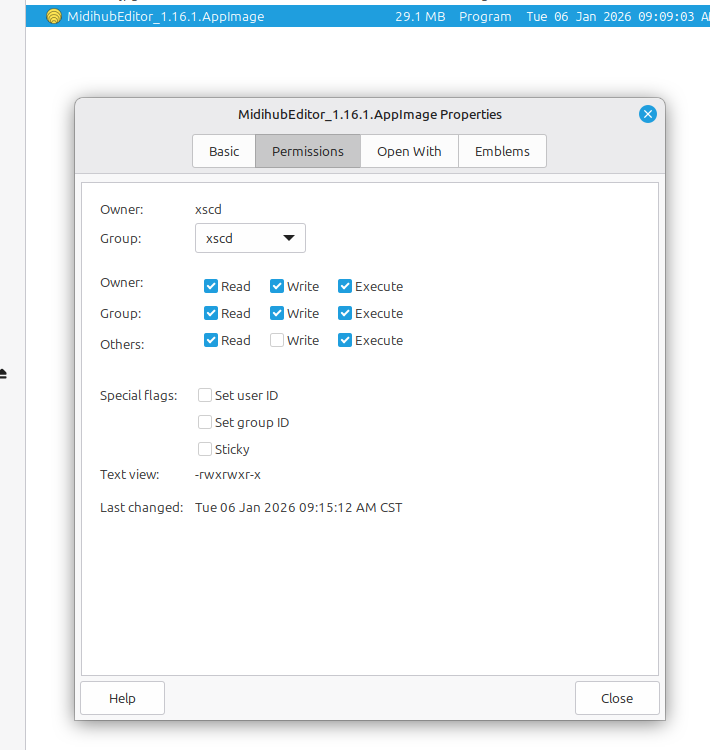
or, perhaps more easily, right-click the AppImage in the file browser and change its properties to “execute” or “mark as executable.” I use Linux Mint Cinnamon edition, so right-clicking opens this window (attached image).